Possible Causes
An impact sensor status fault could be caused by faulty wiring, terminals or connectors, faulty sensor, incorrect sensor mounting or faulty RCM.
- Check for hard or intermittent DTC
Turn ignition switch to OFF position. Connect scan tool to Data Link Connector (DLC). See USING SCAN TOOL under DIAGNOSTICS. Turn ignition switch to RUN position. Retrieve and record any continuous DTCs. See RETRIEVING FAULT CODES under DIAGNOSTICS. Perform on-demand self-test. See ON-DEMAND SELF-TEST under DIAGNOSTICS. Flag DTC B2296. See BIT-MAPPED DIAGNOSTIC TROUBLE CODES under DIAGNOSTICS. Retrieve and record any flagged faults. If DTC B2296 was retrieved during on-demand self-test, fault is hard. If flagged fault of "?" was recorded, multiple faults exist and entire test must be carried out.- For front air bag sensor with mounting/communication (COMM) fault, go to next step.
- For front air bag sensor with internal (INT) fault, replace front air bag sensor. Go to step 14 .
If DTC B2296 was not retrieved, fault is intermittent. Go to step 13 .
- Check front air bag sensor mounting
Turn ignition switch to OFF position. Disable air bag system. See DISABLING SYSTEM under DISABLING & ACTIVATING AIR BAG SYSTEM. Access front air bag sensor. See FRONT AIR BAG SENSOR under REMOVAL & INSTALLATION. Inspect sensor mounting and ensure mounting bolts are fully seated and tightened correctly. See TORQUE SPECIFICATIONS . Remove front air bag sensor. Visually inspect sensor mounting bracket for damage, corrosion or dirt. If any problems were found, clean tighten or repair mounting surface as necessary. Reinstall sensor and go to step 14 . If no problems were found, go to next step. - Install front air bag sensor & repeat on-demand self-test
Clean and repair mounting surface as necessary. Clean sensor mounting bolts. Install front air bag sensor. Perform on-demand self-test. Flag DTC B2296. Retrieve and record any flagged faults. If DTC B2296 was retrieved during on-demand self-test, go to next step. If DTC B2296 was not retrieved during on-demand self-test, fault is corrected. Go to step 14 . - Check ground circuit for high resistance
Turn ignition switch to OFF position. Disconnect front air bag sensor harness connector. Measure resistance in Violet/Light Green wire between front air bag sensor case ground and harness side of front air bag sensor connector. If resistance is less than 100 ohms, go to step 6 . If resistance is more than 100 ohms, go to next step. - Clean sensor mounting & repeat on-demand self-test
Remove front air bag sensor. Clean and repair mounting surface as necessary. Clean sensor mounting bolts. Install front air bag sensor. Perform on-demand self-test. Flag DTC B2296. Retrieve and record any flagged faults. If DTC B2296 was retrieved during on-demand self-test, go to next step. If DTC B2296 was not retrieved during on-demand self-test, fault is corrected. Go to step 14 . - Check circuits for short to ground
Turn ignition switch to OFF position. Access RCM and disconnect both connectors. See RESTRAINTS CONTROL MODULE under REMOVAL & INSTALLATION. Measure resistance in Pink/Orange wire (circuit No. 617) between ground and harness side of front air bag sensor connector. Measure resistance in Violet/Light Green wire (circuit No. 618) between ground and harness side of front air bag sensor connector. If resistance is more than one megohm in both circuits, go to next step. If resistance is less than one megohm in either circuit, repair short to ground in appropriate wire. See WIRING DIAGRAMS . Go to step 14 . - Check circuits for short to battery
Turn ignition switch to RUN position. Measure voltage in Pink/Orange wire between ground and harness side of front air bag sensor connector. Measure voltage in Violet/Light Green wire between ground and harness side of front air bag sensor connector. If voltage is less than 0.2 volt, go to next step. If voltage is more than 0.2 volt, repair short to battery in appropriate wire. Go to step 14 . - Check circuit for open
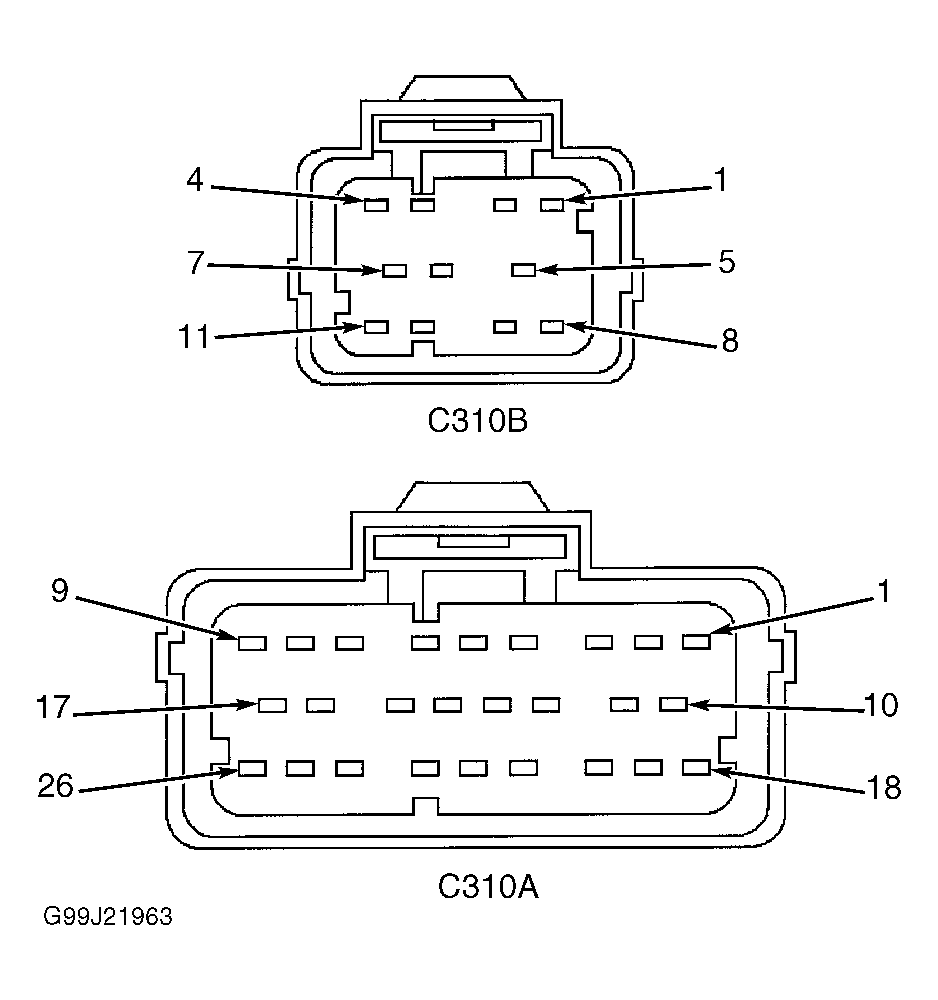
Turn ignition switch to OFF position. Measure resistance in Pink/Orange wire between harness side of RCM connector C310A, terminal No. 25 and harness side of front air bag sensor harness connector. See Figure . If resistance is less than 0.5 ohm, go to next step. If resistance is more than 0.5 ohm, repair open in Pink/Orange wire. Go to step 14 . - Check circuit for open
Measure resistance in Violet/Light Green wire between harness side of RCM connector C310A, terminal No. 26 and harness side of front air bag sensor harness connector. If resistance is less than 0.5 ohm, go to next step. If resistance is more than 0.5 ohm, repair open in Violet/Light Green wire. Go to step 14 . - Check circuit for short
Measure resistance between RCM connector C310A, terminal No. 25 (Pink/Orange wire) and Violet/Light Green wire on harness side of front air bag sensor harness connector. If resistance is less than one megohm, go to next step. If resistance is more than one megohm, repair short between Pink/Orange and Violet/Light Green wires. Go to step 14 . - Check front air bag sensor
Reconnect RCM connectors. Install known-good front air bag sensor. Turn ignition switch to RUN position. Perform on-demand self-test. Flag DTC B2296. Retrieve and record any flagged faults. If any faults were flagged against front air bag sensor, install original front air bag sensor and go to next step. If no faults were flagged against front air bag sensor, fault is corrected. Go to step 14 .NOTE: Ensure all air bag system simulators, sensor electrical connectors and RCM electrical connectors are connected prior to carrying out on-demand self-test or erroneous faults may be set. - Confirm RCM fault
Turn ignition switch to OFF position. Reconnect RCM connectors. Reconnect front air bag sensor connector, if necessary. Turn ignition switch to RUN position. Perform on-demand self-test. Flag DTC B2296. Retrieve and record any flagged faults. If DTC B2296 was retrieved during on-demand self-test and flagged fault of "?" was recorded, multiple faults exist and entire test must be carried out before replacing RCM. Replace RCM. Go to step 14 . If no faults were flagged against front air bag sensor, fault is corrected. Go to step 14 . - Check for intermittent fault
Turn ignition to OFF position. Disable air bag system. See DISABLING SYSTEM under DISABLING & ACTIVATING AIR BAG SYSTEM. Perform on-demand self-test. Flag DTC B2296. If DTC B2296 was retrieved during on-demand self-test, check for causes of intermittent fault at or near front air bag sensor harness connector. Repair any intermittent faults found and go to next step. If intermittent fault was not found, refer to recorded flagged faults for appropriate test. If flagged fault "?" was retrieved during on-demand self-test, multiple faults exist and all steps of diagnostic procedure must be performed before replacing RCM.- For front air bag sensor with mounting/communication (COMM) fault, go to step 2 .
- For front air bag sensor with internal (INT) fault, replace front air bag sensor. Go to step 14 .
If DTC B2296 was not retrieved during on-demand self-test, check for cause of intermittent fault. Attempt to recreate fault by flexing wire harness and cycling ignition switch frequently. Repair any intermittent problems found. Go to next step.
- Check for additional DTCs
Refer to continuous DTCs recorded in step 1 . If any continuous DTCs were retrieved, go to diagnostic trouble code identification table for direction to appropriate test. See DIAGNOSTIC TROUBLE CODE IDENTIFICATION table. DO NOT clear any DTCs until all DTCs have been resolved. If no DTCs were retrieved, reconnect air bag system. Activate air bag system. See ACTIVATING SYSTEM under DISABLING & ACTIVATING AIR BAG SYSTEM. Clear all DTCs. See CLEARING FAULT CODES under DIAGNOSTICS.