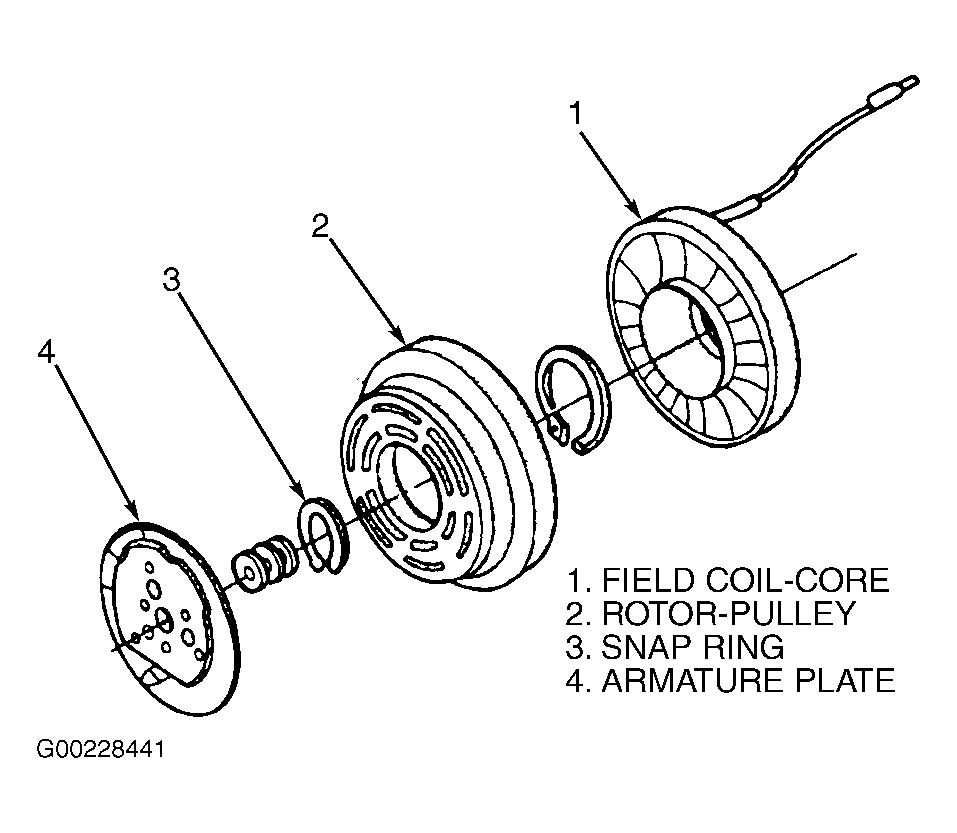
Clutch Assembly: Removal
- Disconnect and isolate the negative battery cable.
- Remove the serpentine drive belt.
- Unplug the compressor clutch coil wire harness connector.
- Remove the clutch plate and the clutch shims. If necessary, tap the clutch plate lightly with a plastic hammer to loosen it.
- Remove the compressor clutch pulley retaining snap ring with snap ring pliers.
- Remove the clutch pulley assembly from the compressor. A 3 jaw pulley can be used to remove pulley. Shaft protector No. 2134A (contained in MC-91268 Universal Compressor Seal Service Tool Set) must be used to protect compressor shaft from damage. DO NOT allow pullers center screw to bear on compressor shaft. If necessary, tap the clutch pulley lightly with a plastic hammer to loosen it.
- Remove the screw and retainer from the clutch coil lead wire harness on the compressor front housing.
- Unplug the compressor clutch wire harness connectors from the thermal limiter switch.
- Note the alignment of the clutch field coil assembly on the compressor before removing it for correct reinstallation.
- Remove the snap ring that secures the clutch field coil assembly to the compressor front housing. See Fig 1.
- Remove the clutch field coil assembly from the compressor front housing.
CAUTION:
DO NOT pry between the clutch plate and the clutch pulley to remove the plate. Failure to observe this caution may result in damage to the compressor clutch assembly.