DTC 2618: LaneWatch Diag
NOTE:
- Check the vehicle 12 volt battery condition first .
- This audio DTC sets when Connection NG is indicated in the LaneWatch diagnosis (the LaneWatch icon is red in the System Links).
- Before you troubleshoot, make sure to follow the General Troubleshooting Information - Refer to: How to Troubleshoot the Audio SystemAudio System Self-Diagnostic Function .
- Check the connectors for poor connections or loose terminals.
- 1. Problem verification:
1. Clear the hard error codes - Refer to: How to Troubleshoot the Audio SystemAudio System Self-Diagnostic Function .
2. Turn the vehicle to the OFF (LOCK) mode then the ON mode.
3. Check for hard error codes - Refer to: How to Troubleshoot the Audio SystemAudio System Self-Diagnostic Function .
Is DTC 2618 indicated?
YES
The failure is duplicated, go to step 2.
NO
Intermittent failure, the system is OK at this time.
- 2. Determine possible failure area (LWC VCC line, others):
1. Turn the vehicle to the OFF (LOCK) mode.
2. Disconnect the following connector.
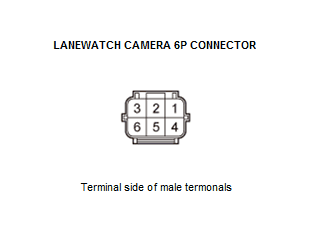
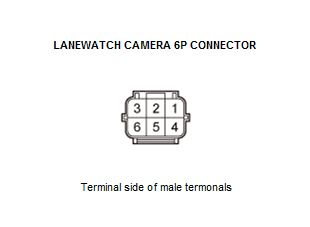
LaneWatch camera 6P connector 3. Turn the vehicle to the ON mode.
4. Measure the voltage between test points 1 and 2.
Test condition Vehicle ON mode LaneWatch camera 6P connector: disconnected Test point 1 LaneWatch camera 6P connector No. 4 Test point 2 Body ground Is there about 8.0 V?
YES
The LWC VCC wire is OK. Go to step 5.
NO
Go to step 3.
- 3. Open wire check (LWC VCC line):
1. Measure the voltage between test points 1 and 2.
Test condition Vehicle ON mode LaneWatch camera 6P connector: disconnected Test point 1 Audio unit connector G (24P) No. 21 - Refer to: Audio Unit Connector for Inputs and Outputs(With Display Audio)Audio Unit Connector for Inputs and Outputs(With Normal Audio) Test point 2 Body ground Is there about 8.0 V?
YES
There is an open in the wire between the audio unit and the LaneWatch camera. Replace the affected shielded harness.
NO
The LWC VCC wire is not open. Go to step 4.
- 4. Shorted wire check (LWC VCC line):
1. Turn the vehicle to the OFF (LOCK) mode.
2. Disconnect the following connector.
Audio unit connector G (24P) 3. Check for continuity between test points 1 and 2.
Test condition Vehicle OFF (LOCK) mode LaneWatch camera 6P connector: disconnected Audio unit connector G (24P): disconnected Test point 1 Audio unit connector G (24P) No. 21 - Refer to: Audio Unit Connector for Inputs and Outputs(With Display Audio)Audio Unit Connector for Inputs and Outputs(With Normal Audio) Test point 2 Body ground Is there continuity?
YES
There is a short to body ground in the wire between the audio unit and the LaneWatch camera. Replace the affected shielded harness.
NO
Replace the audio unit - Refer to: Audio Unit Removal and Installation(With Display Audio)Audio Unit Removal and Installation(With Normal Audio) .
- 5. Shorted wire check (UNIT TO LWC line, LWC TO UNIT line):
1. Turn the vehicle to the OFF (LOCK) mode.
2. Disconnect the following connector.
Audio unit connector G (24P) 3. Check for continuity between test points 1 and 2.
Test condition Vehicle OFF (LOCK) mode LaneWatch camera 6P connector: disconnected Audio unit connector G (24P): disconnected Test point 1 Audio unit connector G (24P) No. 22 - Refer to: Audio Unit Connector for Inputs and Outputs(With Display Audio)Audio Unit Connector for Inputs and Outputs(With Normal Audio) Test point 2 Body ground Test point 1 Audio unit connector G (24P) No. 23 - Refer to: Audio Unit Connector for Inputs and Outputs(With Display Audio)Audio Unit Connector for Inputs and Outputs(With Normal Audio) Test point 2 Body ground Is there continuity?
YES
There is a short to body ground in the wire(s) between the audio unit and the LaneWatch camera. Replace the affected shielded harness.
NO
The UNIT TO LWC and the LWC TO UNIT wires are not shorted to ground. Go to step 6.
- 6. Shorted wire check (UNIT TO LWC line to LWC TO UNIT line):
1. Check for continuity between test points 1 and 2.
Test condition Vehicle OFF (LOCK) mode LaneWatch camera 6P connector: disconnected Audio unit connector G (24P): disconnected Test point 1 Audio unit connector G (24P) No. 22 - Refer to: Audio Unit Connector for Inputs and Outputs(With Display Audio)Audio Unit Connector for Inputs and Outputs(With Normal Audio) Test point 2 Audio unit connector G (24P) No. 23 - Refer to: Audio Unit Connector for Inputs and Outputs(With Display Audio)Audio Unit Connector for Inputs and Outputs(With Normal Audio) Is there continuity?
YES
There is a short in the wires between the audio unit and the LaneWatch camera. Replace the affected shielded harness.
NO
The UNIT TO LWC and the LWC TO UNIT wires are not shorted. Go to step 7.
- 7. Open wire check (UNIT TO LWC line, LWC TO UNIT line):
1. Check for continuity between test points 1 and 2.
Test condition Vehicle OFF (LOCK) mode LaneWatch camera 6P connector: disconnected Audio unit connector G (24P): disconnected Test point 1 Audio unit connector G (24P) No. 22 - Refer to: Audio Unit Connector for Inputs and Outputs(With Display Audio)Audio Unit Connector for Inputs and Outputs(With Normal Audio) Test point 2 LaneWatch camera 6P connector No. 2 Test point 1 Audio unit connector G (24P) No. 23 - Refer to: Audio Unit Connector for Inputs and Outputs(With Display Audio)Audio Unit Connector for Inputs and Outputs(With Normal Audio) Test point 2 LaneWatch camera 6P connector No. 5 Is there continuity?
YES
Replace the LaneWatch camera .
NO
There is an open in the wire(s) between the audio unit and the LaneWatch camera. Replace the affected shielded harness.
NOTE:
- Check the vehicle 12 volt battery condition first .
- This navigation DTC sets when Connection NG is indicated in the LaneWatch diagnosis (the LaneWatch icon is red in the System Links).
- Before you troubleshoot, make sure to follow the General Troubleshooting Information .
- Check any official Honda service website for more service information about the navigation system.
- Check the connectors for poor connections or loose terminals.
- 1. Problem verification:
1. Clear the hard error codes .
2. Turn the vehicle to the OFF (LOCK) mode then the ON mode.
3. Check for hard error codes .
Is DTC 2618 indicated?
YES
The failure is duplicated, go to step 2.
NO
Intermittent failure, the system is OK at this time.
- 2. Determine possible failure area (LWC VCC line, others):
1. Turn the vehicle to the OFF (LOCK) mode.
2. Disconnect the following connector.
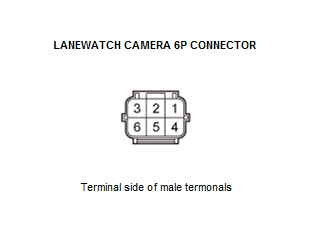
LaneWatch camera 6P connector 3. Turn the vehicle to the ON mode.
4. Measure the voltage between test points 1 and 2.
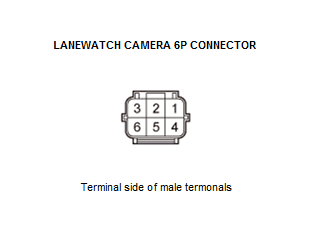
Test condition Vehicle ON mode LaneWatch camera 6P connector: disconnected Test point 1 LaneWatch camera 6P connector No. 4 Test point 2 Body ground Is there about 8.0 V?
YES
The LWC VCC wire is OK. Go to step 5.
NO
Go to step 3.
- 3. Open wire check (LWC VCC line):
1. Measure the voltage between test points 1 and 2.
Test condition Vehicle ON mode LaneWatch camera 6P connector: disconnected Test point 1 Audio-navigation unit connector G (24P) No. 21 Test point 2 Body ground Is there about 8.0 V?
YES
There is an open in the wire between the audio-navigation unit and the LaneWatch camera. Replace the affected shielded harness.
NO
The LWC VCC wire is not open. Go to step 4.
- 4. Shorted wire check (LWC VCC line):
1. Turn the vehicle to the OFF (LOCK) mode.
2. Disconnect the following connector.
Audio-navigation unit connector G (24P) 3. Check for continuity between test points 1 and 2.
Test condition Vehicle OFF (LOCK) mode LaneWatch camera 6P connector: disconnected Audio-navigation unit connector G (24P): disconnected Test point 1 Audio-navigation unit connector G (24P) No. 21 Test point 2 Body ground Is there continuity?
YES
There is a short to body ground in the wire between the audio-navigation unit and the LaneWatch camera. Replace the affected shielded harness.
NO
- 5. Shorted wire check (UNIT TO LWC line, LWC TO UNIT line):
1. Turn the vehicle to the OFF (LOCK) mode.
2. Disconnect the following connector.
Audio-navigation unit connector G (24P) 3. Check for continuity between test points 1 and 2.
Test condition Vehicle OFF (LOCK) mode LaneWatch camera 6P connector: disconnected Audio-navigation unit connector G (24P): disconnected Test point 1 Audio-navigation unit connector G (24P) No. 22 Test point 2 Body ground Test point 1 Audio-navigation unit connector G (24P) No. 23 Test point 2 Body ground Is there continuity?
YES
There is a short to body ground in the wire(s) between the audio-navigation unit and the LaneWatch camera. Replace the affected shielded harness.
NO
The UNIT TO LWC and the LWC TO UNIT wires are not shorted to ground. Go to step 6.
- 6. Shorted wire check (UNIT TO LWC line to LWC TO UNIT line):
1. Check for continuity between test points 1 and 2.
Test condition Vehicle OFF (LOCK) mode LaneWatch camera 6P connector: disconnected Audio-navigation unit connector G (24P): disconnected Test point 1 Audio-navigation unit connector G (24P) No. 22 Test point 2 Audio-navigation unit connector G (24P) No. 23 Is there continuity?
YES
There is a short in the wires between the audio-navigation unit and the LaneWatch camera. Replace the affected shielded harness.
NO
The UNIT TO LWC and the LWC TO UNIT wires are not shorted. Go to step 7.
- 7. Open wire check (UNIT TO LWC line, LWC TO UNIT line):
1. Check for continuity between test points 1 and 2.
Test condition Vehicle OFF (LOCK) mode LaneWatch camera 6P connector: disconnected Audio-navigation unit connector G (24P): disconnected Test point 1 Audio-navigation unit connector G (24P) No. 22 Test point 2 LaneWatch camera 6P connector No. 2 Test point 1 Audio-navigation unit connector G (24P) No. 23 Test point 2 LaneWatch camera 6P connector No. 5 Is there continuity?
YES
Replace the LaneWatch camera .
NO
There is an open in the wire(s) between the audio-navigation unit and the LaneWatch camera. Replace the affected shielded harness.