Service Manual Update: Accessory Power Socket Troubleshooting (20-018)
Reference number: 20-018
SERVICE MANUAL UPDATE: ACCESSORY POWER SOCKET TROUBLESHOOTING
TECHNICAL SERVICE BULLETIN
| HONDA: | All Models |
AFFECTED VEHICLES
All vehicles with accessory power sockets
BACKGROUND
When troubleshooting an inoperative accessory power socket, do the TROUBLESHOOTING STEPS below.
TROUBLESHOOTING STEPS
- If none of the accessory power sockets work, first check the ground being shared with all of the sockets.
- Check for foreign objects such as a coin in the power socket, and remove it before doing this troubleshooting.
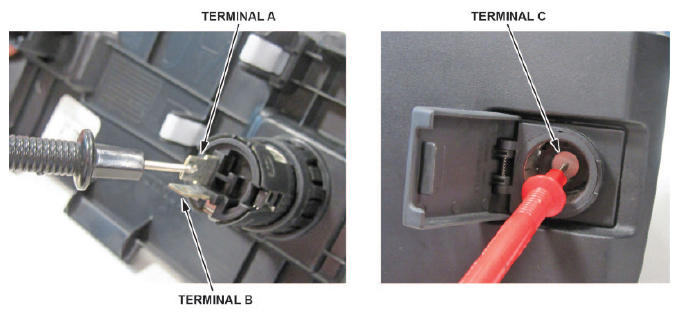
- Access the back of the accessory power socket that is inoperative. Go to the appropriate accessory power socket removal and installation procedure in the service information.
- Check for continuity between terminals A to C and B to C.
Is there continuity between terminals A and C or B and C?
Yes - Go to the next step.
No - Replace the socket and check the socket operation. Advise the customer that the internal fuse of the socket may have blown due to a foreign object, or using a device that exceeded the amperage rating.
- Inspect the accessory power socket 2P connector terminals to make sure they are all making good contact.
- If the terminals are bent, loose, or corroded, repair them as necessary and recheck the socket operation.
- If the terminals look OK, go to the next step.
- Turn the ignition to ON.
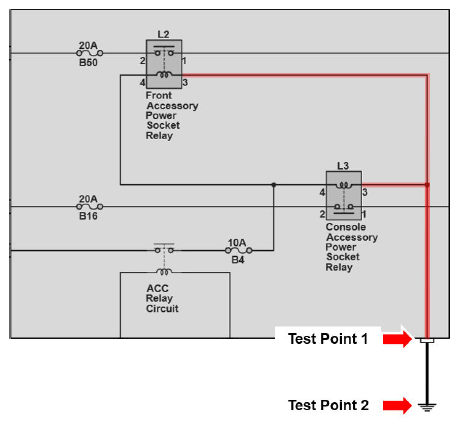
- Measure the voltage between the following:
Test Point 1 - Accessory power socket relay (relay control, ground side), fuse box or relay holder connector: Connected, wire side. Go to the appropriate EWD.
Test Point 2 - Body ground
Is there less than 0.2 volts?
Yes - Go to the next step.
No - There is a open or high resistance in the wire between the fuse box or relay holder and ground. Troubleshoot for an open circuit, and check for a poor ground.
- Measure the voltage between the accessory power socket connector (power side, terminal 1 or 2 depending on the model) and body ground.
Is there battery voltage?
Yes - Go to the next step.
No - Check the appropriate fuse supplying power to the relay-control side and the relay-switch side. If the fuse is blown, replace the fuse and repeat this step. If the fuse is OK, go to step 8.
- Check for continuity between the accessory power socket connector (ground side, terminal 1 or 2 depending on the model) and body ground.
Is there continuity?
Yes - No problem found. Connect the accessory power socket connector, plug in an available electrical device, and check again.
No - There is a open or high resistance in the wire between the accessory power socket and ground. Troubleshoot for an open circuit, and check for poor ground.
- Do the following:
- Check the accessory power socket relay. Go to the procedure Power Relay Test in the service information.
- Check for a open or high resistance in the wire on the power side between the fuse box or relay holder and the accessory power socket.
END