Multi-Information Display Switch Removal, Installation, & Test: Test
- 1. Multi-Information Display Switch - Test
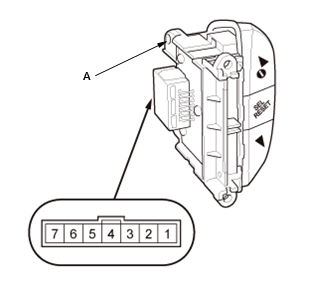
1. Measure the resistance between terminals No. 3 and No. 5 in each switch position according to the table.
Multi-information display switch
Position Resistance No button pressed No resistance button pressed About 33 Ω button pressed About 363 Ω SEL/RESET button pressed About 1.043 KΩ 2. If the resistance is not as specified, replace the multi-information display switch (A).
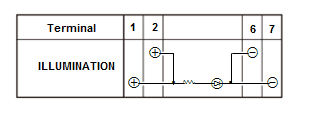
3. Check for continuity between the terminals according to the table. NOTE:
- When an LED is located between terminals, check if the LED light by connecting 12 volt battery power and ground to the LED.
- Make sure the correct test lead (+ or -) is placed on the terminal.
- When checking for continuity across the diode, use the diode setting on the digital volt/ohm meter to check the diode bias.
- Note this important operating characteristic; diode bias causes a diode to fully conduct electricity in one direction (forward), while not at all in the opposite direction (reverse).
4. If the continuity is not as specified, or the LED is faulty, replace the multi-information display switch.