LKAS Does Not Keep Vehicle In Detected Lane (16-076)
WARNING: This page is about the CR-V EX, Eng CD K24V1, which is a different variant/trim than selected.
Publication date: 2016-09-28Reference number: 16-076
LKAS DOES NOT KEEP VEHICLE IN DETECTED LANE
TECHNICAL SERVICE BULLETIN
Reference Number(s): 16-076, Date of Issue:
September 28, 2016
| HONDA: | 2015-2016 CRV; 2016 Civic, Pilot |
AFFECTED VEHICLES
AFFECTED VEHICLES
| Year | Model | Trim | VIN Range |
|---|---|---|---|
| 2015-16 | CRV | Touring, Elite, All with Honda Sensing™ | ALL |
| 2016 | Civic | All with Honda Sensing | ALL |
| 2016 | Pilot | Touring, All with Honda Sensing | ALL |
SYMPTOM
The LKAS does not keep the vehicle in its detected designated lane and no DTC is stored.
POSSIBLE CAUSES
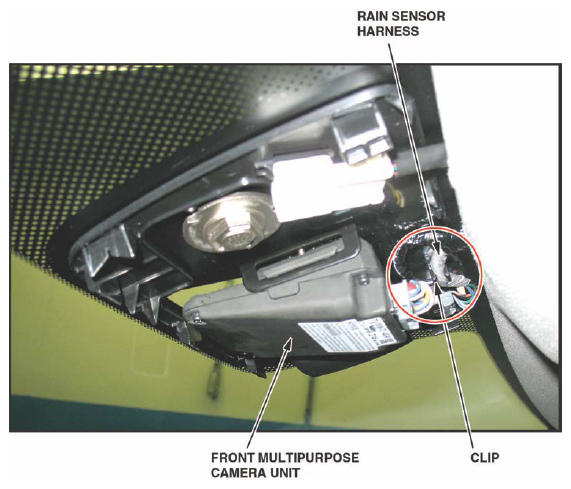
The front multipurpose camera unit/rain sensor harness is not secured in its clip, causing the camera unit to shift out of its neutral position in its bracket.
CORRECTIVE ACTION
Make sure the front multipurpose camera unit/rain sensor harness is properly secured and, if necessary, remove and install the front multipurpose camera unit.
WARRANTY CLAIM INFORMATION
The normal warranty applies.
WARRANTY CLAIM INFORMATION
| Operation Number | Description | Flat Rate Time | Defect Code | Symptom Code | Template ID | Failed Part Number |
|---|---|---|---|---|---|---|
| 7453A1 | Inspect the harness, remove and install the front multipurpose camera unit, do the aiming procedure. | 0.7 hr | 06201 | 03214 | 16-076A | 36160-TZ4-A03 |
Skill Level: Repair Technician
INSPECTION AND REPAIR PROCEDURE
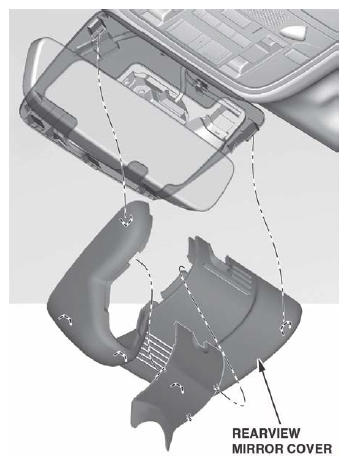
- Remove the rearview mirror cover.
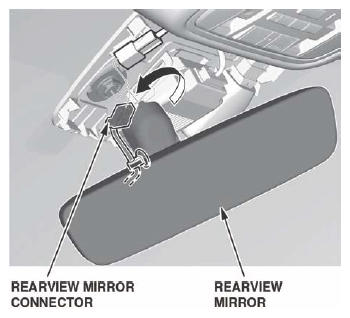
- Disconnect the rearview mirror connector.
- Remove the rearview mirror from its base by turning it counterclockwise.
- Make sure the front multipurpose camera unit/rain sensor harness is secured properly by its clip as shown.
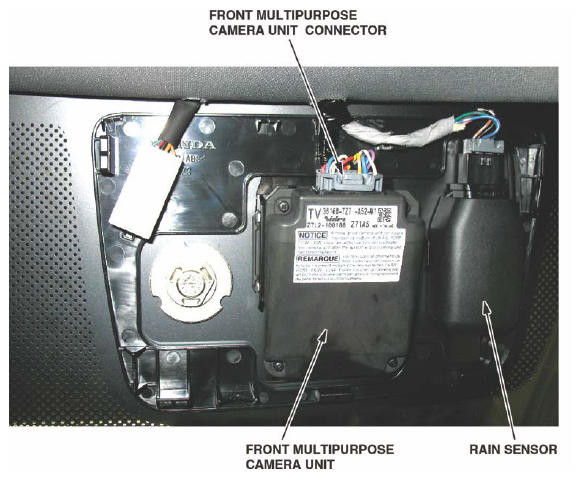
- Disconnect the front multipurpose camera unit connector.
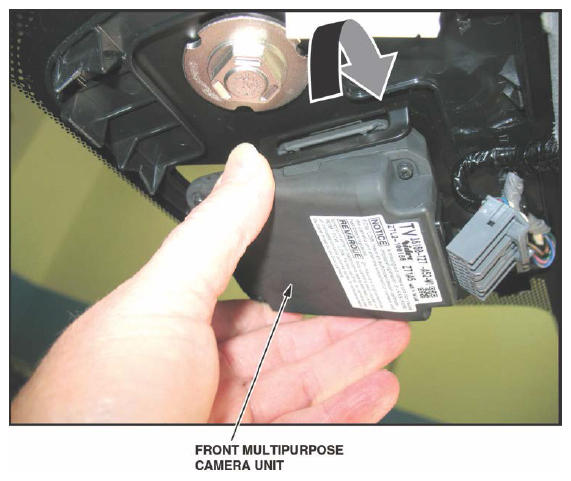
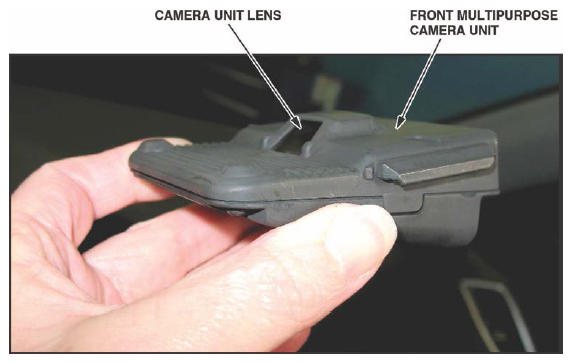
- Remove the front multipurpose camera unit.NOTE: Do not touch the camera unit lens.
- Clean the inside of the windshield with isopropyl alcohol where the camera unit is mounted.
- Install the front multipurpose camera unit and connector.
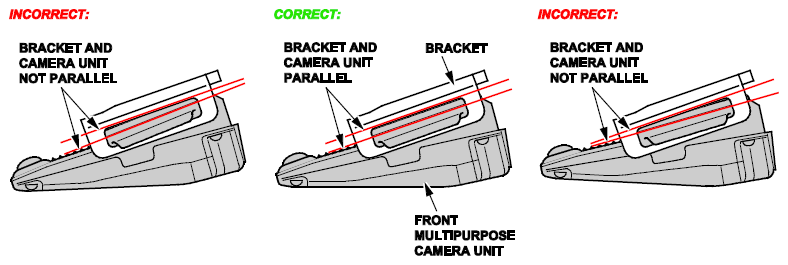
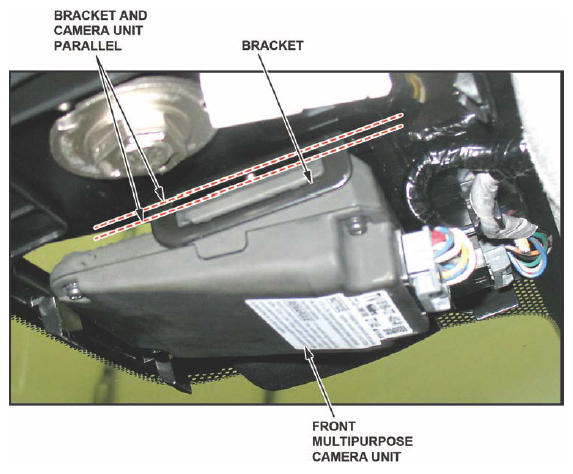
- Make sure the harness does not put any pressure on the camera, forcing it out of position while docked in its bracket. The gap between the camera base and the top of the bracket should be parallel. If it is not, shift the harness to relieve the pressure off the spring clips that hold the camera in place.NOTE: Do not adjust the spring clips in the camera bracket to set the gap.
- Connect the rearview mirror connector.
- Install the rearview mirror.
- Install the review mirror cover.
- Do the multipurpose camera unit aiming procedure, according to the service information. LKAS requires both static and dynamic aiming with the i-HDS.
END