Rattling Or Ticking From Center Panel While Driving (16-023)
WARNING: This page is about the CR-V EX, Eng CD K24V1, which is a different variant/trim than selected.
Publication date: 2016-03-01Reference number: 16-023
RATTLING OR TICKING FROM CENTER PANEL WHILE DRIVING
TECHNICAL SERVICE BULLETIN
Reference Number(s): 16-023, Date of Issue:
March 1, 2016
| HONDA: | 2015-16 CR-V |
AFFECTED VEHICLES
AFFECTED VEHICLES
| Year | Model | Trim | VIN Range |
|---|---|---|---|
| 2015-16 | CR-V | ALL | ALL VINs starting with 3CZ... |
| 2015 | CR-V | ALL | ALL VINs starting with 5J6... |
| 2016 | CR-V | AWD | 5J6RM4...GL000001 thru 5J6RM4...GL029792 |
| 2016 | CR-V | 2WD | 5J6RM3...GL000001 thru 5J6RM3...GL005855 |
SYMPTOM
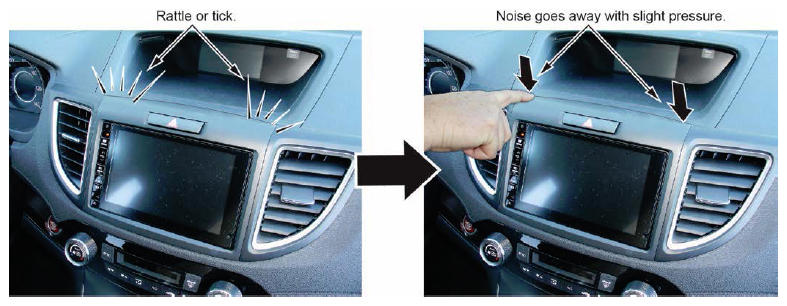
There is a rattling or ticking coming from the center panel while driving.
POSSIBLE CAUSES
The center panel is vibrating or rubbing against the center display visor.
CORRECTIVE ACTION
Apply wool felt behind the center panel.
REQUIRED MATERIALS
PARTS DESCRIPTION
| Description | Part Number | Quantity |
|---|---|---|
| Wool Felt | 06993-SA5-000 | 1 (One roll will repair 400 vehicles.) |
WARRANTY CLAIM INFORMATION
The normal warranty applies.
WARRANTY CLAIM INFORMATION
| Operation Number | Description | Flat Rate Time | Defect Code | Symptom Code | Template ID | Failed Part Number |
|---|---|---|---|---|---|---|
| 0160A0 | Apply wool felt. | 0.4 hr | 06201 | 04201 | 16-023A | 77250-T0A-A01ZA |
Skill Level: Repair Technician
DIAGNOSIS
While test-driving the vehicle, apply slight pressure to the top of the center panel. If the noise goes away, go to the REPAIR PROCEDURE . If the noise does not go away, this bulletin does not apply. Continue with normal troubleshooting.
REPAIR PROCEDURE
- When working on electronic components, make sure the work area is clean and dust-free.
- Make sure your hands are clean and free of oils and grease.
- Eject the CD before disconnecting the audio unit to prevent damaging the CD player's load mechanism.
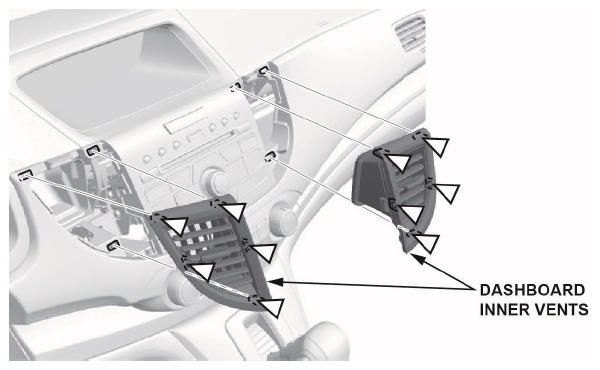
- Carefully remove both dashboard inner vents.
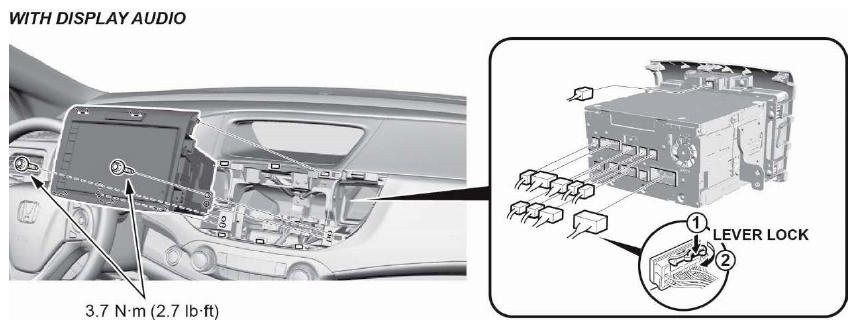
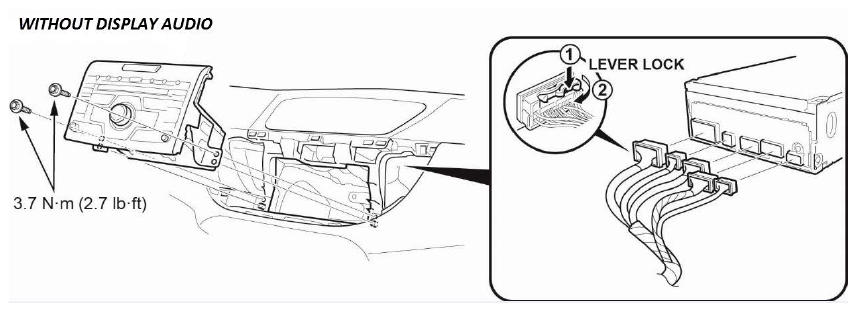
- Remove the audio unit.
- With display audio. (SE, EX, EX-L, Touring)
- Without display audio. (LX)
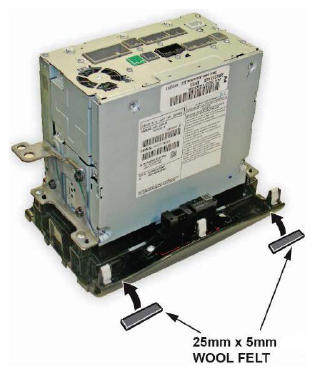
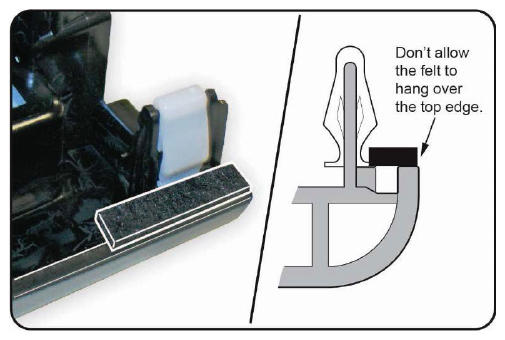
- Cut two (25 mm x 5 mm) pieces of wool felt.
- Apply the wool felt as shown below.
- Install all parts in the reverse order of removal.
END