Audio Unit/Audio-Navigation Unit Stuck In Factory Diagnostic Mode? (A17080C)
Reference number: A17080C
AUDIO UNIT/AUDIO-NAVIGATION UNIT STUCK IN FACTORY DIAGNOSTIC MODE?
TECHNICAL SERVICE BULLETIN
| HONDA: | 2005 and later models |
AFFECTED VEHICLES
2005 and later models
After installing a reman audio unit/audio-navigation unit or a brand new one, are you seeing this screen (or something very similar to it) and it's staying up even after cycling the ignition?
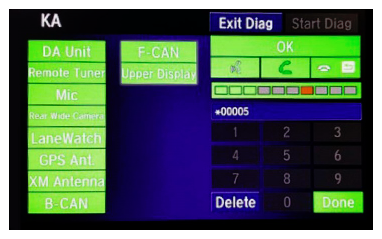
That's because that unit is in the factory diagnostic mode . This mode lets the factory check that everything is plugged in and working right as the vehicle moves down the production line. At the end of the line, before the vehicle leaves the factory, the unit is taken out of this mode and returned to the normal market mode.
Exiting the factory diagnostic mode takes just a few steps, but unless you do them exactly right, the unit will remain stuck in that mode. We started adding exit mode procedures a number of years back to the PDI of the navigation system bulletins, and in the last couple of years, to the basic PDI bulletins. You'll also find them in the service information.
Unfortunately though, not every affected vehicle may be covered. If you can't find the procedure in SIS for the vehicle you're working on, try these steps; they should let you exit the mode:
- Select Start Diag.
- Press all of the buttons on the steering wheel that you see on the screen. The screen icons should turn green.
- Make a loud sound (like snapping your fingers or clapping your hands) next to the microphone to complete the mic test.
- When you've completed all of the tests, the screen icons will be green. Select Exit Diag to exit the mode.
- Turn the ignition to OFF, then to ON, to make sure the In Line Diag screen doesn't reappear.
Of course, if you still can't exit the mode, then call Tech Line. One of their agents will gladly help you.