Using The GPS And Satellite Test Antennas (AJA05118)
Reference number: AJA05118
USING THE GPS AND SATELLITE TEST ANTENNAS
TECHNICAL SERVICE BULLETIN
| HONDA: | All Models |
AFFECTED VEHICLES
General information
REVISION SUMMARY
This job aid has been extensively revised; American Honda recommends you read the entire bulletin.
INTRODUCTION
Troubleshooting either a GPS antenna problem (navigation GPS signal missing, clock not setting) or XM antenna problem (Check Antenna or No Signal message, poor XM reception)? Keep in mind there are two test antennas that we auto shipped to every dealer that can help make short work of this.
- GPS Test Antenna (NUD420391)
- Satellite Radio Test Antenna (NUD420392)
Both of these antennas are available from the Honda Tool and Equipment program if you need to order a replacement or extras for your shop.
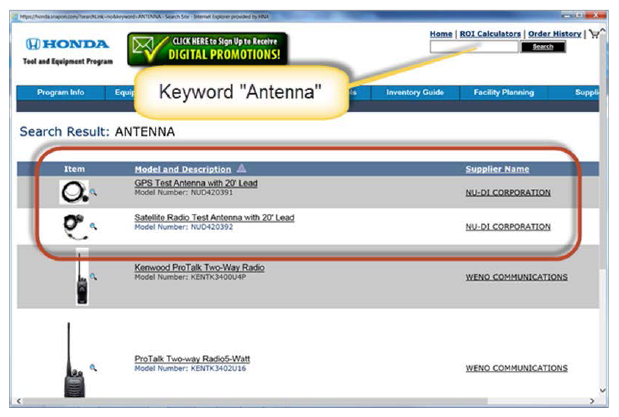
This job aid shows you how to use these test antennas. It covers these two troubleshooting areas:
- GPS Positioning or Clock Setting (Non-Navigation Audio Units with GPS Antenna)
- Check Antenna or No Signal Messages, Poor XM Reception
You might be wondering why vehicles without navigation have a GPS antenna. Many current and most future vehicles will use it to set the clock.
GPS POSITIONING (NAVI) OR CLOCK SETTING (NON-NAVI AUDIO UNITS WITH A GPS ANTENNA)
- Disconnect the GPS antenna from the back of the navigation unit, audio-navigation unit or audio unit, and plug in the GPS test antenna. Leave the antenna in place. Only disconnect the connector from the unit at this time.
- Place the GPS test antenna on the roof, park the vehicle outside away from tall buildings, trees, or high powered electrical lines, or drive the vehicle as necessary and see if the issue is now resolved.
Is the issue resolved?
YES - Go to step 3.
NO - Substitute a known-good navigation unit, audio-navigation or audio unit, and retest.
- Move the test antenna next to the area of the dashboard or rear deck that is directly over the location of the original GPS antenna, and repeat step 2.
Did the problem return?
YES - There is interference in the area of the GPS antenna blocking the GPS signal. Possible causes can be controls units like the gauge control module, HVAC, or other C/Us in the area of the antenna or the dashboard wire harness. Also, look for aftermarket devices hidden near the GPS antenna or electronic toll road devises directly above the GPS antenna. (cell phone chargers, Bluetooth devices, DC to AC inverters)
NO - Replace the GPS antenna.
XM CHECK ANTENNA OR NO SIGNAL MESSAGES OR POOR XM RECEPTION
- For a Check Antenna message, go to step 3.
- For a No Signal message or poor reception, go to step 7.
- Unplug the XM antenna from the rear of the XM receiver or the back of the audio-navigation unit if the XM receiver is built-in.
- Plug the XM test antenna into the rear of the XM receiver or into the back of the audio-navigation unit if the XM receiver is built-in, and place the test antenna on the roof. Then, retest the vehicle under the same conditions.
Is the Check Antenna message gone?
YES - Go to step 5.
NO - Replace the XM receiver (or the audio-navigation unit if the XM receiver is built-in. The unit is defective internally.
- Unplug the XM test antenna, and plug in the XM antenna connector.
- Substitute a known-good XM antenna, and retest.
Is the Check Antenna message gone?
YES - Replace the original XM antenna. The antenna is defective internally.
NO - Replace the XM coaxial antenna lead(s) as necessary. The coaxial lead(s) are defective.
- Plug in the XM test antenna to verify the No Signal message or poor reception issue, and compare it to a like, known-good vehicle under the same conditions.
Does the No Signal message or poor reception issue compare to a like, known-good vehicle under the same conditions?
YES - This is an environmental or SXM system issue and not related to the vehicle. The vehicle is working normally.
NO - Go to step 8.
- Unplug the XM test antenna, and plug the XM antenna into the rear of the XM receiver (or back of the audio-navigation unit if the XM receiver is built-in.
- Substitute a known-good XM antenna, and retest. Then, retest the vehicle under the same conditions.
Did the No Signal error message or poor reception issue go away?
YES - Replace the original XM antenna. The antenna is defective internally.
NO - Replace the XM receiver (or the audio-navigation unit if the XM receiver is built-in. The unit is defective internally.
END