Indirect TPMS Calibration (Interactive) (AJA05074)
Reference number: AJA05074
INDIRECT TPMS CALIBRATION (INTERACTIVE)
TECHNICAL SERVICE BULLETIN
| HONDA: | All Models |
AFFECTED VEHICLES
All models with indirect TPMS; see the complete affected vehicle application list on the final page.
Please Select Model:
YEAR
MODEL
TRIM
INTRODUCTION
Indirect TPMS, first introduced in the 2013 Accord, provides the same function as direct TPMS but does it differently. And because of that, it remains a source of confusion for both service techs and customers alike. This job aid offers important guidance, along with some valuable tips, to help you better understand indirect TPMS.
Here is what it covers:
- A Few Basics
- Calibration
- Low Tire Pressure/TPMS Indicator Functions
- Troubleshooting Tips
- Calibration Comparison Logic and Special Calibration
- To Learn More
A FEW BASICS
Unlike a direct TPMS, an indirect TPMS does not use tire pressure sensors mounted in the tires. Instead, the system is integrated into the VSA modulator-control unit and uses the following inputs to monitor and compare tire characteristics while driving and determine when one or more tires are significantly underinflated.
- VSA/ABS wheel speed sensors
- Yaw and G sensor
- Brake pressure
- Steering angle
- Outside temperature (measured from the front bumper)
From these inputs, the system calculates tire pressures. To determine tire pressure loss, the system uses these two methods:
- Wheel Speed Differential - This method is used to detect if one, two, or three tires have lost pressure. It compares the two left tires to the two right tires, the two front tires to the two rear tires, and the left front and right rear tires to the left rear and right front tires.
- Peak Tire Resonance - This method is used to detect if all four tires have lost pressure. A good example: if the tire pressures have not been checked for over 9 months.
An easy way to tell which type of TPMS a vehicle has is by looking at the valve stems. Vehicles with indirect TPMS have black rubber valve stems. Vehicles with direct TPMS have gray alloy valve stems.
CALIBRATION
In order to calculate tire pressures, the system must first be calibrated. The system relies on the tire pressures being set to the cold inflation values listed on the driver's doorjamb label and the calibration process started. This process must be done at PDI, and also at scheduled maintenance and anytime you do the following:
- Adjust pressure in one or more tires
- Rotate tires
- Replace one or more tires
Keep in mind if the Low Tire Pressure/TPMS indicator is not on, you just need to start the process; the system will finish it on its own as the customer drives the vehicle.
If the tire pressures are not properly set and/or the calibration process is not started at the right time, the tire pressure calculations are tricked, causing the Low Tire Pressure/TPMS indicator to possibly come on, resulting in a possible customer comeback and wasted troubleshooting time.
Starting calibration is very easy. Here is how it is done. You will also find these procedures in the PDI bulletins, owner's guides, owner's manuals, and service information.
Before You Start
- Make sure the vehicle is completely stopped with the transmission in Neutral (M/T) or Park (A/T or CVT).
- Make sure all of the tires are the same type and size. The system will not work right otherwise.
- Set the tire pressures to the cold inflation values listed on the driver's doorjamb label.
- Turn the ignition to ON.
TPMS BUTTON METHOD
Starting Calibration - TPMS Button Method
Procedure: Press and hold the TPMS button underneath the left side of the dashboard until the Low Tire Pressure/TPMS indicator blinks twice.
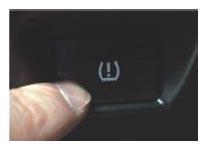
- If this DID NOT fix the issue click here to view Special Method.
TPMS BUTTON SPECIAL METHOD
Starting Special Calibration - TPMS Button Special Method
Procedure: Press and hold the TPMS button until the Low Tire Pressure/TPMS indicator blinks twice. Wait 5 seconds, then press and hold the button until the indicator blinks twice. Wait 5 more seconds , then press and hold the button until the indicator blinks twice. Within 10 seconds , the indicator blinks once, letting you know that special calibration has started.
DISPLAY AUDIO METHOD
Starting Calibration - Display Audio Method
Procedure: Select HOME, Settings, Vehicle, TPMS Calibration , then Calibrate.
- If this DID NOT fix the issue click here to view Special Method.
DISPLAY AUDIO SPECIAL METHOD
Starting Special Calibration - Display Audio Method
Procedure: Select HOME, Settings, Vehicle, TPMS Calibration , then Calibrate. Wait 5 seconds , then select TPMS Calibration and Calibrate. Wait 5 more seconds , then select TPMS Calibration and Calibrate. Within 10 seconds , the indicator blinks once , letting you know that special calibration has started.
MID/IMID/DRIVER INFORMATION INTERFACE METHOD
Starting Calibration - MID/iMID/Driver Information Interface Method
Procedure: Using the steering wheel buttons, select Settings or Menu, TPMS Calibration, then Calibrate or Initialize.
Calibration Status
During calibration, if you cycle the ignition, and the vehicle is not moved within 45 seconds , the Low Tire Pressure/TPMS indicator will come on for 2 seconds. This is normal and simply means that calibration has not yet completed.
- If this DID NOT fix the issue click here to view Special Method.
MID/IMID/DRIVER INFORMATION INTERFACE SPECIAL METHOD
Starting Calibration - MID/iMID/Driver Information Interface Special Method
Procedure: Using the steering wheel buttons, select Settings or Menu, TPMS Calibration , then Calibrate or Initialize . Wait 5 more seconds , then select TPMS Calibration and Calibrate or Initialize. Wait 5 more seconds , then select TPMS Calibration and Calibrate or Initialize. Within 10 seconds , the indicator blinks once, letting you know that special calibration has started.
LOW TIRE PRESSURE/TPMS INDICATOR FUNCTIONS
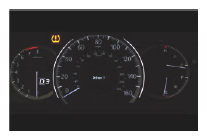
The Low Tire Pressure/TPMS indicator does a variety of things, depending on conditions and circumstances.
Normal Conditions
- The indicator comes on for a few seconds when you turn the ignition to ON. This is just part of the system check.
- The indicator comes on for 2 seconds , then goes off, if the vehicle is not moved within 45 seconds after turning the ignition to ON. This just means the system is still calibrating.
Abnormal Conditions
- The indicator comes on and stays on if one or more tire pressures are very low or the system has not been calibrated. If this happens, the vehicle should be stopped in a safe place, the tire pressures checked and adjusted as needed, and the calibration process started.
- The indicator blinks for about 1 minute
, then stays on if the compact spare tire is mounted or there is a problem with the TPMS.
If the spare is mounted, the regular tire should be repaired or replaced and mounted as soon as possible, and the calibration process started. If the spare is not mounted, the calibration process should be started and the system checked.
TROUBLESHOOTING TIPS
If the Low Tire Pressure/TPMS indicator is on steady, here are a few tips to help you troubleshoot.
- Check cold tire pressures. A cold tire means the vehicle has been parked for at least 3 hours or driven less than 1 mile . Be sure to use an accurate tire pressure gauge (P/N 07AAJ-000-A100)
- If you find a low tire, repair or replace it, then set the tire pressure to the recommended cold inflation value and start the calibration process. You do not need to finish calibration.
- If the tire pressures are OK, check that the wheels and tires are the OEM size, make, and model and that they are not damaged in any way. Then, check if the vehicle was recently serviced within or outside a Honda dealer. If a tire was recently replaced, and its tread depth is different from the other tires, the Low Tire Pressure/TPMS indicator could be triggered.
- If all of the vehicle's tires are worn, it's best to replace them together. If that's not possible, then replace the front pair or the rear pair.
- If you suspect that calibration was not done at a recent service, you can find out for sure by connecting the i-HDS and checking the INITIALIZED ODOMETER signal in the VSA Data List. In the case below, calibration was not started at PDI.

CALIBRATION COMPARISON LOGIC AND SPECIAL CALIBRATION
Whenever calibration is started, the TPMS control unit learns the tire characteristics during the calibration drive. Should those characteristics change for any reason from what it has learned (for example, there is a sudden drop in tire pressure), the Low Tire Pressure/TPMS indicator comes on as a reminder to check the tire pressures.
If the tire pressures are properly set and calibration is started, the indicator goes off, the control unit learns the proper tire characteristics during the calibration drive, and all is well. But what if nothing is done about the tire pressures, but calibration is started? The indicator will still go off, but now something called calibration comparison logic steps in.
The control unit then compares the tire characteristics that caused the indicator to come on to the tire characteristics during the calibration drive. If the control unit sees that there has been no change in tire characteristics, the indicator comes on again within 20 minutes as a reminder to check the tire pressures.
It is not uncommon for customers to experience this situation and, when they do, they are often confused and think there is something wrong with the TPMS and end up back at their dealership. Here are two ways this can happen:
Scenario 1
At PDI, the tire pressures are not checked and they remain at their high-pressure values for shipping. The vehicle is delivered to the customer, and the control unit learns the tire characteristics at high pressure. Sometime later, the pressures are lowered to the recommended values but for some reason, calibration is not started. The control unit sees there is a change in tire characteristics and the Low Tire Pressure/TPMS indicator comes on. The customer, knowing the tire pressures were already set to the recommended values, just starts calibration. The control unit's calibration comparison logic sees there is no change in tire characteristics since the last calibration, and the indicator comes on again within 20 minutes.
Scenario 2
The Low Tire Pressure/TPMS indicator comes on while driving. The customer, not wanting to stop and check tire pressures, starts calibration knowing it will turn off the indicator. The control unit's calibration comparison logic sees there is no change in tire characteristics since the last calibration and the indicator comes on again within 20 minutes.
The truth is both of these scenarios can easily be avoided: the first one by just remembering to set the tire pressures and start calibration at PDI, the second one by simply heeding the indicator and taking proper action (setting the tire pressures and starting calibration).
To clear all learned tire pressures and avoid calibration comparison logic activity, there is a special calibration , which has you start the normal calibration three times in a row, waiting 5 seconds between each start. After the third start, the Low Tire Pressure/TPMS indicator blinks once , letting you know the special calibration has started. There is no need for a calibration drive after each start.
TO LEARN MORE
To learn more about the material covered in this job aid, check out these resources:
- Online University Self-Study Module SSC16, Indirect Tire Pressure Monitoring System
- Tech2Tech® Video "TPMS Identification and Calibration"
We have also produced and posted these five videos demonstrating the calibration process on the Honda YouTube Channel:
- "Calibrating an Indirect Tire Pressure Monitoring System: Vehicles with TPMS Button" -
- https://www.youtube.com/watch?v=gFSY3Ztq9Gk&=youtu.be
- "Calibrating an Indirect Tire Pressure Monitoring System: Vehicles with MID" -
- https://www.youtube.com/watch?v=r0mxflHR6ps&=youtu.be
- "Calibrating an Indirect Tire Pressure Monitoring System: Vehicles with i-MID" -
- https://www.youtube.com/watch?v=CPkg_eTJL6I&=youtu.be
- "Calibrating an Indirect Tire Pressure Monitoring System: Using Driver Information Interface" -
- https://www.youtube.com/watch?v=tLm2xwOVepA&=youtu.be
- "Calibrating an Indirect Tire Pressure Monitoring System: Using Display Audio" -
- https://www.youtube.com/watch?v=ORr4mSqPRc4&=youtu.be
AFFECTED VEHICLE APPLICATION CHART FOR INDIRECT TPMS
| Year | Model | Trim | Calibration Me... |
|---|---|---|---|
| 2013-17 | Accord | All Except Touring | TPMS Button |
| 2013-17 | Accord | Touring | MID/iMID/Driver Inf... |
| 2014 | Accord | Plug-in | MID/iMID/Driver Inf... |
| 2014-15 | Accord | Hybrid | MID/iMID/Driver Inf... |
| 2017 | Accord | Hybrid | MID/iMID/Driver Inf... |
| 2014-15 | Civic | All | MID/iMID/Driver Inf... |
| 2016-17 | Civic | LX w/o Honda Sensing | TPMS Button |
| 2016-17 | Civic | LX w/Honda Sensing | MID/iMID/Driver Inf... |
| 2016-17 | Civic | EX/Touring | Display Audio |
| 2017 | Civic | Sport | TPMS Button |
| 2017 | Civic | Sport Touring/Type R | Display Audio |
| 2017 | Clarity | All | Display Audio |
| 2014-16 | CR-V | All Except Touring | TPMS Button |
| 2015-16 | CR-V | Touring | MID/iMID/Driver Inf... |
| 2017 | CR-V | LX | TPMS Button |
| 2017 | CR-V | Except LX | Display Audio |
| 2016 | CR-Z | All | MID/iMID/Driver Inf... |
| 2015-17 | Fit | ll TPMS Button | |
| 2018 | Fit | w/o Honda Sensing | TPMS Button |
| 2018 | Fit | w/Honda Sensing | MID/iMID/Driver Inf... |
| 2016-17 | HR-V | All | TPMS Button |