Audio System Description - Overview
Overview
The Audio and Visual system consists of digital audio/video playback function, wireless communication to the customer's device, and displaying the driver's support information.
Audio Unit
The audio unit acts as the processor which includes playback functions of the AM, FM, and HD radio* tuners, the external tuner (XM* ) that is connected to GA-net, the CD player, the USB, the Bluetooth audio* , and the iPod for music. Select audio functions from the audio unit buttons, touch screen (Touch the display directly to select items on the screen)* , or the audio remote switch (on the steering wheel).
*: With display audio
The audio unit has a built-in EEPROM (electrically erasable programmable read-only memory). This memory holds the AM/FM audio presets (sound settings, etc.) even when the 12 volt battery is disconnected (XM presets are stored in the XM receiver).
A security signal is daisy-chained between the audio system and vehicle components for integration into the vehicle's security system.
There are two kinds of audio units according to a vehicle model.
| Display Audio | Normal Audio | |
|---|---|---|
| With Navigation | ◦ | X |
| Without Navigation | ◦ | ◦ |
Display Audio
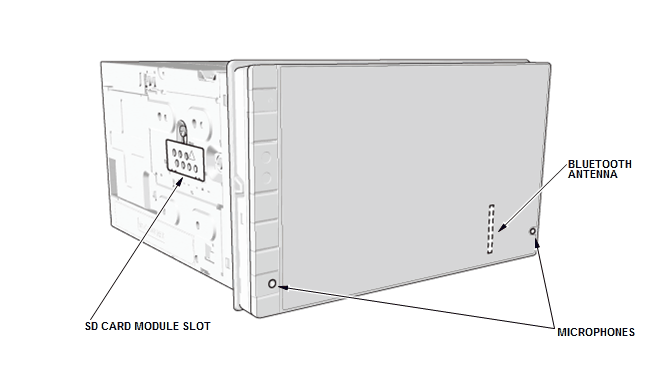
The audio unit has a 7-inch WVGA electrostatic capacitance touch panel. Two microphones for voice recognition or HandsFreeLink (HFL), an antenna for Bluetooth communication, and an antenna for wireless LAN communication are built into the audio panel. The microphones have high directivity and are able to clearly hear and differentiate the driver and front passenger's voices. As an advanced feature, a smart phone linkage function and a video playback function are available. An audio unit with navigation function is referred to as audio-navigation unit. This unit has built-in yaw rate sensor, an acceleration sensor, and the navigation map data is installed (refer to the Navigation System Overview).
Display audio units exist as an audio unit and an audio-navigation unit, and these units look like a same unit, but the audio-navigation unit displays a Honda Globe screen after displaying a Honda logo screen every time when you turn the vehicle to the ACCESSORY mode. If the unit does not displayed any screen according to failure of the unit or the vehicle, remove the unit, and check for connector G (24P) terminal No. 14. If the terminal is using a GRN wire (VSP line), the unit can be recognized as an audio-navigation unit.
The audio unit uses a SD card module as a storage media that saves the system data, the backup data, and the applications. The audio unit and the SD card module cannot be substituted separately.
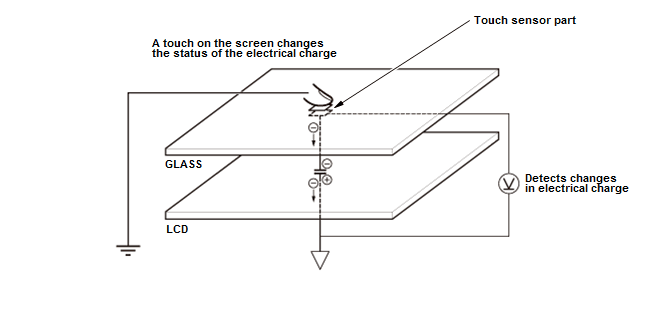
Electrostatic Capacitance Touch Panel
To use the touch-screen, bring your finger close to the screen or gently touch it with your finger. The touch sensor senses the change of the electrical charge when your finger is close to the screen and detects the position of the electrical charge. Use only a gentle touch to select or move the screen image. A hard finger press is not necessary. The screen cannot sense your touch if you wear heavy gloves, use a fingernail, or a pen.
Audio Unit Functions
GA-Net Bus Configuration
The multi-information display unit, the XM receiver* pass the signals to the audio unit via the GA-Net bus. Any open connections or short in the wiring in the GA-Net bus circuit will cause audio (including the audio accessories) functions to be inoperative.
*: With display audio
Self-Diagnostic Function
The audio unit has the self-diagnostic function to check the failure of the audio unit or its connection. Additionally, the audio unit has original hard error codes* that can see on the diagnostic screen to identify the failure part.
*: With display audio
Fail-Safe Function
The audio unit performs the fail-safe control when the system detects an abnormal high temperature in the unit:
- Built-in cooling fan on/off control* : When the audio unit temperature is too high, the audio unit turns the cooling fan on until the temperature cools down.
- Display backlight on/off control: When the audio unit display temperature is too high, the audio unit displays the error message and then the display back light turns off (the background system stay on) until the temperature cools down.
*: With display audio
USB/HDMI Connection
The USB port and the HDMI port* are equipped for external device input and smartphone connection.
*: With display audio
Bluetooth Connection (With Display Audio)
The audio unit supports the Bluetooth Ver 3.0+EDR. The Bluetooth Ver 3.0+EDR enables audio streaming, wireless play back on an audio device, hands-free calling with a phone, data communication, and phone book loading.
Speed-Sensitive Volume Compensation (SVC)
All audio systems are equipped with speed-sensitive volume compensation (SVC). The audio-navigation unit or audio unit receives the vehicle speed pulse (VSP) from the gauge control module (B-CAN). The system processes the speed input and increases the audio system volume level as the vehicle speed increases to compensate for the various interior noises that occur at higher speeds. When the vehicle slows down, the volume returns to its normal level. The SVC has four settings: SVC OFF, SVC LOW, SVC MID, and SVC HIGH that can be adjusted using the audio-navigation unit or audio unit. The SVC comes from the factory with the MID setting as the default (see the owner's manual for more information).
HD Radio (TM) (With Navigation)
HD Radio(TM) is a crystal clear digital audio broadcast by local radio stations. There is no charge for HD radio. Simply tune to your favorite station, and if the station is broadcasting with HD Radio(TM) technology, then the radio will automatically pick up the digital signal, and begin playing the crystal clear, subscription free audio. Refer to your Owner's Manual to determine how your particular receiver indicates HD Radio(TM) reception and how to transition from the main program to the multicast program(s).
- The HD1 channel acquires analog station first and blends with the digital signal. Therefore the digital audio may have a short delay.
- There is no analog signal available on the HD2/HD3 channels. Therefore there is a short delay while decoding the digital audio. Audio will begin playing when available.
- Go to www.hdradio.com for stations in the area to verify correct operation on the station.
Song By Voice (TM) (With Navigation)
A customer can use the Song By Voice(TM) feature to select and play the audio files in an iPod or a USB device with voice commands.
When an iPod or a USB device is connected to the audio-navigation unit, the unit makes a dictionary from the album name, the folder name, the artist name, the track name, and the file name.
If a different device is connected, or the customer updates the files on the connected device, a new dictionary is created.
Bluetooth Audio
Bluetooth audio allows approved Bluetooth phones equipped with music function to play music via the vehicle's audio system using Bluetooth technology. You can control the phone's music player remotely using the wireless connection.
- You can play music stored in your phone using the wireless connection.
- You can choose next song, previous song and resume/pause via the wireless connection.
NOTE: Not all phones support the Bluetooth audio function.
Supported Devices
- Bluetooth music phones that support A2DP 1.0 and AVRCP 1.0, 1.3, and 1.4.
- Bluetooth adapters for portable music devices including iPod are not supported.
NOTE: Availability of the functions depends on the connected phone.
USB Adapter
The audio system can play digital music from portable audio players, a USB drive, etc. when the device is plugged into the USB port. When the vehicle is turned to ACCESSORY mode, the audio unit begins to communicate with the connected USB device, and to supply the VBUS power. The audio unit controls the device when searching and playing the files. Not all players and player functions work with the USB adapter. Please see the Owner's Manual for more information.
Supported Devices
- 2.0 High speed USB capable (maximum speed is 480 Mbps).
- At least 256 MB storage capacity.
- USB formatted to be compatible with Windows-based operating systems.
- If the USB has a security feature, like write protection, it must be turned off.
There are many different USB drives, manufacturers, and configurations with new devices being released every day, which makes it impossible to test all USB devices with the audio system. Even if the USB device has all these requirements, it may not be compatible.
Hard drives do not support overwriting the data for the track order, which is why they are not recommended.
When you disconnect a USB device, the data for the track order remains in the audio unit's memory so when you reconnect the same USB device, the audio unit continues playing from the location where it was disconnected. If a new USB device is connected, the data for the track order is rewritten and you need to select the album or music file.
Smartphone Linkage Function (With Display Audio)
This function ensures safe use of smartphone while driving. Connect a smartphone to the audio unit to use it. Connection methods vary depending on carriers.
When using the navigation function via a smartphone, The audio unit can display the navigation map screen that is in the connected smartphone. In this case, the GPS signal is received by the smartphone, and the vehicle signals are received from the F-CAN and the B-CAN as information of vehicle position tuning.
The vehicle signal that is used for vehicle position tuning does vary by the connected smartphone.
Muting Logic
When using the navigation route guidance (RG), the driver's dooa speaker provide the navigation sound and the rear speakers continue to play the audio. The outline of the muting logic is shown in this table.
| Contents | Audio Output | |||
| Left Front CH | Right Front CH | Right Rear CH | Left Rear CH | |
| Route Guidance* | Navigation output | Navigation output | Audio | Audio |
| HFL | HFL output | HFL output | Muted | Muted |
| HFL and Route Guidance* | Navigation output | HFL output | Muted | Muted |
*: With navigation
Multi-View Rear Camera System
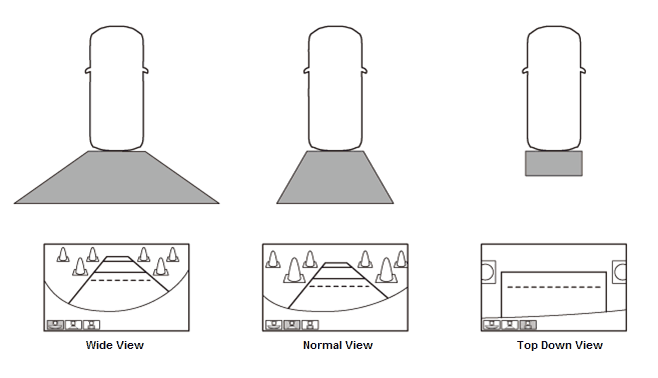
The multi-view rear camera system is a function that provides three different views images of the rearview camera to the audio unit*1 or the audio-navigation unit*1 or the multi-information display unit*2 , and can be changed by the user. The rearview guide lines change according to the selected view. The rearview camera is connected directly to the audio unit*1 or the audio-navigation unit*1 , or the multi-information display unit*2 .
| *1: With display audio |
| *2: With normal audio |
- Normal View Mode
The display shows the standard view.
- Wide View Mode
The display shows wider visibility than the normal view, which helps the driver confirm any objects approaching from right and left.
- Top Down View Mode
The display shows the view from the top angle of the vehicle, which helps the driver confirm the distance from any object behind.
Basic Control
When the audio unit detects the BACK LT signal (when the transmission is shifted to R position/mode) for at least 0.3 seconds, the audio unit display turns on the rearview camera image. The display delays for the 0.3 seconds to prevent changing the screen image too frequently because of incorrect shift position/mode selection. You can change the view mode by touching the mode icon*1 or by pressing the SELECTOR knob*2 .
| *1: With display audio |
| *2: With normal audio |
When the rearview camera image is displayed, the camera view can be changed from the audio unit. The audio unit sends a signal using the CAMERA BIT0 and CAMERA BIT1 to the rear view camera.
| Wide | Normal | Top Down | |
|---|---|---|---|
| CAMERA BIT0 Signal | OFF (0 V) | ON (5 V - 8 V) | OFF (0 V) |
| CAMERA BIT1 Signal | OFF (0 V) | OFF (0 V) | ON (5 V - 8 V) |
Any time the audio unit loses power (12 volt battery disconnected, audio unit disconnected, etc.) the rearview camera defaults to the normal angle view. The rearview camera will also default to this angle if you had the top down angle selected when you turn the vehicle to the OFF (LOCK) mode. If you change the rearview camera to the wide view, the rearview camera will remember this view when you turn the vehicle to the ON mode.
When the rearview image is displayed with the guide line, the guide line changes according to the steering angle input (When the steering rotates 90 degrees or more). The steering angle information is received from the gauge control module via the B-CAN as vehicle signals.
Multi-information Display Unit
The multi-information display unit displays audio, trip information, and any customized screen via the audio-navigation unit or the audio unit. The multi-information display unit uses a liquid crystal display (LCD). The LCD is a 5-inch diagonal, thin film transistor (TFT). The color film and fluorescent light are laid out on the back of the liquid crystal film. This unit is controlled by the audio-navigation unit or the audio unit via the GA-Net bus or DUET. The image signal sends by the digital data.
When the multi-information unit temperature is 167 °F (75 °C) or higher, the display sends the information to the audio-navigation unit or audio unit via the GA-NET. The audio-navigation unit or audio unit outputs the warning screen for about 30 seconds and then the display back light turns off until the temperature cools down.
The System Diagnostic Mode can check GA-NET data connections between the multi-information display unit. The System Diagnostic Mode also includes several screens designed to check the dot matrix screen performance.
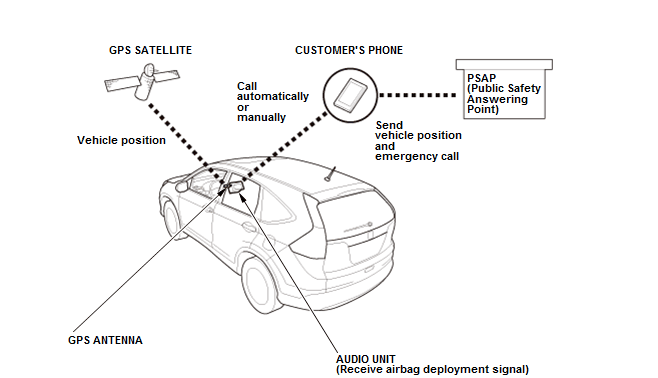
HondaLink911 (With Display Audio)
HondaLink delivers remote services to the vehicle using the customer's compatible bluetooth phone.
If the SRS airbag is deployed, the SRS unit sends a signal to the audio unit via the F-CAN. Then the audio unit calls a PSAP (Public Safety Answering Point) automatically using the customer's compatible bluetooth phone, and sends the vehicle location using DTMF (Dual-Tone Multi-Frequency). The audio unit uses the GPS antenna for tracking the vehicle location.