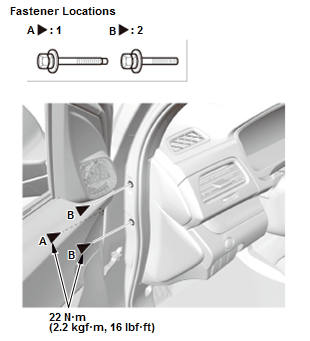
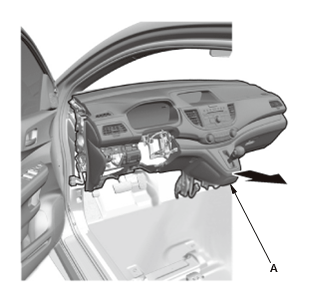
Removal & Installation
SRS components are located in this area. Review the SRS component locations and the precautions and procedures before doing repairs or service.
- 1. 12 Volt Battery Terminal - Disconnect
- 2. Both A-Pillar Trims - Removal - Refer to: Interior Trim Removal and Installation - Pillar AreasInterior Trim Removal and Installation - Tailgate AreasInterior Trim Removal and Installation - Cargo AreasInterior Trim Removal and Installation - Rear Side AreaInterior Trim Removal and Installation - Door Areas
- 3. Passenger's Dashboard Undercover - Remove - Refer to: Passenger's Dashboard Undercover Removal and InstallationDriver's Dashboard Undercover Removal and Installation
- 4. Driver's Dashboard Lower Cover - Remove
- 5. Both Kick Panels - Remove - Refer to: Interior Trim Removal and Installation - Pillar AreasInterior Trim Removal and Installation - Tailgate AreasInterior Trim Removal and Installation - Cargo AreasInterior Trim Removal and Installation - Rear Side AreaInterior Trim Removal and Installation - Door Areas
- 6. Glove Box - Move
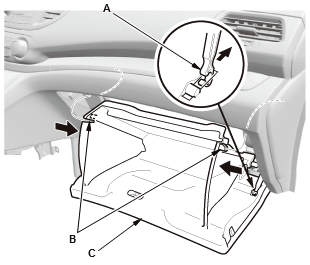
1. Detach the glove box damper (A), and release both glove box stops (B) by pushing them in, then let glove box (C) hang down.
- 7. Center Console - Remove
- 8. Steering Column - Remove
- 9. Shift Cable (Shift Lever Side) - Disconnect
- 10. Dashboard/Steering Hanger Beam - Remove
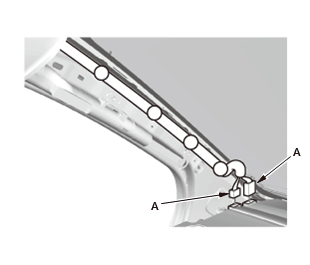
Left side
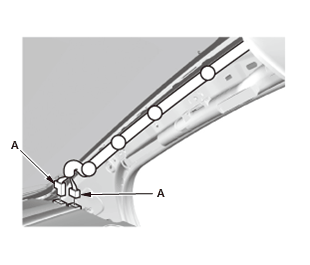
Right side
1. At the A-pillar, disconnect the connectors (A).
NOTE: The positions and number of connectors vary depending on models.
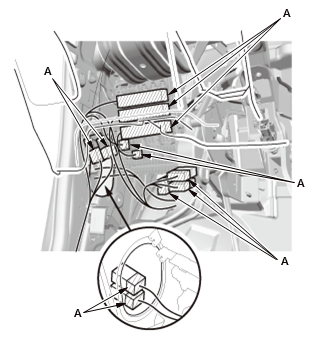
Driver's side 2. Disconnect the connectors (A).
NOTE: The positions and number of connectors vary depending on models.
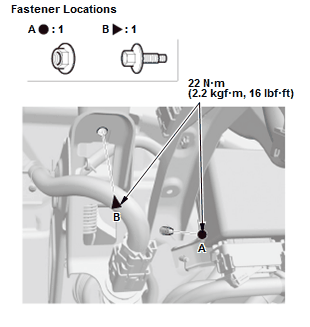
3. Remove the nut (A) and the bolt (B).
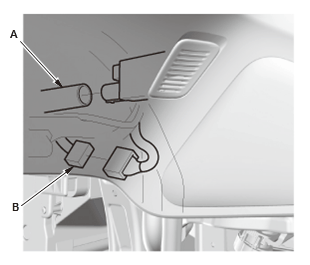
4. With climate control: Disconnect the aspirator hose (A) 5. Disconnect the connector (B).
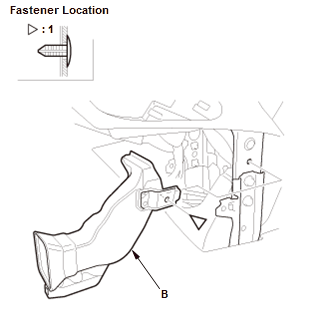
Center area 6. Remove heater joint duct B.
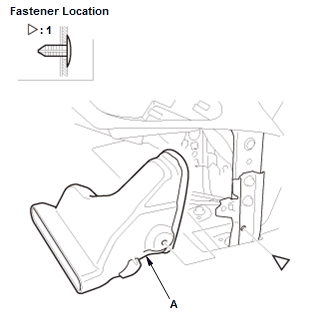
7. Remove heater joint duct A. 8. Disconnect the connectors (A)
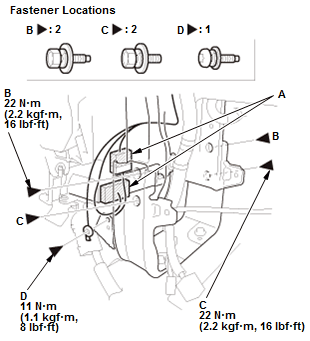
9. Remove the bolts (B, C), and remove the ground bolt (D) with a TORX T30 bit.
NOTE: Apply medium strength liquid thread lock to mounting bolts C before installation.
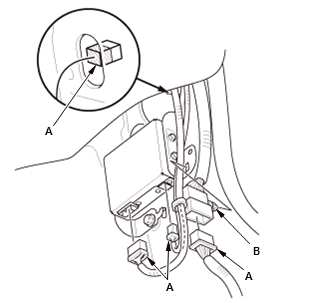
Passenger's side 10. Disconnect the connectors (A), and detach the connector clip (B).
NOTE: The positions and number of connectors vary depending on models.
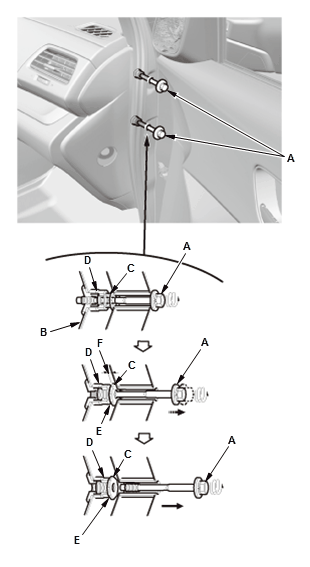
11. Loosen the special bolts (A) until they disengage from the threads on the hanger beam side bracket (B), and engage the inside threads of the collar bolts (C). The thread lock on the special bolts makes the special bolts and the collar bolts turn together 12. Continue loosening the special bolts to turn the collar bolts into the fixed space adjusters (D) until the collar bolts engage the stops (E). This creates a gap (F) between the collar bolts and the body
13. Loosen the special bolts to disengage them from the collar bolts, then remove them.
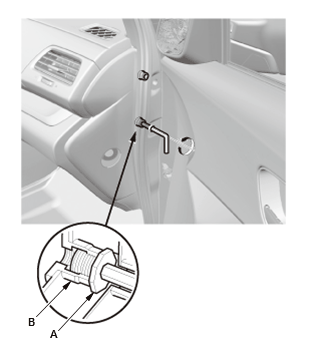
14. Check that the collar bolts (A) are seated in the fixed space adjusters (B). NOTE: If either collar bolt was not seated, replace the special bolts
15. If necessary, insert an 8 mm hex wrench to the collar bolt
16. Gently turn the wrench counterclockwise. If the wrench turns easily, continue turning the collar bolt.
17. Remove the bolts (A, B).
18. Remove the dashboard/steering hanger beam (A). - 11. All Removed Parts - Install
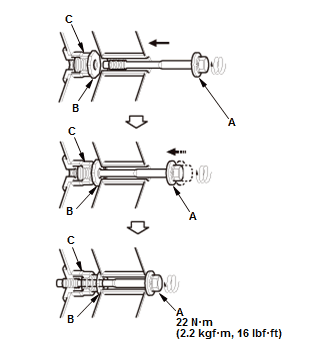
Special bolt tightening on passenger's side
 Courtesy of HONDA, U.S.A., INC.
1. Install the parts in the reverse order of removal.
NOTE:
- Make sure the dashboard fits onto the guide pins correctly.
- Before tightening the bolts, make sure the wire harnesses are not pinched.
- Make sure the connectors are plugged in properly.
- Before reinstalling the dashboard, screw the special bolts (A) into the collar bolts (B), and check that they turn together. If they do not turn together, replace the special bolts.
- Before reinstalling the dashboard, be sure the collar bolt on the passenger's side can be screwed/unscrewed lightly by hand, and then screw them into the space adjuster (C) fully by hand. Do not tighten them with any tools.
- After setting the dashboard/steering hanger beam in the body, install all of the mounting bolts but do not tighten them. First tighten the driver's side bracket bolts to the specified torque. Next, tighten the special bolts to turn the collar bolts. As you tighten the bolts, the collar bolts screw out of the fixed space adjuster until they contact the body. Continue tightening the special bolts to the specified torque.
- After tightening the dashboard mounting bolts, tighten the center joint bracket mounting bolts, and then tighten the center frame mounting bolts.
- Do the 12 Volt battery terminal reconnection procedures.
- Check for any DTCs that may have been set during repairs, and clear them.
- 12.Shift Cable - Adjustment
- 13.Steering After Install - Check
- 14.Confirm Proper SRS Operation
- 15.VSA Sensor Neutral Position - Memorization
- 16.Steering Angle Sensor Neutral Position - Clear