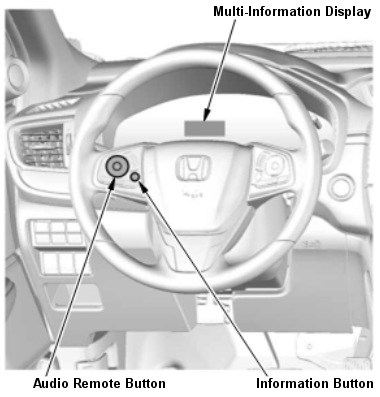
With Display Audio Type (7-Inch Screen)
NOTE:
Vehicle must be stopped with the transmission in neutral (M/T) or P or N (CVT).
- Make sure the tires are inflated to the specified tire pressure listed on the doorjamb label.
- Turn the vehicle to the ON mode.
- Press the INFORMATION button (left side of steering wheel - See Fig 1), then press the AUDIO REMOTE button to select the VEHICLE SETTINGS.
- Press the AUDIO REMOTE button to select TPMS CALIBRATION.
- Press the AUDIO REMOTE button to select CALIBRATE.
- When the calibration successfully begins, CALIBRATION STARTED is displayed on Multi-information display when the system receives the calibration.
NOTE:
If the calibration does not begin successfully, CALIBRATION FAILED TO START is displayed on Multi-information display.