Resetting the Maintenance Minder
Resetting the Maintenance Minder
NOTE:
- The vehicle must be stopped to reset the Maintenance Minder.
- If a required service is done and the Maintenance Minder is not reset, or if the Maintenance Minder is reset without doing the service, the system will not show the proper maintenance timing. This can lead to serious mechanical problems because there will be no accurate record of when the required maintenance is needed.
- The engine oil life and the maintenance item(s) can be independently reset with the HDS.
Information Display
1. Turn the vehicle to the ON mode
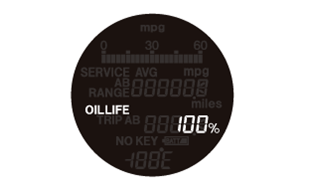
2. Push the SEL/RESET knob repeatedly until the engine oil life indicator is displayed
3. Press and hold the SEL/RESET knob for about 10 seconds. The engine oil life indicator and the maintenance item code(s) will blink, then release the knob.
NOTE: If you are resetting the Maintenance Minder when the engine oil life is more than 15 %, make sure any maintenance item(s) requiring service are done before resetting the display
4. Press and hold the SEL/RESET knob for another 5 seconds. The maintenance item code(s) will disappear, and the engine oil life will reset to "100 %."