How to Obtain the Audio Unit Serial Number
How to Obtain the Audio Unit Serial Number
This diagnosis is applied to the audio unit (normal audio) only.
NOTE: This procedure can only be done after the battery power has been disconnected and reconnected to the audio unit, and the audio system displays "Push and hold POWER for more than two seconds to start." when the audio unit is turned on.
1. Turn the vehicle to the ON mode
2. Make sure the audio unit is turned off
3. Use the DISPLAY button on the steering wheel to select the screen that displays Audio Off
4. Press and hold the preset No. 1 and No. 6 buttons
5. While holding the buttons, press the POWER button
6. Release the buttons, and the audio unit displays an 8-digit serial number on the display.
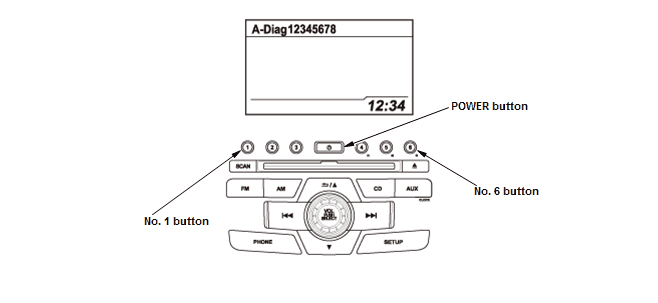
7. Use all 8 numbers as the serial number when using the Interactive Network (iN) to retrieve the 5-digit anti-theft code
8. To end the function, turn the audio system off, or turn the vehicle to the OFF mode.