Removal & Installation
SRS components are located in this area. Review the SRS component locations and the precautions and procedures before doing repairs or service.
NOTE:
- When working on electronic components, make sure the work area is clean and dust free.
- Make sure your hands are clean and free of oils and grease.
- 1. Audio Unit Assembly (Without Navigation) - Remove - Refer to: Audio Unit Removal and Installation(With Display Audio) Audio Unit Removal and Installation(With Normal Audio)
- 2. Audio-Navigation Unit Assembly (With Navigation) - Remove
- 3. Dashboard Center Display Visor Assembly - Remove
- 4. Multi-Information Display Unit Assembly - Remove
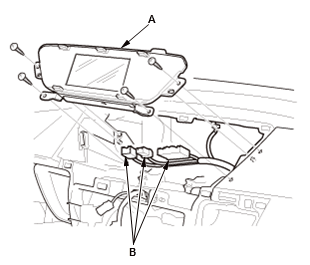
1. Pull out the multi-information display unit assembly (A)
2. Disconnect the connectors (B).
- 5. Front Passenger's Airbag on/off Indicator - Remove
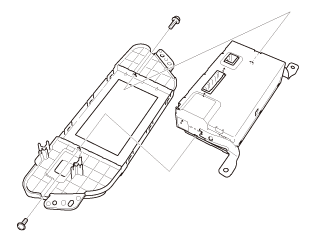
- 6. Multi-Information Display Unit - Remove
- 7. All Removed Parts - Install the multi-information display unit in the reverse order of removal.
NOTE:
- After installing the audio-navigation unit, park the vehicle outside, and do the GPS initialization.
- When the audio-navigation unit is disconnected, do the Map Matching. This part of the initialization matches the GPS coordinates with a road on the map screen. To do this part of the procedure, make sure that the navigation system displays a map, and drive the vehicle on a mapped road shown on the map screen. Do not enter a destination at this time. When the name of the current road you are driving on appears at the bottom of the screen, the entire procedure is complete.