Navigation System Symptom Troubleshooting - Voice control does not work/respond(With Display Audio)
NOTE:
- Check the vehicle 12 volt battery condition first .
- Make sure that the latest navigation software is installed.
- Before assuming that a voice complaint is hardware related, ensure that the voice control system is being operated correctly:
-
- Make sure you are on the correct screen when trying to issue a voice command. For instance, the command "Find the nearest Italian Restaurant" only works on Map screen (see the Navigation Manual for a complete list of allowed voice commands for the information being displayed)
- Close the windows and moonroof
- Pause after pressing the TALK button then give a voice command clearly in a natural speaking voice. If the system cannot recognize your command, speak louder
- If you speak a command with something in your mouth, or your voice is too husky, or high pitched, the system may misunderstand your command
- Determine if the problem only happens to one person, or everyone who uses the system.
- If the system only has a problem with one person's voice, this should be considered a system limitation.
- Check the connectors for poor connections or loose terminals.
- 1. HFL switch input check:
- 1. Turn the vehicle to the ON mode.
- 2. Go into the System Diagnostic Mode, and use the Hard Key to check the HFL switch .
Do all the HFL switch buttons respond?
YES
Go to step 2.
NO
Go to step 4.
- 2. Microphone input check:
- 1. Go into the System Diagnostic Mode, and use the HFT/Mic to check the microphone .
- 2. Press the TALK button, then say "testing" in front of the microphone to check the Mic level.
Is the microphone level OK?
YES
Go to step 3.
NO
- 3. Problem verification:
- 1. Turn the vehicle to the OFF (LOCK) mode then the ON mode.
- 2. Pressing the TALK button, then give a voice command "Audio" clearly in a natural speaking voice.
Does the audio system turn on by the voice command?
YES
Intermittent failure, the system is OK at this time.
NO
- 4. Determine possible failure area (HFL switch circuit, others):
- 1. Turn the vehicle to the ON mode.
- 2. Turn on the audio unit, and using the audio remote switch buttons, check if the audio system operates properly.
Is the audio system operation OK?
YES
Go to step 5.
NO
- 5. HFL switch check:
- 1. Turn the vehicle to the OFF (LOCK) mode.
- 2. Disconnect the following connector.
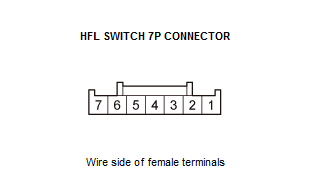
HFL switch 7P connector - 3. Do the HFL Switch Test .
Is the HFL switch OK?
YES
Go to step 6.
NO
- 6. Shorted wire check (HFT/NAVI REMOTE SW line):
- 1. Disconnect the following connector.
Audio-navigation unit connector C (20P) - 2. Check for continuity between test points 1 and 2.
Test condition Vehicle OFF (LOCK) mode HFL switch 7P connector: disconnected Audio-navigation unit connector C (20P): disconnected Test point 1 Audio-navigation unit connector C (20P) No. 12 Test point 2 Body ground Is there continuity?
YES
Repair a short to body ground in the wire between the audio-navigation unit and the HFL switch. If the wire is OK, replace the cable reel .
NO
The HFT/NAVI REMOTE SW wire is not shorted to ground. Go to step 7.
- 7. Determine possible failure area (audio-navigation unit, others):
- 1. Reconnect the HFL switch 7P connector.
- 2. Disconnect the following connector.
NOTE: Eject the disc before disconnecting the audio-navigation unit to prevent damaging the CD player's load mechanism.
Audio-navigation unit connector A (24P) - 3. Measure the resistance between test points 1 and 2 as specified in the table.
Test condition Vehicle OFF (LOCK) mode Audio-navigation unit connector C (20P): disconnected Audio-navigation unit connector A (24P): disconnected Test point 1 Audio-navigation unit connector C (20P) No. 12 Test point 2 Audio-navigation unit connector A (24P) No. 11 Button held down HANG-UP/BACK PICK-UP TALK No button pressed Resistance About 47 Ω About 222 Ω About 2.25 kΩ About 10 kΩ Is the resistance OK?
YES
Replace the audio-navigation unit .
NO
Go to step 8.
- 8. Determine possible failure area (HFT/NAVI REMOTE SW line, others):
- 1. Check for continuity between test points 1 and 2.
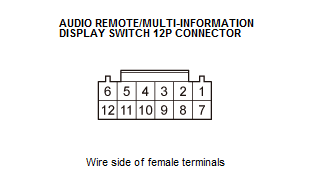
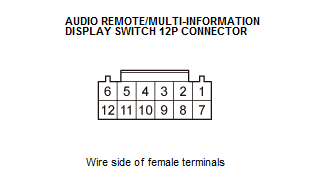
Test condition Vehicle OFF (LOCK) mode Audio-navigation unit connector C (20P): disconnected Audio-navigation unit connector A (24P): disconnected Test point 1 Audio remote/multi-information display switch 12P connector No. 5 Test point 2 HFL switch 7P connector No. 5 Is there continuity?
YES
Repair an open in the wire between the audio-navigation unit and the HFL switch. If the wire is OK, replace the cable reel .
NO
The HFT/NAVI REMOTE SW wire is OK. Go to step 9.
- 9. Audio remote switch check:
- 1. Check for continuity between test points 1 and 2.
Test condition Vehicle OFF (LOCK) mode Audio-navigation unit connector C (20P): disconnected Audio-navigation unit connector A (24P): disconnected Test point 1 Audio remote/multi-information display switch 12P connector No. 4 Test point 2 Audio remote/multi-information display switch 12P connector No. 5 Is there continuity?
YES
Repair an open in the wire between the audio remote switch and the HFL switch.
NO