LaneWatch Camera Aiming: Adjustment
NOTE:
- The LaneWatch camera must be aimed after one or more of the following procedures are done:
-
- LaneWatch camera removal or replacement
- Passenger's side power mirror removal or replacement
- Passenger's side door panel removal or replacement
- Passenger's side door panel body repair
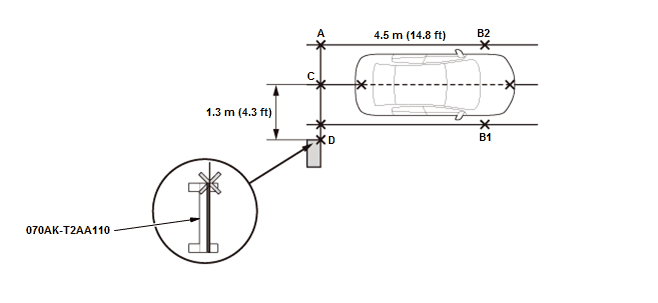
- Park the vehicle on level ground in a wide open area to avoid any reflection from objects that could affect the alignment procedure. Make sure you have at least the following amount of space around the vehicle: 6.5 m (21.3 ft) in length, 3.5 m (11.5 ft) in width.
- 1. Before Aiming Set
- 2. Aiming Marker - Set
NOTE:
- Make sure there are no other objects except the aiming target in this area.
- Check the tire pressures, and adjust them to the specified value if needed.
- Put a person or an object equivalent to the driver's weight in the driver's seat.
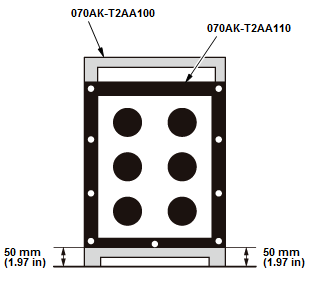
1. Set the aiming marker to the lane watch aiming stand, and adjust the height of the aiming marker
2. Measure these points between A and B2, C and D, and position the aiming marker by aligning the edge of the target with point D.
NOTE:
- Install an aiming target on the passenger's side of the vehicle.
- When marking on the floor, use suitable tape to mark the exact locations.
- Leave the tape measure on the ground.
- 3. LaneWatch Camera - Aim
NOTE:
- When you stop the aiming procedure, turn the vehicle to the OFF (LOCK) mode.
- If the aiming procedure fails, brighten or darken the ambient lighting in case the lighting is affecting the aiming.
1. Go into the System Diagnostic Mode, and select the Detail Information & Setting.
- Without navigation system - Refer to: Audio System Sound Quality DiagnosisAudio System Diagnostic Mode
- With navigation system
2. Select Functional Setup in the Detail Information & Setting
3. Select LaneWatch in the Functional Setup, then select Aiming Start
4. Press the LaneWatch switch on the end of the turn signal switch to aim the camera
5. Wait until the aiming process is complete, and the display returns to the LaneWatch camera image.