LaneWatch Symptom Troubleshooting - Does not switch to the LaneWatch screen
Does not switch to the LaneWatch screen
- 1. LaneWatch camera check:
- 1. Start the engine.
- 2. Go into the System Diagnostic Mode, and select the Detail Information & Setting.
- Without navigation system - Refer to: Audio System Sound Quality DiagnosisAudio System Diagnostic Mode
- With navigation system
- 3. Select LaneWatch in the Unit Check.
Is the Connection OK?
YES
Go to step 2.
NO
Go to step 5.
- 2. LaneWatch switch check:
- 1. Select Return, then select LaneWatch in the Functional Setup.
- 2. Operate the LaneWatch switch.
Is the LaneWatch switch OK?
YES
Intermittent failure, the system is OK at this time.
NO
Go to step 3.
- 3. Open wire check (LWC SW line):
- 1. Turn the vehicle to the OFF (LOCK) mode.
- 2. Disconnect the following connector.
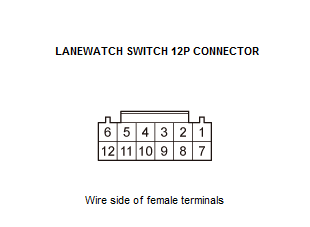
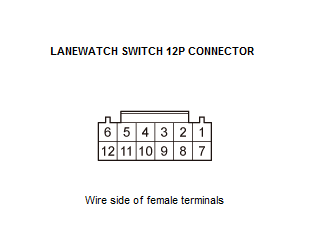
LaneWatch switch (combination light switch) 12P connector - 3. Turn the vehicle to the ON mode.
- 4. Go into the System Diagnostic Mode, and select the Detail Information & Setting.
- Without navigation system - Refer to: Audio System Sound Quality DiagnosisAudio System Diagnostic Mode
- With navigation system
- 5. Select LaneWatch in the Functional Setup.
- 6. Connect terminals A and B with a jumper wire.
Terminal A LaneWatch switch (combination light switch) 12P connector No. 4 Terminal B Body ground Is the LaneWatch Switch turned on?
YES
The LWC SW wire is OK. Go to step 4.
NO
Repair an open in the wire between the LaneWatch switch (combination light switch) and the audio/audio-navigation unit.
- 4. Open wire check (GND line):
- 1. Connect terminals A and B with a jumper wire.
Terminal A LaneWatch switch (combination light switch) 12P connector No. 3 Terminal B LaneWatch switch (combination light switch) 12P connector No. 4 Is the LaneWatch Switch turned on?
YES
The GND wire is OK. Replace the LaneWatch switch (combination light switch) .
NO
Repair an open in the wire between the LaneWatch switch (combination light switch) and the body ground at G501.
- 5. Shorted wire check (LWC VCC line) 1:
- 1. Turn the vehicle to the OFF (LOCK) mode.
- 2. Disconnect the following connectors.
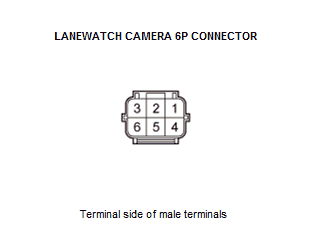
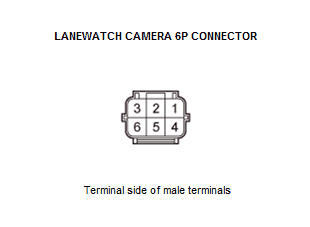
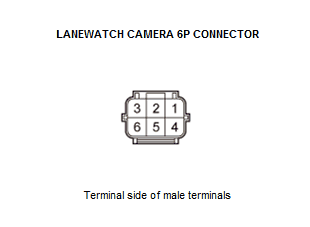
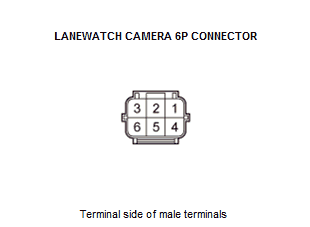
LaneWatch camera 6P connector - 3. Turn the vehicle to the ON mode.
- 4. Measure the voltage between test points 1 and 2.
Test condition Vehicle ON mode LaneWatch camera 6P connector: disconnected Test point 1 LaneWatch camera 6P connector No. 4 Test point 2 Body ground Is there about 8 V?
YES
The LWC VCC wire is OK. Go to step 6.
NO
Go to step 10.
- 6. Open wire check (LWC SH line):
- 1. Turn the vehicle to the OFF (LOCK) mode.
- 2. Check for continuity between test points 1 and 2.
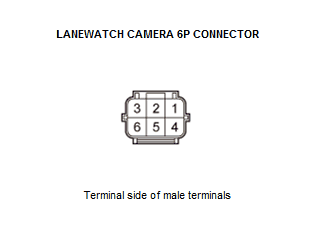
Test condition Vehicle OFF (LOCK) mode LaneWatch camera 6P connector: disconnected Test point 1 LaneWatch camera 6P connector No. 3 Test point 2 Body ground Is there continuity?
YES
The LWC SH wire is OK. Go to step 7.
NO
Repair an open in the wire between the LaneWatch camera and the audio/audio-navigation unit.
- 7. Shorted wire check (LWC TO UNIT, UNIT TO LWC line) 1:
- 1. Turn the vehicle to the OFF (LOCK) mode.
- 2. Disconnect the following connectors.
Audio/audio-navigation unit connector G (24P) - 3. Check for continuity between test points 1 and 2.
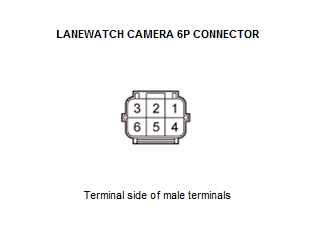
Test condition Vehicle OFF (LOCK) mode LaneWatch camera 6P connector: disconnected Audio/audio-navigation unit connector G (24P): disconnected Test point 1 LaneWatch camera 6P connector No. 5 Test point 2 Body ground Test point 1 LaneWatch camera 6P connector No. 2 Test point 2 Body ground Is there continuity?
YES
Repair a short to bodyground in the wire between the LaneWatch camera and the audio/audio-navigation unit.
NO
Go to step 8.
- 8. Shorted wire check (LWC TO UNIT, UNIT TO LWC line) 2:
- 1. Check for continuity between test points 1 and 2.
Test condition Vehicle OFF (LOCK) mode LaneWatch camera 6P connector: disconnected Audio/audio-navigation unit connector G (24P): disconnected Test point 1 LaneWatch camera 6P connector No. 2 Test point 2 LaneWatch camera 6P connector No. 5 Is there continuity?
YES
Repair a short in the wire between the LaneWatch camera and the audio/audio-navigation unit.
NO
Go to step 9.
- 9. Open wire check (LWC TO UNIT, UNIT TO LWC line):
- 1. Check for continuity between test points 1 and 2.
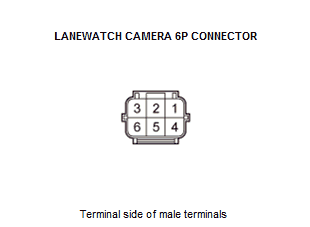
Test condition Vehicle OFF (LOCK) mode LaneWatch camera 6P connector: disconnected Audio/audio-navigation unit connector G (24P): disconnected Test point 1 LaneWatch camera 6P connector No. 2 Test point 2 Audio/audio-navigation unit connector G (24P) No. 22 - Refer to: Audio Unit Connector for Inputs and Outputs(With Display Audio)Audio Unit Connector for Inputs and Outputs(With Normal Audio) Test point 1 LaneWatch camera 6P connector No. 5 Test point 2 Audio/audio-navigation unit connector G (24P) No. 23 - Refer to: Audio Unit Connector for Inputs and Outputs(With Display Audio)Audio Unit Connector for Inputs and Outputs(With Normal Audio) Is there continuity?
YES
The LWC TO UNIT, UNIT TO LWC wires are OK. Replace the LaneWatch camera .
NO
Repair an open in the wire between the LaneWatch camera and audio/audio-navigation unit.
- 10. Shorted wire check (LWC VCC line) 2:
- 1. Turn the vehicle to the OFF (LOCK) mode.
- 2. Disconnect the following connectors.
Audio/audio-navigation unit connector G (24P) - 3. Check for continuity between test points 1 and 2.
Test condition Vehicle OFF (LOCK) mode LaneWatch camera 6P connector: disconnected Audio/audio-navigation unit connector G (24P): disconnected Test point 1 LaneWatch camera 6P connector No. 4 Test point 2 Body ground Is there continuity?
YES
Repair a short in the wire between the LaneWatch camera and the audio/audio-navigation unit.
NO
Go to step 11.
- 11. Open wire check (LWC VCC line):
- 1. Check for continuity between test points 1 and 2.
Test condition Vehicle OFF (LOCK) mode LaneWatch camera 6P connector: disconnected Audio/audio-navigation unit connector G (24P): disconnected Test point 1 LaneWatch camera 6P connector No. 4 Test point 2 Audio/audio-navigation unit connector G (24P) No. 21 - Refer to: Audio Unit Connector for Inputs and Outputs(With Display Audio)Audio Unit Connector for Inputs and Outputs(With Normal Audio) Is there continuity?
YES
The LWC VCC wire is OK. Replace the audio unit (without navigation system) - Refer to: Audio Unit Removal and Installation(With Display Audio)Audio Unit Removal and Installation(With Normal Audio) or the audio-navigation unit (with navigation system) .
NO
Repair an open in the wire between the LaneWatch camera and the audio/audio-navigation unit.