Battery Maintenance At Dealers (A89-003 VER8)
Reference number: A89-003 VER8
Supersedes refnos: A89-003, A89-003 VER1, A89-003 VER2, A89-003 VER3, A89-003 VER4, A89-003 VER5, A89-003 VER6, A89-003 VER7
BATTERY MAINTENANCE AT DEALERS
TECHNICAL SERVICE BULLETIN
| HONDA: | All Models |
REVISION SUMMARY
The CPX-900 and DCA-8000 have been added to functionality.
The Battery Receipt process has been changed.
BACKGROUND
Maintaining batteries in unsold vehicles is the dealership's responsibility and is an important part of ensuring a battery's operating life. If a new battery is not properly maintained and is allowed to go dead, it greatly affects the battery's long-term life, which can lead to unnecessary battery replacement and customer complaints. If a battery sits in a discharged state in hot weather (above 80°F), the electrolyte is closer to water. This water permanently sulfates the internal plates similar to oxidation and prevents charging and discharging. In cold temperatures, a discharged battery's electrolyte may freeze which can cause damage to the internal plates and prevent starting. Therefore, if you do not properly maintain a battery according to the scheduled inspection and charging intervals, the customer may receive a damaged battery or a battery with a low state-of-charge.
RECOMMENDED MAINTENANCE GUIDELINES
How a vehicle is stored determines the time intervals for checking the battery's state-of-charge. These time intervals assume that the vehicle is not moved. If a vehicle is moved during this time, it affects the battery state-of-charge. Very short drives reduce a battery's charge, while long drives increase it. This affects the amount of time needed to charge the battery. If a vehicle is being stored on the dealership lot, you need to properly maintain the battery by routinely checking its state-of-charge and charging as needed.
- To ensure that batteries are tested on a regular schedule, the battery maintenance responsibility should be assigned to one person in the dealership as recommended by the Perfect Delivery program.
- To determine when charging is needed, American Honda recommends using ED-18 Battery Tester and CPX-900 Battery Electrical System Analyzer to measure the battery state-of-charge quickly and accurately. Refer to Service Bulletin 88-023, Battery Testing and Replacement, for more information.
- Once charging is determined to be necessary, American Honda recommends two methods for charging
- DCA-8000 Dynamic Diagnostic Charging System or the GR8 Battery Diagnostic Station should be used as the first option for charging the battery.
- Idling the vehicle for 30 minutes with the headlights ON can be performed as a second option*.
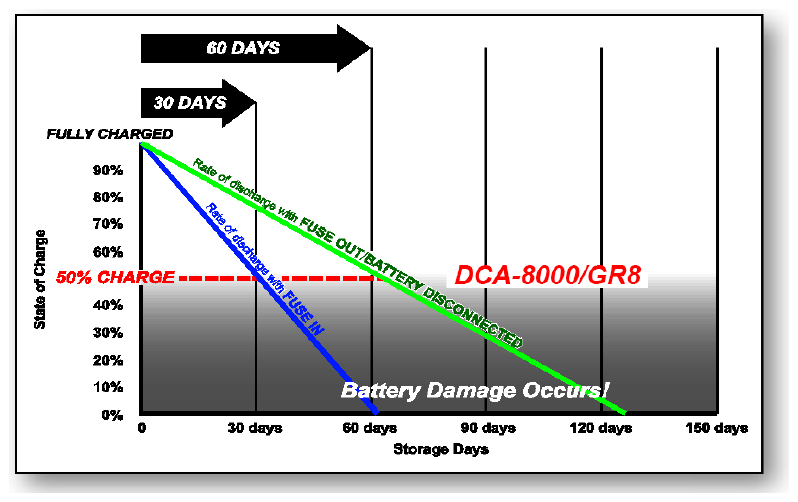
- American Honda recommends pulling the backup fuse while the vehicle is in inventory. The chart on the following page shows the effects of increased storage time, and also the importance of checking the battery at its scheduled interval to make sure the customer receives a good battery.
- Always leave the ignition OFF whenever possible, especially when installing accessories. The battery will quickly discharge and will be damaged if left in a discharged state.NOTE: * Charging time will depend on the battery's initial condition and the type of vehicle. Check the battery state of charge with an approved tester after charging. Battery results must demonstrate "Good Battery".
CUSTOMER INFORMATION: The information in this bulletin is intended for use only by skilled technicians who have the proper tools, equipment, and training to correctly and safely maintain your vehicle. These procedures should not be attempted by "do-it-yourselfers," and you should not assume this bulletin applies to your vehicle, or that your vehicle has the condition described. To determine whether this information applies, contact an authorized Honda automobile dealer.
INSPECTION INTERVALS
When a vehicle first arrives at the dealership, the inspection intervals must be decided based on the vehicle storage status:
- Vehicle arrival at dealer - Check every battery on every vehicle on arrival at your dealership. This ensures that you know when to check the battery next. It is also a good practice in case something happened during storage or transportation (for example, a door was left ajar or a light was left on), and the battery state-of-charge fell below the recommended level, you can charge it and make sure the next battery check is properly timed.
- Showroom floor - Disconnect the battery negative cable and check the battery every 60 days or as directed by the BMIS Inventory Management Report.
- Front Line Display - Install all of the fuses and check the battery every 30 days or as directed by the BMIS Inventory Management Report.
- Storage - Disconnect the negative battery cable or remove the back-up fuse and check the battery every 60 days or as directed by the BMIS Inventory Management Report.
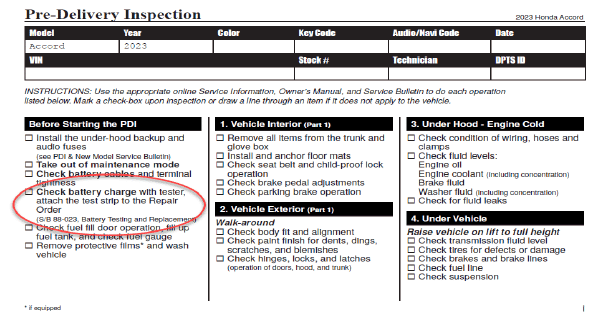
- PDI - The PDI may not be done when the vehicle arrives at your dealership, which is why it is important that you check every battery when the vehicle arrives. When you do the PDI, follow the Pre-Delivery Inspection checklist in the PDI and Final Delivery Checklist and attach the Good Battery receipt to the "Under Hood - Engine Cold" section.
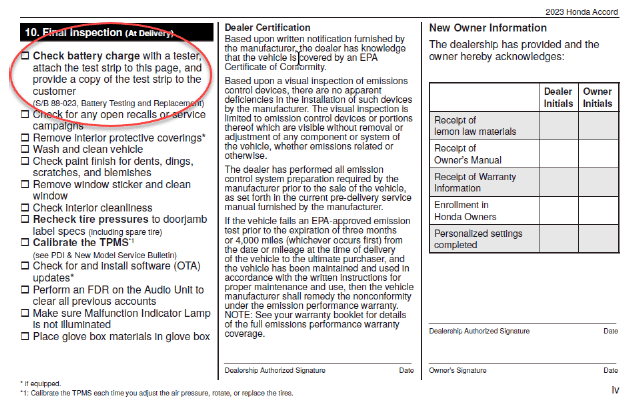
- Final Inspection (part of PDI) - Follow the Pre-Delivery Inspection checklist in the PDI and Final Delivery Checklist and attach the Good Battery receipt to the "Final Inspection (At Delivery)" section.
Potential Battery Discharge Rate
RECORD KEEPING
As you maintain the stored batteries (checking battery state-of-charge and charging them as needed), American Honda recommends keeping a detailed maintenance record. In case there is a warranty claim, you may be asked to show records about the battery maintenance. Record should be include these items:
- A battery test done when the vehicle arrives and/or during PDI.
- Scheduled battery inspections (and recharging when needed). The battery inspection schedule depends on how the vehicle was stored and how ling the vehicle was stored on the lot. See INSPECTION INTERVALS for more information.
- A battery test done at final delivery. Print out the Good Battery results, including VIN, from the battery tester and add it to the vehicle's file.
There are two places to attach the receipt for the Good Battery results in the PDI and Final Delivery Checklist under the Pre-Delivery Inspection Checklist:
- Before starting the PDI:
- Final Inspection (At Delivery):
Fill in the information. Remove one copy of the Pre-Delivery Inspection Checklist form the PDI and Final Delivery Checklist and put it in the customer/vehicle file. The other copy stays in the PDI Checklist.
BMIS USAGE FOR BATTERY MAINTENANCE
- Using the Battery Management Information System (BMIS) will greatly facilitate the battery maintenance in your new vehicle inventory.
- The BMIS identifies vehicles that requires action, and when used regularly, breaks down activities to an easily manageable set of tasks.
- If you experience problems with uploading data, the BMIS website, or emails from the BMIS, please call Midtronics Customer Service at (866) 592-8054.
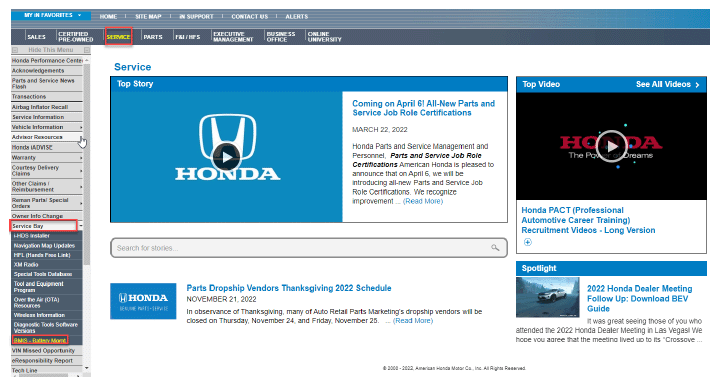
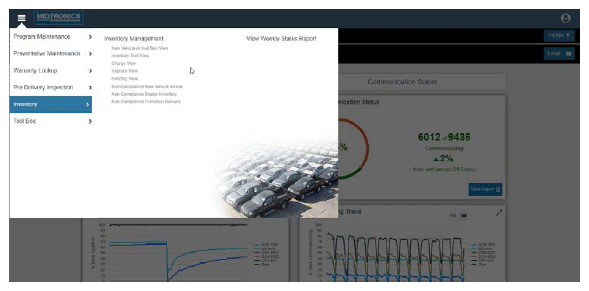
- To access BMIS through the interactive network (iN). Select SERVICE.
- Select Service Bay on the left column.
- Select BMIS - Battery Mgmt.
- Go to Inventory management report by selecting View Reports
, then Inventory Management. NOTE: Each vehicle in your dealership's new vehicle inventory will be shown in one of five views:
- New Vehicle Arrival Test View - shows vehicles with no tests uploaded to BMIS.
- Dealer Inventory View - shows vehicles previously tested which are due for retesting.
- Charge View - shows vehicles which battery test indicated that charging is required.
- Replace View - shows vehicles which battery test indicated that a battery replacement is required.
- Pending View - shows vehicles previously tested but not currently requiring action.
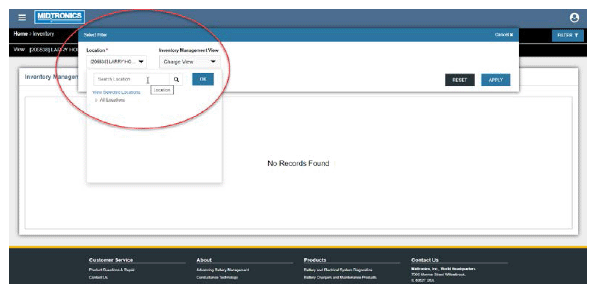
The current view will be shown at the top of the report as shown below.
The Views can be changed by selecting the Filter Function and selecting a different view.
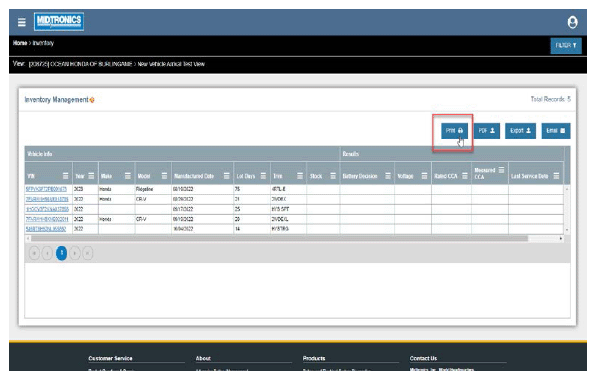
To print a copy of the BMIS report, select the print icon.
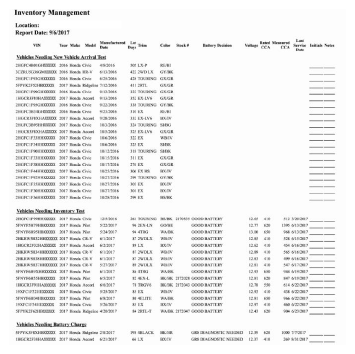
Printing out a BMIS report will show all vehicle required action.
The BMIS will permanently store all dealership results, greatly facilitating the dealers record keeping.
NOTE: Use the Vehicle Lifecycle report to view tests on vehicles no longer in inventory.For proper record keeping, it is very important that the ED-18 V3 Battery Testers/CPX-900 and GR8 Battery/DCA-8000 Diagnostics Stations upload test results at least once per day, and that the correct vehicle status is selected when doing a test. There are four vehicle statuses for ED-18 and GR8:
- New Vehicle Arrival - Select at vehicle arrival or PDI.
- Dealer Inventory - Select for testing of vehicles in inventory after PDI.
- Customer Delivery - Select when a new vehicle is delivered to a customer.
- Customer Owned - Select when a customer owned vehicle is in for service.
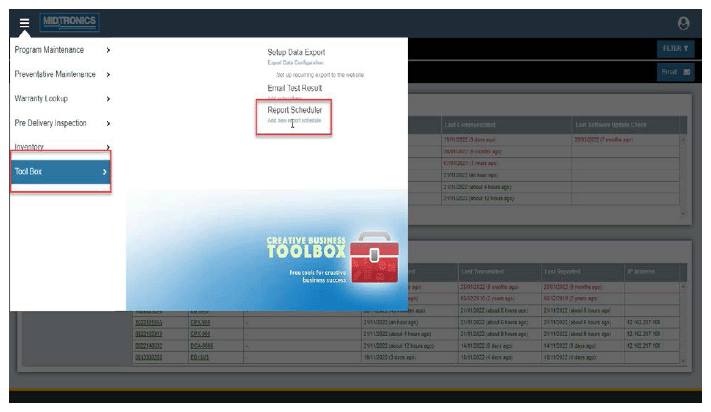
The Inventory Management report can also be emailed automatically from BMIS. Select Tool Box , then Report Scheduler and select +Add New Schedule , enter the required fields and select save.
NOTE: If you experience problems with uploading data, the BMIS website, or emails from the BMIS please call Midtronics Customer Service at (866)592-8054.
REQUIRED TOOLS
| Part Name | Tool Number | Quantity |
|---|---|---|
| GR8 Battery Diagnostic Station with Alternator Starter Test (AST) Module | MTRGR8ASTCVH | 1 |
| ED-18 Battery Tester Version 3 | INBED18V3H | 1 |
| CPX-900 Battery and Electrical Diagnostic Analyzer | MTRCPX900PBARH | 1 |
| DCA-8000 Dynamic Diagnostic Charging System | MTRDCA8000PH | 1 |
These tools are available through the Honda Tool and Equipment Program at 888-424-6857.
TOOL REQUIREMENTS
The GR8, ED-18, CPX-900, and DCA-8000 software must be updated within 3 days of a new software update release.
Refer to the applicable service bulletin for more information:
- 09-060, GR8 Battery Diagnostic Station Update Information
- 09-045, ED-18 Battery Tester Update Information
- 22-059, CPX-900 Battery Tester Update Information
- 22-060, Honda DCA-8000 Dynamic Diagnostic Charging System Update Information
WARRANTY REQUIREMENTS
The 10-digit code must be included on a battery replacement claim. Refer to WARRANTY CLAIM INFORMATION.
WARRANTY CLAIM INFORMATION
The dealer is responsible for testing and charging batteries when a vehicle first arrives at the dealership and while it is in dealer inventory. Testing and maintenance charging of a battery in a new, unsold vehicle cannot be claimed under warranty. If you let a good battery sit discharged and it is damaged from poor maintenance, this is not a defect and the replacement is not covered by warranty.
For more information, refer to the Honda Dealer Operations Manual and to Service Bulletin 88-023, Battery Testing and Replacement.
Entering the Test Codes for Warranty Claims
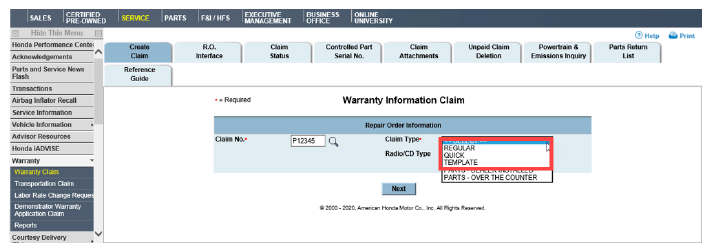
- REGULAR, QUICK, and TEMPLATES Warranty Claims
Enter the test code into the Test Code field.
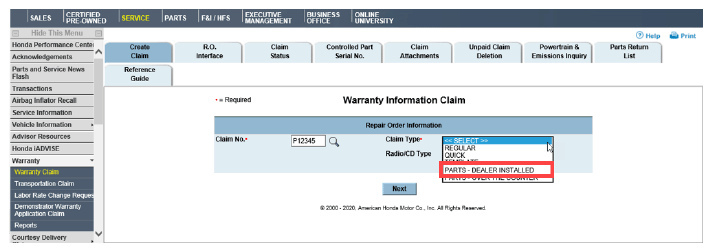
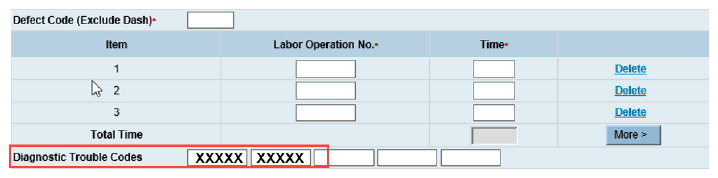
- PARTS - DEALER INSTALLED Warranty Claims
Enter the test code in the Diagnostic Trouble Codes field as shown.
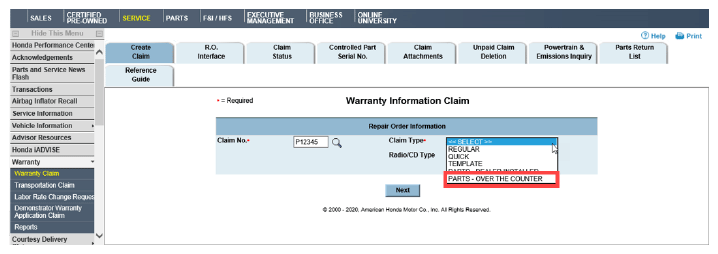
- PARTS - OVER THE COUNTER Warranty Claims
Over-the-Counter warranty claims currently do not have a field to enter the test code. Continue with normal warranty procedure.

END