Ed-18 Battery Tester Update Information (09-045)
Reference number: 09-045
ED-18 BATTERY TESTER UPDATE INFORMATION
TECHNICAL SERVICE BULLETIN
| HONDA: | All Models |
REVISION SUMMARY
This service bulletin has been revised extensively, American Honda recommends that you review the entire bulletin.
INTRODUCTION
The software for the ED-18 Battery Tester is updated periodically to fix software bugs and enhance the tool's function. You can download software for your ED-18 using WiFi and the Internet. It is extremely important to use the latest ED-18 software to ensure that the current battery testing procedures are used.
The ED-18 software must be updated within 3 days of receiving notification from an iN message or other Honda communication. If an out-of-date version is used, battery replacements will not be covered under warranty .
ED-18 VERSION 3 UPDATE REQUIREMENTS
- ED-18 Version 3: P/N INBED18V3H
- ED-18 Version 3 A/C Charger: P/N MTRA213
- Internet access via 802.11b/g WiFi (go to WIFI SETUP for requirements)
To order the ED-18 Version 3 Battery Tester; go to the Honda Tool and Equipment program catalog on the iN (select Service > Service Bay > Tool and Equipment Program > Online Catalog) , or call 888-424-6857 .
SOFTWARE VERSION
The current software version is listed online. Go to the iN (Service > Service Bay > Diagnostic Tools Software Versions ). To check the software version (either version 2 or 3), use one of the methods below:
- Turn on the ED-18 and read the version number on the screen. It should appear for about 3 seconds.
- Select Language > Version . Refer to the number listed as CONFIG.
WARRANTY CLAIM INFORMATION
None. This service bulletin is for information only.
IDENTIFYING YOUR ED-18 VERSION
Identify your ED-18 version using the front panel images below.
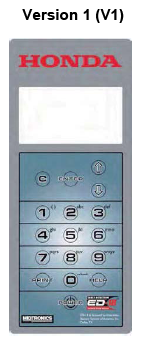
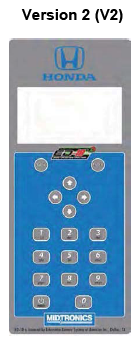
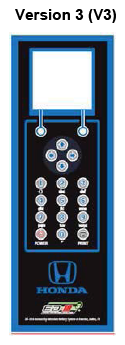
WIFI SETUP
To update the ED-18 V3, it must be connected to the internet via your service department WiFi network. For more information see Honda ED-18 V3 WiFi Upgrade and Setup in Service Information under General Publications > Tool Information .
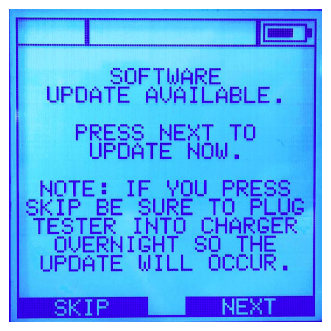
System Update Prompt
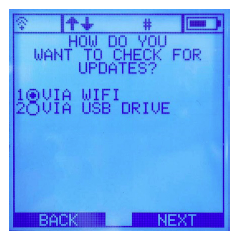
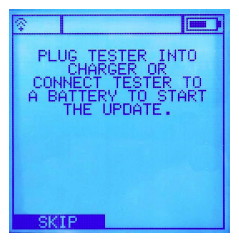
When an update is available via the update server, the user will be prompted with the following screen to download and install the update. Follow the prompts on the screen to proceed with the update.
Manual Update
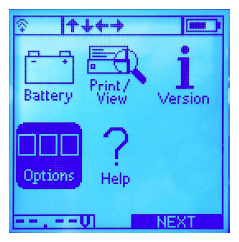
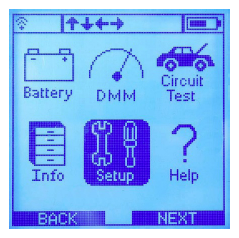
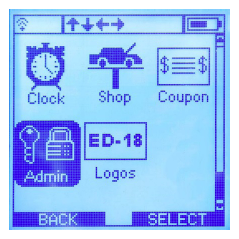
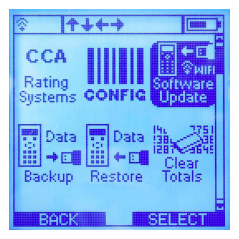
Overnight Update
The ED-18 V3 will update automatically overnight when plugged into a its charger and within WiFi range.
Download and Installation
DO NOT disconnect or shut the power off during the update. A series of screens will indicate the status of the download and installation.
When the installation is complete, the ED-18 V3 will restart automatically. Confirm the software version by selecting VERSION and confirming that it matches the version in the iN message announcing the software release.
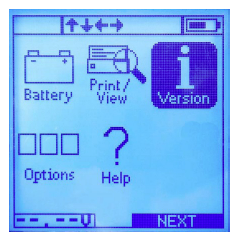
You can also confirm the software version on the iN, go to Service > Service Bay > Diagnostic Tools Software Versions .
If you have any problems updating the ED-18 Version 3, call Midtronics Customer Service at 866-592-8054.
END