Automatic Lighting/Rain Sensor Removal & Installation: Installation
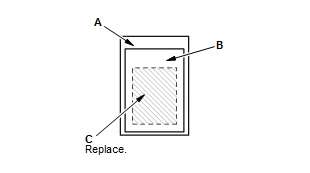
- 1. Silicon Sheet - Replace
NOTE:
- Never touch the primed surface on the automatic lighting/rain sensor with your hands.
- Do not put on the silicon sheet out of automatic lighting/rain sensor.
- Be careful not to touch the silicon sheet surfaces, make sure it is clean. keep it away from dust.
1. Remove the protective sheet A from the silicon sheet (C)
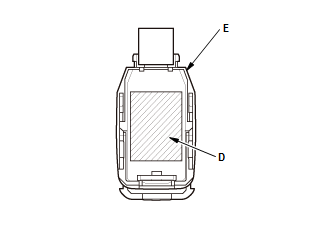
2. Hold the protective sheet B, then set and put silicon sheet on position (D) to the automatic lighting/rain sensor (E)
3. Remove the protective sheet B.
- 2. Automatic Lighting/Rain Sensor - Install
NOTE:
- If the automatic lighting/rain sensor connector is connected after the 12 volt battery terminal is connected, the automatic lighting/rain sensor is not confirmed by MICU.
- If the MICU does not confirm the automatic lighting/rain sensor, automatic wiper system does not work.
- Connect the automatic lighting/rain sensor connector first, then connect the battery terminal.
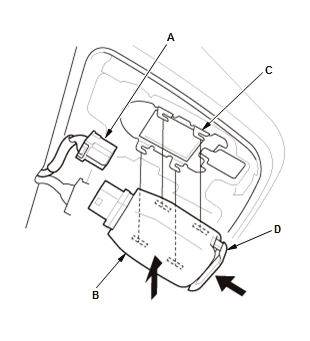
1. Connect the connector (A)
2. Install the automatic lighting/rain sensor (B) to the bracket (C), and slide the automatic lighting rain sensor to upward then lock the stopper (D).
- 3. Mirror Cover - Install