DTC C0040-12: Brake Lamp Switch Failure (Stuck ON)
NOTE: Before you troubleshoot, review the general troubleshooting information .
| DTC Description | DTC | Freeze Frame |
|---|---|---|
| C0040-12 Brake Lamp Switch Failure (Stuck ON) |
- 1. Brake pedal position switch performance check 1:
1. Turn the vehicle to the ON mode.
2. Check the parameter(s) below with the HDS while pressing the brake pedal.
Signal Current conditions Values Unit BRAKE SWITCH Does it indicate ON when the pedal is pressed, and OFF when the pedal is released?
YES
Go to step 2.
NO
Go to step 3.
- 2. Problem verification:
1. Clear the DTC with the HDS.
2. Turn the vehicle to the OFF (LOCK) mode, then start the engine.
3. Test-drive the vehicle at 9 mph (15 km/h) or more for 60 seconds or more under these condition:
- Accelerator pedal pressed
- Brake pedal released
NOTE: Drive the vehicle on the road, not on a lift.
4. Check for DTCs with the HDS.
DTC Description DTC Freeze Frame C0040-12 Brake Lamp Switch Failure (Stuck ON) Is DTC C0040-12 indicated?
YES
The failure is duplicated. Go to step 6.
NO
Intermittent failure, the system is OK at this time. Refer to intermittent failures troubleshooting . If the freeze data/on-board snapshot of this DTC is recorded, try to reproduce the failure under the same conditions with the Freeze data/on-board snapshot.
- 3. Brake pedal position switch performance check 2:
1. Turn the vehicle to the OFF (LOCK) mode.
2. Disconnect the following connector.
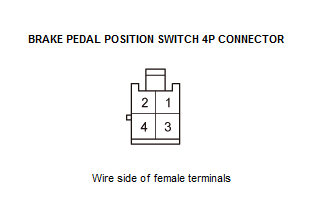
Brake pedal position switch 4P connector 3. Turn the vehicle to the ON mode.
4. Check the parameter(s) below with the HDS.
Signal Current conditions Values Unit BRAKE SWITCH Does the indicator change from ON to OFF?
YES
Replace the brake pedal position switch .
NO
Go to step 4.
- 4. Shorted wire check (STOP SW line to power):
1. Turn the vehicle to the OFF (LOCK) mode.
2. Jump the SCS line with the HDS, and wait more than 1 minute.
3. Disconnect the following connector.
PCM connector A (51P) 4. Turn the vehicle to the ON mode.
5. Measure the voltage between test points 1 and 2.
Test condition Vehicle ON mode Brake pedal position switch 4P connector: disconnected PCM connector A (51P): disconnected Test point 1 Brake pedal position switch 4P connector No. 1 Test point 2 Body ground Is there 0.1 V or more?
YES
Repair a short to power in the wire between the PCM and the brake pedal position switch.
NO
The STOP SW wire is OK. Go to step 5.
- 5. PCM check (update or substitution):
1. Turn the vehicle to the OFF (LOCK) mode.
2. Reconnect the following connectors.
Brake pedal position switch 4P connector PCM connector A (51P) 3. Update the PCM if it does not have the latest software , or substitute a known-good PCM .
4. Clear the DTC with the HDS.
5. Turn the vehicle to the OFF (LOCK) mode, then start the engine.
6. Test-drive the vehicle at 9 mph (15 km/h) or more for 60 seconds or more under these condition:
- Accelerator pedal pressed
- Brake pedal released
NOTE: Drive the vehicle on the road, not on a lift.
7. Check for DTCs with the HDS.
DTC Description DTC Freeze Frame C0040-12 Brake Lamp Switch Failure (Stuck ON) Is DTC C0040-12 indicated?
YES
Go to step 6.
NO
If the PCM was updated, troubleshooting is complete. If the PCM was substituted, replace the original PCM .
- 6. VSA modulator-control unit check (update):
1. Update the VSA modulator-control unit if it does not have the latest software .
2. Turn the vehicle to the OFF (LOCK) mode, then start the engine.
3. Test-drive the vehicle at 9 mph (15 km/h) or more for 60 seconds or more under these condition:
- Accelerator pedal pressed
- Brake pedal released
NOTE: Drive the vehicle on the road, not on a lift.
4. Check for DTCs with the HDS.
Is DTC C0040-12 indicated?
YES
Check for loose terminals and poor connections in the VSA modulator-control unit 38P connector. If the VSA modulator-control unit was updated and the symptom/indication is still present, replace the VSA modulator-control unit .
NO
Troubleshooting is complete. If any other DTCs are indicated, go to the indicated DTCs troubleshooting.