Rear Differential Fluid Inspection and Replacement (AWD): Replacement
NOTE: Check that the real time AWD system indicator does not come on. If it does, check for real time AWD system DTC's .
- 1. Vehicle - Lift
- 2. Rear Differential Fluid - Drain
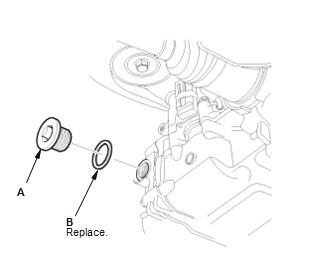
1. Remove the oil filler plug (A) and the sealing washer (B).
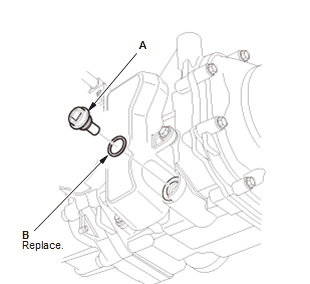
2. Remove the drain plug (A) and the sealing washer (B), then drain the rear differential fluid. - 3. Rear Differential Fluid - Refill
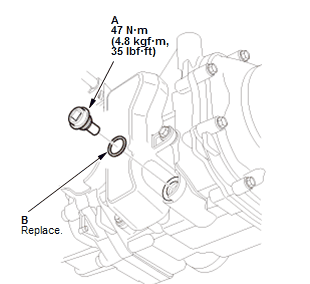
1. Remove the metal particles from the magnetic surface of the drain plug (A)
2. Install the drain plug with a new sealing washer (B)
3. Refill the rear differential with rear differential fluid to the proper level.
NOTE: If you disassemble the differential, check the rear differential fluid level again after the real time AWD system check is finished. Add fluid if necessary.
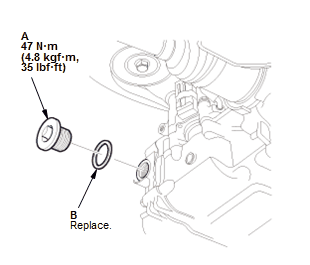
Fluid Capacity: 1.2 L (1.3 US qt, 1.1 Imp qt) at fluid change 1.5 L (1.6 US qt, 1.3 Imp qt) at overhaul Recommended fluid: Honda DPSF-II 4. Install the oil filler plug (A) with a new sealing washer (B). - 4. Rear Differential Fluid After Replacement - Check
1. Lower the vehicle.
2. Apply the parking brake, and block all four wheels.
3. Start the engine, and let it idle more than 6 seconds, then turn the engine off. Repeat this step three more times.
4. Shift to D while pressing the brake pedal firmly. Press the accelerator pedal for 2 seconds, then let it idle. Repeat this step three more times.
5. Check that the real time AWD system indicator does not come on. If it does, check for real time AWD system DTC's .
- 5. Maintenance Minder - Reset
1. If the Maintenance Minder required to replace the rear differential fluid, reset the Maintenance Minder with the gauge . If the Maintenance Minder did not require to replace the rear differential fluid, reset the Maintenance Minder with the HDS .