How to check for DTCs with the HDS (preferred method)
The HDS can check F-CAN and B-CAN communication status, read and clear DTCs, display data list, and perform function tests.
Check for DTCs
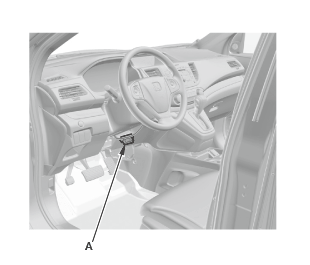
1. Connect the HDS to the data link connector (DLC) (A) located under the driver's side of the dashboard.
2. Turn the vehicle to the ON mode, but do not start the engine.
3. Make sure the HDS communicates with the vehicle.
NOTE: If the HDS does not communicate with the vehicle, troubleshoot the DLC circuit .
4. Select BODY ELECTRICAL, then select the desired MODE MENU, and check for DTCs. If the DTCs do not pertain to the select menu, select the ALL DTC Check icon to view all Body Electrical DTCs.
NOTE: For specific operations, refer to the HDS user's manual.
5. If any DTCs are indicated, go to the indicated DTCs troubleshooting.