Engine Lubrication System Symptom Troubleshooting - Low oil pressure indicator stays on
Low oil pressure indicator stays on
- 1. Input signal test:
- 1. Connect the HDS to the DLC .
- 2. Turn the vehicle to the ON mode.
- 3. Make sure the HDS communicates with the vehicle and the PCM. If it does not communicate, go to the DLC circuit trouble shooting .
- 4. Check for DTCs - Refer to: How to Troubleshoot the Fuel and Emissions SystemsHow to Troubleshoot the CVT System(CVT System) . If a DTC is present, diagnose, and repair the cause before continuing with this test.
- 5. Start the engine, and check the parameter(s) below with the HDS.
Signal Threshold Current conditions Values Unit Values Unit OIL PRESSURE SWITCH OFF Do the current condition(s) match the threshold?
YES
Replace the gauge control module .
NO
Go to step 2.
- 2. Oil pressure switch test:
- 1. Turn the vehicle to the OFF (LOCK) mode.
- 2. Check the oil pressure switch .
Is the oil pressure switch OK?
YES
Go to step 3.
NO
Do the oil pressure test . If the oil pressure is OK, replace the oil pressure switch .
- 3. Shorted wire check (ENG OP SW line):
- 1. Turn the vehicle to the OFF (LOCK) mode.
- 2. Jump the SCS line with the HDS, and wait more than 1 minute.
NOTE: This step must be done to protect the PCM from damage.
- 3. Disconnect the following connectors.
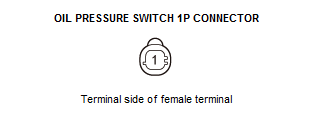
PCM connector B (51P) Oil pressure switch 1P connector - 4. Check for continuity between test points 1 and 2.
Test condition Vehicle OFF (LOCK) mode PCM connector B (51P): disconnected Oil pressure switch 1P connector: disconnected Test point 1 Oil pressure switch 1P connector No. 1 Test point 2 Body ground Is there continuity?
YES
Repair a short to ground in the ENG OP SW wire between the oil pressure switch and the PCM.
NO
Update the PCM if it does not have the latest software , or substitute a known-good PCM , then recheck. If the PCM was substituted, and the symptom/indication goes away, replace the original PCM .