How to Use the HDS (Honda Diagnostic System)
1. Start the engine, and check the MIL (A) in the gauge control module.
NOTE: If the vehicle is turned to the ON mode, and the engine is not started, the MIL stays on for 15-20 seconds.
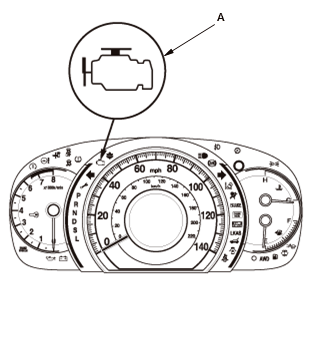
2. If the MIL stays on, connect the HDS to the data link connector (DLC) .
3. Turn the vehicle to the ON mode.
4. Make sure the HDS communicates with the PCM and other vehicle systems. If it does not, go to the DLC circuit troubleshooting .
5. Check the diagnostic trouble code (DTC) and note it. Also check the freeze data and/or on-board snapshot data, and download any data found. Then refer to the indicated DTC's troubleshooting, and begin the appropriate troubleshooting procedure.
NOTE:
- Freeze data indicates the engine conditions when the first malfunction, misfire, or fuel trim malfunction was detected.
- The HDS can read the DTC, the freeze data, the on-board snapshot, the current data, and other PCM data.
- For specific operations, refer to the user's manual that came with the HDS.
6. If no DTCs are found, go to the MIL circuit troubleshooting .