Service Information (multi-information display)
Service Information (multi-information display)
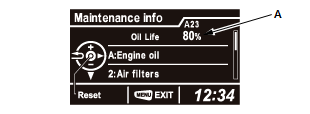
Maintenance items, which should be serviced at the same time that you replace the engine oil (A), appear on the multi-information display. You can view them on the "Maintenance info" screen at any time.
How to access Maintenance Minder
1. Turn the vehicle to the ON mode
2. Press the MENU button to go to the "Vehicle Menu" screen
3. Select "Vehicle Information" with the Audio Remote/Multi-Information Display Switch, then press the Source/Enter Button
4. Press the Source/Enter Button again to go to the "Maintenance info" screen. The maintenance item(s) appears on the Maintenance Minder.