Multi-information Display
Multi-information Display
1. Turn the vehicle to the ON mode
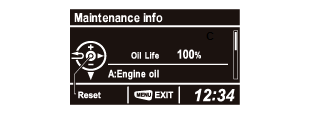
2. Refer to the How to access Maintenance Minder procedure, and go to the "Maintenance info" screen, then displaying maintenance item(s)
3. Press the Source/Enter Button to change into maintenance item(s) reset mode.
NOTE:
- If you are resetting the Maintenance Minder when the engine oil life is more than 15 %, make sure any maintenance item(s) requiring service are done before resetting the display.
- To cancel the reset mode, select "NO", then press the Source/Enter Button.
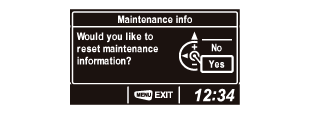
4. To reset the Maintenance Minder, select "YES" with the Audio Remote/Multi-Information Display Switch, then press the Source/Enter Button. The displayed maintenance items disappear, and the engine oil life display returns to "100 %." The display will return to the Maintenance Minder, and you will see any maintenance items that are necessary for your vehicle at the next maintenance service will appear.