Steering Column Removal & Installation: Installation
SRS components are located in this area. Review the SRS component locations , and the precautions and procedures before doing repairs or service.
- 1. Steering Column
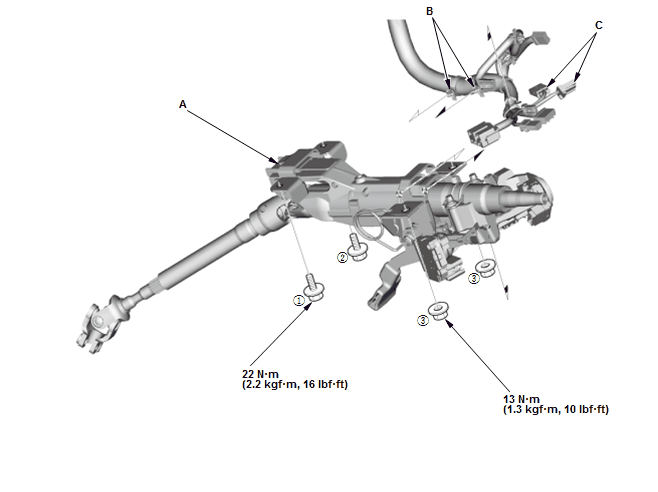
1. Install the steering column (A).
NOTE: Do not release the lock lever until the steering column is installed. If the lock lever is released before installation, adjust the steering column after installation.
 Courtesy of HONDA, U.S.A., INC.
2. Loosely tighten the attaching nuts and bolts
3. Tighten the attaching nuts and bolts to the specified torque in the sequence shown
4. Install the wire harness clips (B) to the steering column
5. Connect the connectors (C).
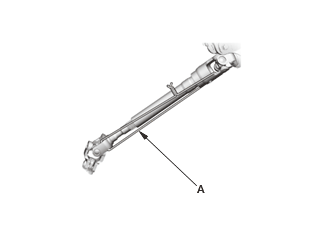
- 2. Steering Column Lower Slide Shaft - Release
1. Cut the wire (A).
- 3. Steering Joint - Connect
1. Set the rack in the straight ahead driving position
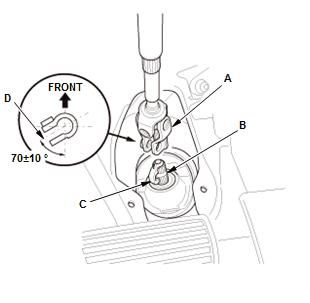
2. Slip the lower end of the steering joint (A) onto the pinion shaft (B).
NOTE:
- Pinion shaft with center guide: Install the steering joint by aligning the center guide (C).
- Pinion shaft without center guide: Position the steering column by aligning the gap (D) within the angle.
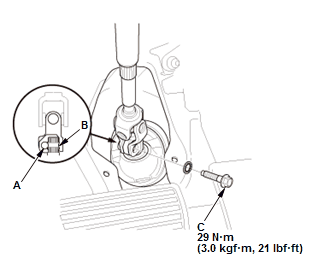
3. Align the bolt hole (A) on the steering joint with the groove (B) around the pinion shaft
4. Loosely install the steering joint bolt (C)
5. Be sure that the joint bolt is securely in the groove in the pinion shaft
6. Pull on the steering joint to make sure that the steering joint is fully seated
7. Tighten the steering joint bolt to the specified torque.
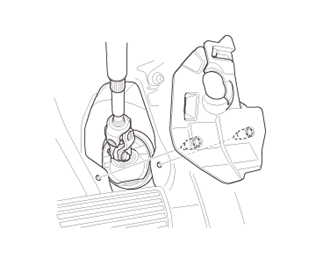
- 4. Steering Joint Cover - Install
- 5. Driver's Dashboard Undercover - Install - Refer to: Passenger's Dashboard Undercover Removal and InstallationDriver's Dashboard Undercover Removal and Installation
- 6. Combination Switch Body Assembly - Install
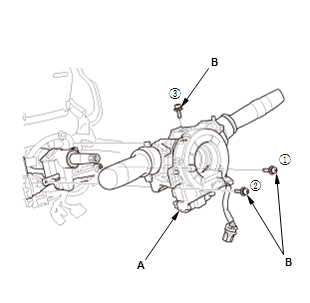
1. Install the combination switch body assembly (A)
2. Tighten three screws (B) in the sequence shown.
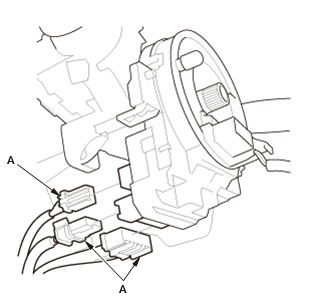
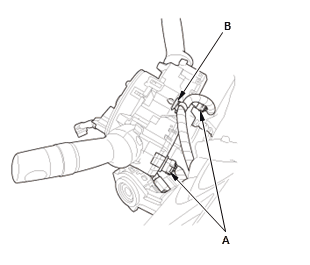
3. Connect the connectors (A). 4. Connect the connectors (A) 5. Install the harness clip (B).
- 7. Column Cover - Install
- 8. Steering Wheel - Install
- 9. Driver's Airbag - Install
- 10.12 Volt Battery Terminal - Reconnect
- 11. Steering After Install - Check
1. After installation, check these items:
- Start the engine, allow it to idle, and turn the steering wheel from lock to lock several times.
- Check that the EPS indicator does not come on.
- Check the steering wheel spoke angle. If steering spoke angles to the right and left are not equal (steering wheel and rack are not centered), correct the engagement of the joint/pinion shaft splines.
- 12.Wheel Alignment - Check
- 13.VSA Sensor Neutral Position - Memorize
- 14.Steering Angle Sensor Neutral Position - Clear