Removal & Installation
SRS components are located in this area. Review the SRS component locations and the precautions and procedures before doing repairs or service.
NOTE:
- When working on electronic components, make sure the work area is clean and dust free.
- Make sure your hands are clean and free of oils and grease.
- Eject the CD before disconnecting the audio unit to prevent damaging the CD player's load mechanism.
- If you are replacing the audio unit, write down the audio presets (if possible), and enter them into the new audio unit.
- 1. Dashboard inner vents- Remove
- 2. Audio Unit Assembly - Remove
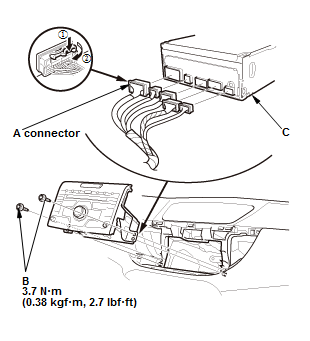
1. Remove the bolts (B)
2. Disconnect the hazard warning switch connector and the audio unit connectors, then pull out the audio unit assembly (C).
NOTE: There is a lever lock on audio unit connector A.
- 3. Hazard Warning Switch - Remove
- 4. Audio Unit - Remove
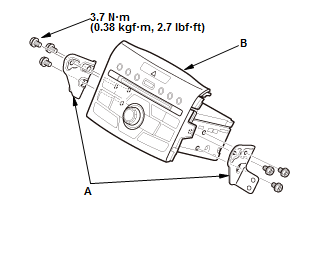
1. Remove the brackets (A) from the audio unit (B).
- 5. All Removed Parts - Install the audio unit in the reverse order of removal.
NOTE:
- There is a lever lock on audio unit connector A.
- Make sure all the connectors and the antenna lead are secure.
- If the audio unit was replaced, enter the audio presets that you saved onto the new unit.