LaneWatch Symptom Troubleshooting - LaneWatch camera image does not come on (Switches to the black screen)
LaneWatch camera image does not come on (Switches to the black screen)
- 1. LaneWatch camera check:
- 1. Start the engine.
- 2. Go into the System Diagnostic Mode, and select the Detail Information & Setting.
- Without navigation system - Refer to: Audio System Sound Quality DiagnosisAudio System Diagnostic Mode
- With navigation system
- 3. Select LaneWatch in the Unit Check.
Is the Connection OK?
YES
Go to step 2.
NO
- 2. B-CAN check:
- 1. Select the Return, then back to Unit Check menu.
- 2. Select B-CAN in the Unit Check, then start diagnostic.
Is the MICU_ICU changed red?
YES
Go to step 5.
NO
Go to step 3.
- 3. Open wire check (LWC VID line):
- 1. Turn the vehicle to the OFF (LOCK) mode.
- 2. Disconnect the following connectors.
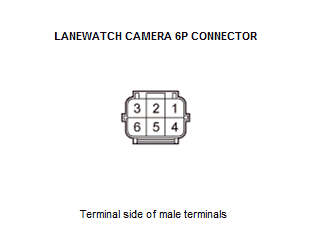
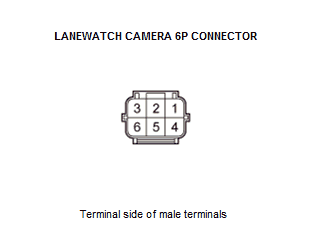
LaneWatch camera 6P connector Audio/audio-navigation unit connector G (24P) - 3. Check for continuity between test points 1 and 2.
Test condition Vehicle OFF (LOCK) mode LaneWatch camera 6P connector: disconnected Audio/audio-navigation unit connector G (24P): disconnected Test point 1 LaneWatch camera 6P connector No. 1 Test point 2 Audio/audio-navigation unit connector G (24P) No. 20 - Refer to: Audio Unit Connector for Inputs and Outputs(With Display Audio)Audio Unit Connector for Inputs and Outputs(With Normal Audio) Is there continuity?
YES
The LWC VID wire is OK. Go to step 4.
NO
Repair an open in the wire between the LaneWatch camera and the audio/audio-navigation unit.
- 4. Open wire check (LWC VID GND line):
- 1. Check for continuity between test points 1 and 2.
Test condition Vehicle OFF (LOCK) mode LaneWatch camera 6P connector: disconnected Audio/audio-navigation unit connector G (24P): disconnected Test point 1 LaneWatch camera 6P connector No. 6 Test point 2 Audio/audio-navigation unit connector G (24P) No. 8 - Refer to: Audio Unit Connector for Inputs and Outputs(With Display Audio)Audio Unit Connector for Inputs and Outputs(With Normal Audio) Is there continuity?
YES
The LWC VID GND wire is OK. Replace the LaneWatch camera .
NO
Repair an open in the wire between the LaneWatch camera and the audio/audio-navigation unit.
- 5. Body electrical DTCs check:
- 1. Clear the DTC with the HDS.
- 2. Turn the vehicle to the OFF (LOCK) mode, then back to the ON mode.
- 3. Wait for at least 6 seconds.
- 4. Check for body electrical DTCs with the HDS.
DTC Description DTC Are any DTCs indicated?
YES
Go to the indicated DTC's troubleshooting.
NO
Go to step 6.
- 6. Open wire check (B-CAN_H, B-CAN_L line):
- 1. Turn the vehicle to the OFF (LOCK) mode.
- 2. Disconnect the following connector.
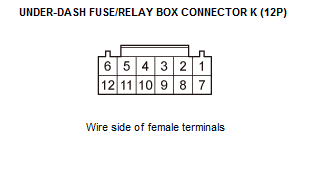
Under-dash fuse/relay box connector K (12P) Audio/audio-navigation unit connector C (20P) - 3. Check for continuity between test points 1 and 2.
Test condition Vehicle OFF (LOCK) mode Under-dash fuse/relay box connector K (12P): disconnected Audio/audio-navigation unit connector C (20P): disconnected Test point 1 Under-dash fuse/relay box connector K (12P) No. 2 Test point 2 Audio/audio-navigation unit connector C (20P) No. 13 - Refer to: Audio Unit Connector for Inputs and Outputs(With Display Audio)Audio Unit Connector for Inputs and Outputs(With Normal Audio) Test point 1 Under-dash fuse/relay box connector K (12P) No. 1 Test point 2 Audio/audio-navigation unit connector C (20P) No. 3 - Refer to: Audio Unit Connector for Inputs and Outputs(With Display Audio)Audio Unit Connector for Inputs and Outputs(With Normal Audio) Is there continuity?
YES
The B-CAN_H, B-CAN_L wires are OK. Check for poor connection or loose terminal at the audio unit. If the symptom does not go away, replace the audio unit (without navigation system) - Refer to: Audio Unit Removal and Installation(With Display Audio)Audio Unit Removal and Installation(With Normal Audio) or the audio-navigation unit (with navigation system) .
NO
Repair an open in the wire between the under-dash fuse/relay box and the audio/audio-navigation unit.