How to Check the History DTCs
How to Check the History DTCs
The climate control unit can record history DTCs. To read the history DTCs, do the following:
1. Turn the vehicle to the OFF (LOCK) mode and then the ON mode
2. Press and hold both the AUTO and ON/OFF buttons
3. While pressing and holding both the AUTO and ON/OFF buttons, the history DTCs will be indicated.
NOTE:
- If there is any problem in the system, the driver's temperature indicator flashes. Refer to checking for DTCs.
- If there is more than one DTC, they are displayed one at a time in sequence followed by a pause (all the display indicator segments illuminate) between the DTCs.
- If there are no problems detected, the system will flash no.
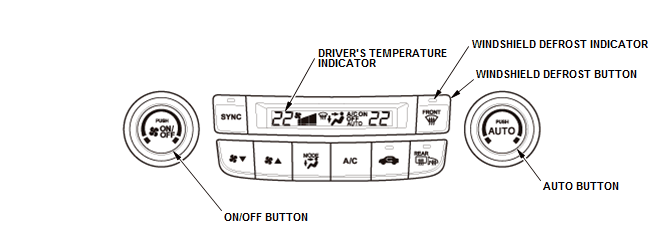
Canceling the Read History DTCs
4. Turn the vehicle to the OFF (LOCK) mode to cancel the read history DTCs. After completing the repair work, clear the DTCs.