How to Check the History DTCs
How to Check the History DTCs
The HVAC control unit can record history DTCs. To read the history DTCs, do the following:
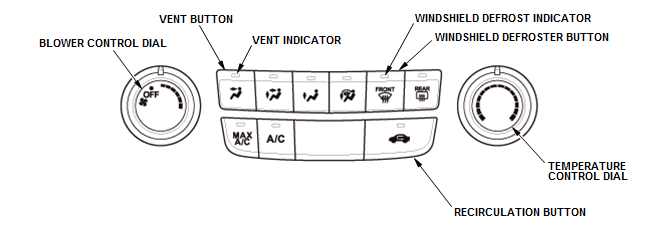
1. Turn the vehicle to the OFF (LOCK) mode
2. Set the BLOWER CONTROL dial to OFF
3. Press and hold both the RECIRCULATION and the VENT buttons, and turn the vehicle to the ON mode
4. The VENT indicator blinks two times, then the history DTCs will be indicated.
NOTE:
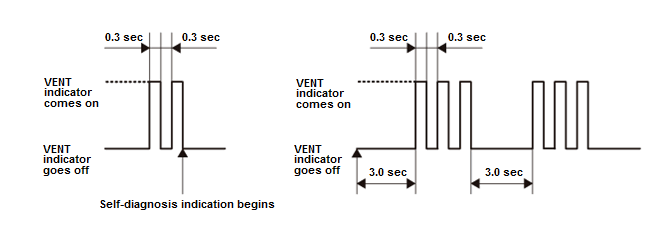
- If there is any problem in the system, the VENT indicator blinks Diagnostic Trouble Code (DTC) number 1 through 13.
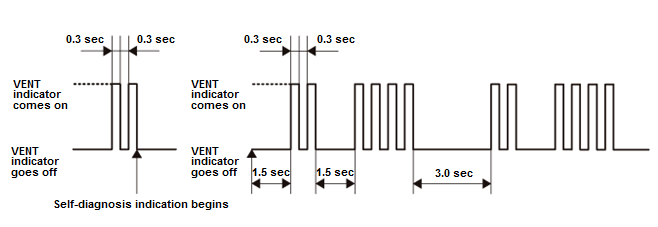
- If there are multiple DTCs, the VENT indicator blinks each DTC in sequence from the lowest DTC number to the highest.
- If there are no problems detected, the indicator will not blink.
Example of DTC Indication Pattern (DTC 3)
Example of DTCs Indication Pattern (DTC 2 and 4)
| DTC (VENT Indicator blinks) | Detection Item |
|---|---|
| 1 | An open in the air mix control motor circuit |
| 2 | A short in the air mix control motor circuit |
| 3 | A problem in the air mix control motor circuit, linkage, door, or motor |
| 4 | An open in the mode control motor circuit |
| 5 | A short in the mode control motor circuit |
| 6 | A problem in the mode control motor circuit, linkage, door, or motor |
| 7 | An open in the recirculation control motor circuit |
| 8 | A short in the recirculation control motor circuit |
| 9 | A problem in the recirculation control motor circuit, linkage, door, or motor |
| DTC (VENT Indicator blinks) | Detection Item |
|---|---|
| 10 | A problem in the blower motor circuit |
| 11 | HVAC control unit internal error |
| 12 | An open in the evaporator temperature sensor circuit |
| 13 | A short in the evaporator temperature sensor circuit |
Canceling the Read History DTCs
5. Turn the vehicle to the OFF (LOCK) mode to cancel the read history DTCs. After completing the repair work, clear the DTCs.