How to Check Error History (Audio DTCs)
How to Check Error History (Audio DTCs)
NOTE: The audio DTCs cannot be retrieved with the HDS.
The Error History feature is to record intermittent audio issues that occur while the customer is using the system. Sometimes the customer complaint cannot be duplicated. The error history may record the information needed to diagnose the problem. To check the error history:
1. Turn the vehicle to the ON mode
2. At any screen except the HOME screen, press and hold the EJECT button, the POWER (

) button, and the HOME button until the Select Diagnosis Items menu screen is displayed.
Displaying Select Diagnosis Items Menu Screen
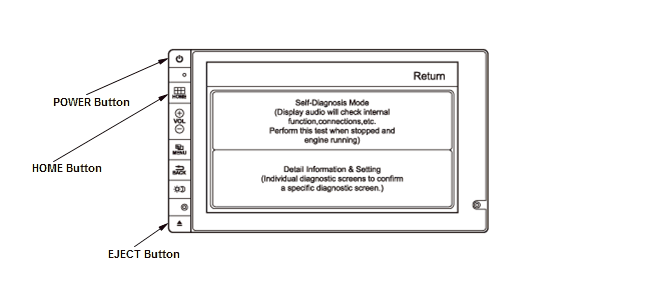
3. When the Select Diagnosis Items menu appears, select the Self-Diagnosis Mode
4. When the audio unit has hard error codes, the Error History icon (A) appears yellow. When no hard error codes are stored, the icon appears gray. To view the errors with their audio DTC, select the Error History icon.
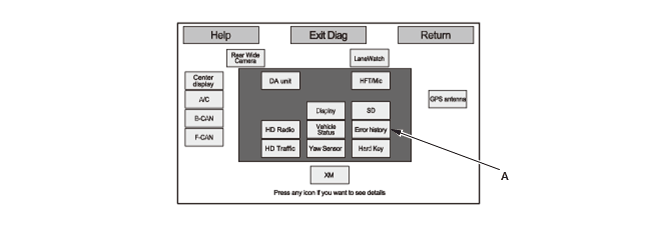
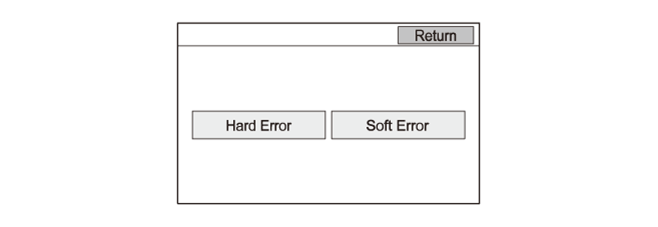
5. Select the Hard Error icon in the Error History menu.
NOTE: The Soft Error feature is for factory use only.
6. The Hard Error screen displays the following information by selecting the Date_Time icon (A):
- The date and time when the error occurred.
- The audio DTC for the error.
- A brief description of the audio DTC.
NOTE: The Save feature is for factory use only.
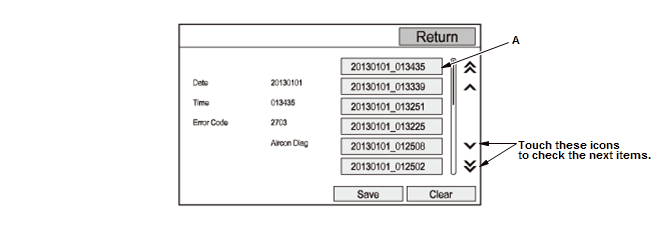
7. Use the audio DTC Troubleshooting table to troubleshoot the error. Select the Return icon to exit the Error History main menu.
How to Clear Error History
NOTE: The audio DTCs cannot be deleted with the HDS.
8. Select the Clear icon in the Hard Error. The confirmation screen appears.
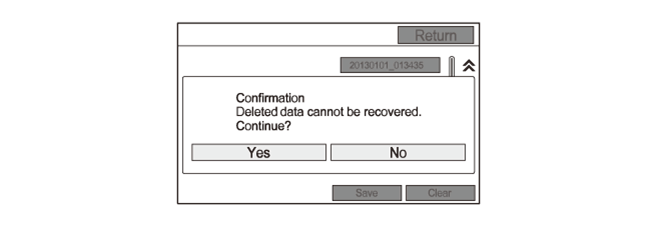
9. Select the Yes icon. All Hard Error histories are cleared. The system returns to the Error History menu automatically.