HandsFreeLink System Symptom Troubleshooting - HFL does not respond(Without Navigation, With Display Audio)
NOTE:
- Check the vehicle 12 volt battery condition first .
- You must be able to duplicate the customer's concern to successfully diagnose the problem. If you cannot duplicate the issue, have the customer demonstrate it.
- Check the connectors for poor connections or loose terminals.
- 1. HFL switch input check:
- 1. Turn the vehicle to the ON mode.
- 2. Go into the System Diagnostic Mode, and use the Hard Key to check the HFL switch - Refer to: Audio System Sound Quality DiagnosisAudio System Diagnostic Mode .
Does all the HFL switch buttons respond?
YES
Go to step 2.
NO
Go to step 6.
- 2. Bluetooth module check:
- 1. Go into the System Diagnostic Mode, and use the HFT/Mic to check the Bluetooth Connection Diagnosis - Refer to: Audio System Sound Quality DiagnosisAudio System Diagnostic Mode .
Does the status indicate OK?
YES
Go to step 3.
NO
Replace the audio unit - Refer to: Audio Unit Removal and Installation(With Display Audio)Audio Unit Removal and Installation(With Normal Audio) .
- 3. Microphone input check:
- 1. Go into the System Diagnostic Mode, and use the HFT/Mic to check the microphone - Refer to: Audio System Sound Quality DiagnosisAudio System Diagnostic Mode .
- 2. Press the TALK button, then say "testing" in front of the microphone to check the Mic level.
Is the microphone level OK?
YES
Go to step 4.
NO
Replace the audio unit - Refer to: Audio Unit Removal and Installation(With Display Audio)Audio Unit Removal and Installation(With Normal Audio) .
- 4. Cell phone connection check (known-good phone):
- 1. Turn the vehicle to the OFF (LOCK) mode then the ON mode.
- 2. Pair a known-good cell phone with Bluetooth to the customer's vehicle.
Can you pair the cell phone?
YES: USA models
Go to HFL system troubleshooting - Refer to: HandsFreeLink System Troubleshooting(With Display Audio) HandsFreeLink System Troubleshooting(With Normal Audio) .
YES: Except USA models
Go to step 5.
NO
Replace the audio unit - Refer to: Audio Unit Removal and Installation(With Display Audio)Audio Unit Removal and Installation(With Normal Audio) .
- 5. Cell phone connection check (customer's phone):
- 1. Pair the customer's cell phone with Bluetooth to the customer's vehicle.
Can you pair the cell phone, and does it operate normally?
YES
The HFL system is OK at this time. Inquire if there are any known issues for the problem.
NO
The customer's cell phone is defective or not compatible.
- 6. Determine possible failure area (HFL switch circuit, others):
- 1. Do the Self-Diagnostic Function, and use the In Line Diag to check the audio remote switch - Refer to: How to Troubleshoot the Audio SystemAudio System Self-Diagnostic Function .
Does all the audio remote switch buttons respond?
YES
Go to step 7.
NO
- 7. HFL switch check:
- 1. Turn the vehicle to the OFF (LOCK) mode.
- 2. Disconnect the following connector.
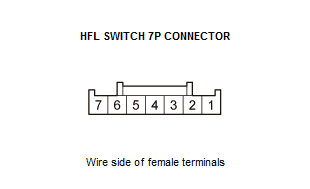
HFL switch 7P connector - 3. Do the HFL Switch Test .
Is the HFL switch OK?
YES
Go to step 8.
NO
- 8. Shorted wire check (HFT/NAVI REMOTE SW line):
- 1. Disconnect the following connector.
Audio unit connector C (20P) - 2. Check for continuity between test points 1 and 2.
Test condition Vehicle OFF (LOCK) mode HFL switch 7P connector: disconnected Audio unit connector C (20P): disconnected Test point 1 Audio unit connector C (20P) No. 12 - Refer to: Audio Unit Connector for Inputs and Outputs(With Display Audio)Audio Unit Connector for Inputs and Outputs(With Normal Audio) Test point 2 Body ground Is there continuity?
YES
Repair a short to body ground in the wire between the audio unit and the HFL switch. If the wire is OK, replace the cable reel .
NO
The HFT/NAVI REMOTE SW wire is not shorted to ground. Go to step 9.
- 9. Determine possible failure area (audio unit, others):
- 1. Reconnect the HFL switch 7P connector.
- 2. Disconnect the following connector.
NOTE: Eject the disc before disconnecting the audio unit to prevent damaging the CD player's load mechanism.
Audio unit connector A (24P) - 3. Measure the resistance between test points 1 and 2 as specified in the table.
Test condition Vehicle OFF (LOCK) mode Audio unit connector C (20P): disconnected Audio unit connector A (24P): disconnected Test point 1 Audio unit connector C (20P) No. 12 - Refer to: Audio Unit Connector for Inputs and Outputs(With Display Audio)Audio Unit Connector for Inputs and Outputs(With Normal Audio) Test point 2 Audio unit connector A (24P) No. 11 - Refer to: Audio Unit Connector for Inputs and Outputs(With Display Audio)Audio Unit Connector for Inputs and Outputs(With Normal Audio) Button held down HANG-UP/BACK PICK-UP TALK No button pressed Resistance About 47 Ω About 222 Ω About 2.25 kΩ About 10 kΩ Is the resistance OK?
YES
Replace the audio unit - Refer to: Audio Unit Removal and Installation(With Display Audio)Audio Unit Removal and Installation(With Normal Audio) .
NO
Go to step 10.
- 10. Determine possible failure area (HFT/NAVI REMOTE SW line, others):
- 1. Check for continuity between test points 1 and 2.
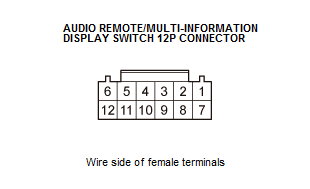
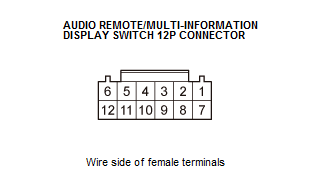
Test condition Vehicle OFF (LOCK) mode Audio unit connector C (20P): disconnected Audio unit connector A (24P): disconnected Test point 1 Audio remote/multi-information display switch 12P connector No. 5 Test point 2 HFL switch 7P connector No. 5 Is there continuity?
YES
Repair an open in the wire between the audio unit and the HFL switch. If the wire is OK, replace the cable reel .
NO
The HFT/NAVI REMOTE SW wire is OK. Go to step 11.
- 11. Audio remote switch check:
- 1. Check for continuity between test points 1 and 2.
Test condition Vehicle OFF (LOCK) mode Audio unit connector C (20P): disconnected Audio unit connector A (24P): disconnected Test point 1 Audio remote/multi-information display switch 12P connector No. 4 Test point 2 Audio remote/multi-information display switch 12P connector No. 5 Is there continuity?
YES
Repair an open in the wire between the audio remote switch and the HFL switch.
NO