Power Lumbar Support Motor Test: Test
SRS components are located in this area. Review the SRS component locations and the precautions and procedures before doing repairs or service.
- 1. Front Seat Belt Lower Anchor Bolt - Remove (Without Front Driver's Lap Belt Tensioner)
- 2. Front Seat Recline Cover - Remove
NOTE: If you are removing the seat recline cover, you do not need to remove the front seat.
- 3. Power Lumbar Support Motor - Test
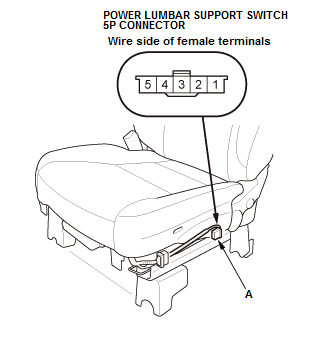
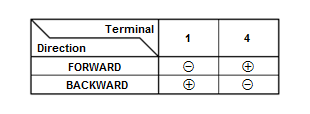
1. Test the motor by applying 12 volt battery power and ground at the power lumbar support switch connector (A) on the seat harness side according to the table. When the motor stops running, disconnect 12 volt battery power immediately.
2. If the motor does not run or fails to run smoothly, remove the front seat-back cover/pad as needed , go to step 3.
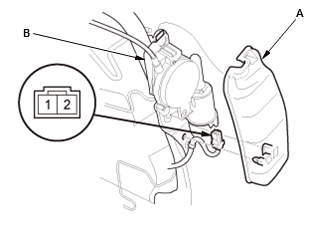
3. Remove the cover (A). 4. Disconnect the power lumbar support motor connector.
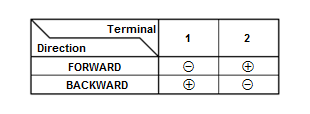
5. Test the power lumbar support motor by applying 12 volt battery power and ground to the terminals according to the table. When the motor stops running, disconnect 12 volt battery power immediately.
6. If the motor does not run or fails to run smoothly, the motor is faulty; replace the power lumbar support assembly (B) .
If the motor runs smoothly, replace the driver's seat wire harness.
- 4. All Removed Parts - Install the parts in the reverse order of removal.