How to Troubleshoot Circuits at the SRS Unit Connectors
How to Troubleshoot Circuits at the SRS Unit Connectors
Special Tools Required
Pin Probe Male 07ZAJ-RDJA110
NOTE:
- Make sure the 12 volt battery is fully charged when doing an electrical test. If the 12 volt battery is not fully charged, the results of the tests may not be accurate.
- To prevent damage to the connector, do not insert test equipment probes, paper clips, or other substitutes. Damaged terminals cause a poor connection and an incorrect measurement.
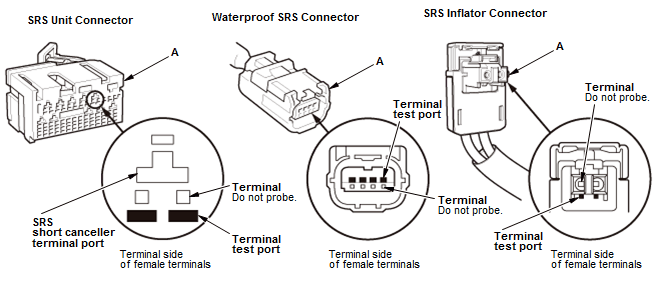
1. When diagnosing or troubleshooting at an SRS unit connector (A), use the terminal test port below the terminal you need to check. Gently insert the pin probes of the tester or jumper wire at the terminal test port from the terminal side.
NOTE:
- Do not insert the pin probes of the tester or a jumper wire at the terminal or the SRS short canceller terminal port.
- To prevent damage to the connector terminals, do not insert the test equipment probes, paper clips, or other substitutes as they can damage the terminals. Damaged terminals cause a poor connection and an incorrect measurement.
2. Connect one side of the patch cord terminals (A) to a commercially available digital multimeter (B), and connect the other side of the terminals (C) to the pin probe male.
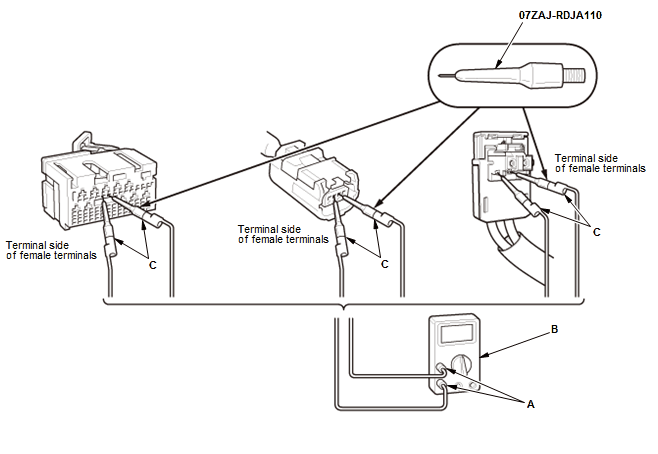
3. Gently contact the pin probe male at the terminal test port from the terminal side. Do not force the tips into the terminals.
NOTE:
- For accurate results, always use the pin probe male.
- To prevent damage to the connector terminals, do not insert test equipment probes, paper clips, or other substitutes. Damaged terminals cause a poor connection and an incorrect measurement.
- Do not puncture the insulation on a wire. Punctures can cause poor or intermittent electrical connections.