Forward Facing Camera Module Heater
If FFC module is being replaced with a new unit, use a diagnostic scan tool to perform the Flash Programming Procedure (if available). This will confirm that the module is updated to the latest applicable software level.
REMOVAL
- Disconnect and isolate the negative battery cable.
- Remove the FFCM. Refer to MODULE, FORWARD FACING CAMERA (FFCM), REMOVAL AND INSTALLATION .
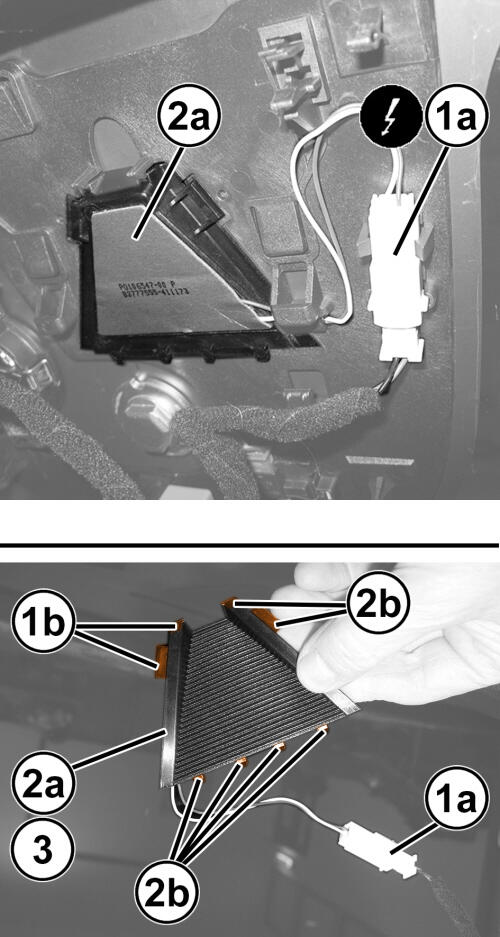
- Disconnect the wire harness connector (1a) from the heater housing.
- Remove the heater (2a) by releasing the support retainers (2b).
INSTALLATION
- Inspect the heater and the wire harness connector integrity.
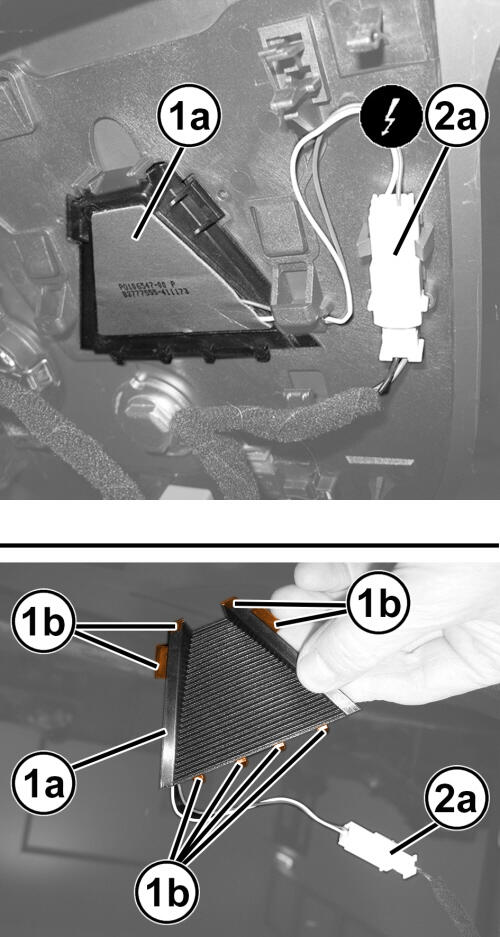
- Position and install the heater to the support retainers (1b).
- Connect the wire harness connector (2a).
- Install the heater to the housing.
- Install the Forward Facing Camera Module (FFCM). Refer to MODULE, FORWARD FACING CAMERA (FFCM), REMOVAL AND INSTALLATION .
- Connect the negative battery cable.NOTE:
If this Electronic Control Unit (ECU) is being replaced with a new unit, use a diagnostic scan tool to perform the Flash Programming Procedure (if available). This will confirm that the module is updated to the latest applicable software level.
If this Electronic Control Unit (ECU) is being replaced with a new unit, a diagnostic scan tool MUST be used to determine if alignment of the PROXI configuration data into the new ECU is needed. If PROXI alignment is needed, follow the routine outlined in the diagnostic scan tool for PROXI Configuration Alignment under the Body Control Module (BCM) Miscellaneous Functions menu.