Removal - Rear Logo "Q4"
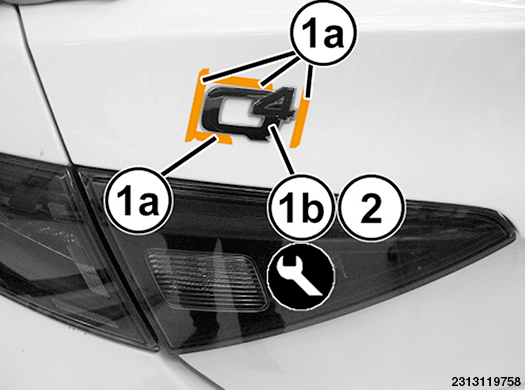
- Apply a double layer of bodywork adhesive tape (1a) around the edges of the logo (1b).NOTE:
The purpose of the adhesive tape will be to protect the body when the logo is removed and act as a template for applying the new logo.
- Remove the logo (1b) releasing the adhesive bonding it to the body, using a trim stick or equivalent.NOTE:
If necessary, gently heat the badge and the surrounding panel using an air heater to make it easier to detach the adhesive.
NOTE:
If ambient temperatures are below 21° C (70° F), warm the badges and body panel with a heat lamp or gun to assure proper adhesion.
INSTALLATION - REAR LOGO "Q4"
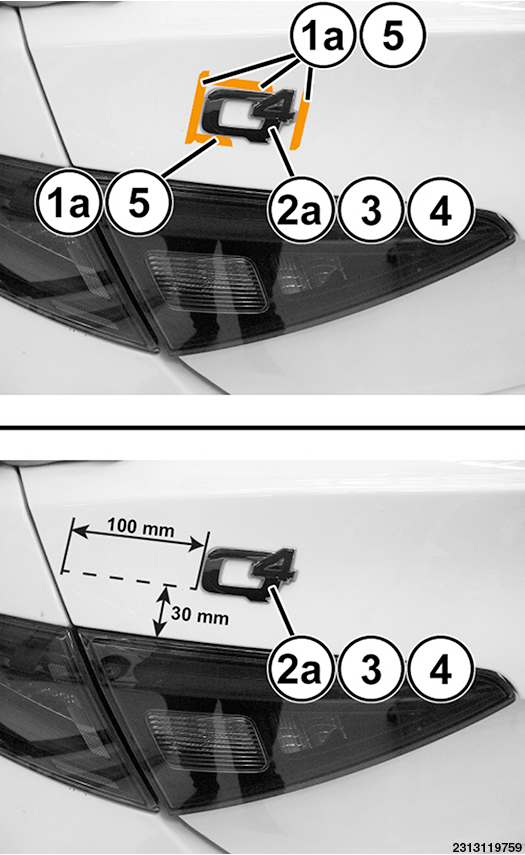
- Leave the adhesive tape (1a) applied during removal; it will be used for subsequent positioning of the initials.
- If the logo (2a) was not present (and have not therefore been removed), refer to the positioning measurements shown in illustration.
- Remove all glue residues and carefully clean and degrease with heptane the zone concerned by the gluing of the new logo (2a).
- Remove the film protecting the adhesive surface of the new logo (2a), then immediately position the logo on the body. Bond the adhesive surface, pressing manually on the logo.NOTE:
Do not touch the adhesive surface of the logo during assembly. Bond at an ambient temperature of no less than 18 - 20°C.
- If present, remove the adhesive tape (1a).
- Apply pressure on the badge again to guarantee that the air bubbles are completely removed so that the adhesive adheres correctly to the body.