Safety Recall V27/NHTSA 19V-148 Adaptive Cruise Control (V27)
Publication date: 2019-03-01Reference number: V27
SAFETY RECALL V27/NHTSA 19V-148 ADAPTIVE CRUISE CONTROL
SERVICE CAMPAIGN BULLETIN
| CHRYSLER: | 2017-2019 (GA) Alfa Romeo Giulia; 2018-2019 (GU) Alfa Romeo Stelvio |
REMEDY AVAILABLE
2017-2019 (GA) Alfa Romeo Giulia
2018-2019 (GU) Alfa Romeo Stelvio
SUBJECT
The Adaptive Cruise Control (ACC) on about 19, 100 of the above vehicles may not allow cancelation of the ACC in specific driving conditions. In certain circumstances while ACC is active and the traction control detects a specific wheel slip, it is possible for a positive torque request to be locked by the Brake System Module (BSM) which may result in unexpected acceleration. If the driver does not shift to neutral or apply firm, sustained brake-pedal application to deactivate the ACC, this condition can cause a vehicle crash without prior warning
REPAIR
Update the Antilock Brake System (ABS) module/BSM software.
PARTS INFORMATION
No parts are required to perform this service procedure.
PARTS RETURN
No parts return required for this campaign.
SPECIAL TOOLS
The following special tools are required to perform this repair:
- NPN wiTECH micro pod II
- NPN Laptop Computer
- NPN wiTECH Software
SERVICE PROCEDURE
- Open the hood and install a battery charger. Verify that the charging rate provides 13.0 to 13.5 volts. Do not allow the charger to time out during the flash process. Set the battery charger timer (if so equipped) to continuous charge.NOTE: Use an accurate stand-alone voltmeter. The battery charger volt meter may not be sufficiently accurate. Voltages outside of the specified range will cause an unsuccessful flash. If voltage reading is too high, apply an electrical load by activating the park or headlamps and/or HVAC blower motor to lower the voltage.
- Connect the wiTECH micro pod II to the vehicle data link connector.
- Place the ignition in the "RUN" position.
- Open the wiTECH 2.0 website.
- Enter your "User id" and "Password" and your "Dealer Code" , then select "Sign In" at the bottom of the screen. Click "Accept" .
- From the "Vehicle Selection"
screen, select the vehicle to be updated.NOTE: Before updating the ABS/BSM software, create a scan report and save a copy for future reference.
- Create and save a Vehicle Scan Report (VSR) before proceeding.
- From the left column in the analysis section, select "Reports" .
- On the reports page, select "Scan Report" .
- Select "ECU Summary" from the dropdown menu on the right.
- Select "Printer Friendly" then save file type as "PDF" . Name the file with the last eight digits of the vehicle VIN.
- From the "Action Items" screen, select the "Topology" tab.
- From the "Topology"
tab, select the "ABS"
module icon.NOTE: ABS module icon may NOT display a lightning bolt. Absence of a lightning bolt does NOT indicate there is no flash available.
- From the ABS "Flash"
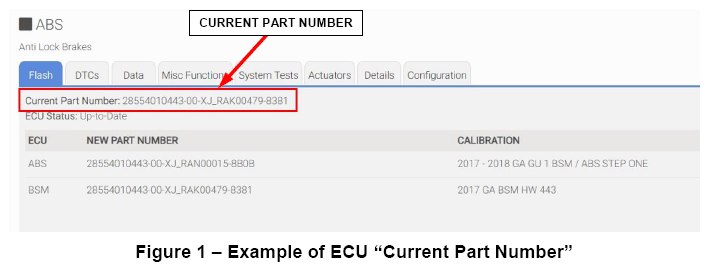
tab, record the "Current Part Number"
(Figure 1) for the software currently installed in the Electronic Control Unit (ECU), then proceed to the table in (Figure 2) to determine which flash Procedure A, B, C, D, E, F
is the appropriate starting point for the specific hardware and software combination currently installed in the vehicle.NOTE: Use the chart below in order to determine the appropriate flash service procedure based on the hardware (HW) and software (SW) level currently installed in the vehicle. Then proceed to the appropriate Service Procedure A, B, C, D, E, F and complete all relevant steps detailed in that service procedure.
HW number HW version SW number SW version To do 28554010353 or 28554010443 or 28554010535 00 XJ_RAL00164 83C1 Procedure A XJ_RAK00479 8383 XJ_RAK00496 8382 XJ_RAK00479 8382 XJ_RAK00479 8381 XJ_RAK00478 8381 XJ_RAJ00430 8343 XJ_RAJ00428 8343 XJ_RAJ00370 8342 XJ_RAJ00314 8342 XJ_RAL00165 83C1 XJ_RAJ00480 8343 XJ_RAN00010 8401 Procedure B 28554010353 or 28554010443 or 28554010535 00 XJ_RAN00010 8402 Procedure C XJ_RAN00010 8403 28554010535 00 XJ_RAP00046 8441 Procedure D 28554057115 00 XJ_RAT00007 84C1 Procedure E 00 XJ_RAS00023 8481 00 XJ_RAS00042 8482 28554010353 or 28554010443 or 28554010535 00 XJ_RAX00007 8541 Procedure F XJ_RAX00007 8542 XJ_RAX00007 8543 28554010535 00 XJ_RAW00010 8502 28554057115 00 XJ_RAY00006 8581 Procedure A
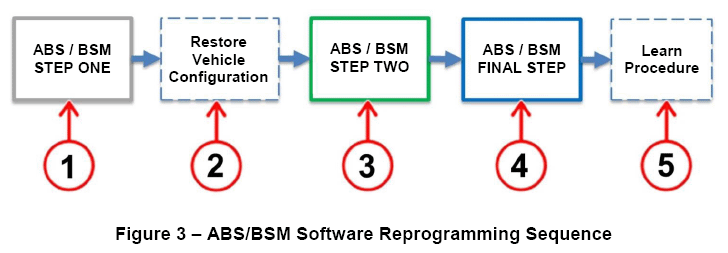
NOTE: To update the ABS/BSM software to proper level, three separate software flashes are required. Complete all relevant procedures steps. The procedure must be followed in the same sequence as listed below (Figure 3):- Step 1 - First flash ABS/BSM - "STEP ONE"
- Step 2 - "Restore Vehicle Configuration"
- Step 3 - Second flash ABS/BSM - "STEP TWO"
- Step 4 - Third flash ABS/BSM - "FINAL STEP"
- Step 5 - Post reprogramming calibration - "Learn Procedure"
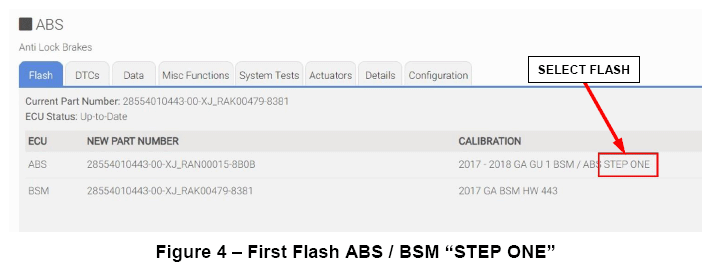
Step 1 - First flash ABS/BSM - "STEP ONE"
- From the ABS flash tab, select the ABS flash "STEP ONE" and proceed with the first reprogramming procedure (Figure 4).
- Read the flash special instructions page. Select "OK " to continue.
- From the flash ECU agreement page, agree to terms by checking the box.
- Select "Flash ECU"
and then follow the wiTECH screen instructions to complete the flash.NOTE: Read all the instructions and warning messages displayed during reprogramming; do not continue without performing all of the relevant procedures when prompted.NOTE: If the reprogramming process is interrupted/aborted, it must be restarted.
- Click "View DTCs" , select "Clear All DTCs" , click "Continue" and then click "Close" .
- The following table shows the software (SW) codes of the ABS/BSM, before and after the first reprogramming flash (Figure 5).
Before ABS/BSM programming After ABS/BSM programming SW number SW version SW number SW version XJ_RAL00164 83C1 XJ_RAN00015 8B0B XJ_RAK00479 8383 XJ_RAK00496 8382 XJ_RAK00479 8382 XJ_RAK00479 8381 XJ_RAK00478 8381 XJ_RAJ00430 8343 XJ_RAJ00428 8343 XJ_RAJ00370 8342 XJ_RAJ00314 8342 XJ_RAL00165 83C1 XJ_RAJ00480 8343 Step 2 - Restore Vehicle Configuration
Obtain the key code pin number for use later during vehicle configuration :
- Sign into DealerConnect.
- Select the "Service" tab.
- Within the "Repair Information" section select "Key Code" .
- Enter the following:
- Vehicle VIN.
- Reason Code (Module Replacement).
- Password.
- Check the box next to Dealer Policy acknowledgement.
- Click "Search" then record the key code pin number.
- Under the "Activities" heading in the left column of the wiTECH screen, select "Vehicle Preparations".
- Within "Vehicle Preparations",
select "Restore Vehicle Configuration"
then follow the screen prompts.NOTE: If not successful, the Restore Vehicle Configuration procedure may be repeated until successful.
- From the "Topology"
screen, select the "ABS"
module icon.
Step 3 - Second flash ABS/BSM - "STEP TWO"
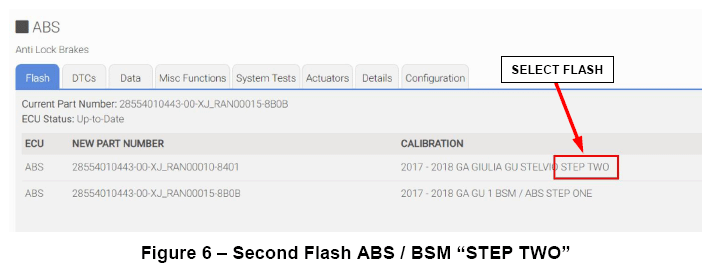
- From the ABS "Flash"
tab, select the ABS flash "STEP TWO"
and proceed with the second reprogramming procedure (Figure 6).
- Read the flash special instructions page. Select "OK" to continue.
- From the flash ECU agreement page, agree to terms by checking the box.
- Select "Flash ECU"
and then follow the wiTECH screen instructions to complete the flash.NOTE: Read all the instructions and warning messages displayed during reprogramming; do not continue without performing all of the relevant procedures when prompted.NOTE: If the reprogramming process is interrupted/aborted, it must be restarted.
- Click "View DTCs", select "Clear All DTCs", click "Continue" and then click "Close".
- The following table shows the software (SW) codes of the ABS/BSM, before and after the second reprogramming (Figure 7).
Before ABS/BSM programming After ABS/BSM programming SW number SW version SW number SW version XJ_RAN00015 8B0B XJ_RAN00010 8401 Step 4 - Third flash ABS/BSM - "FINAL STEP"
- From the ABS flash tab, select the ABS flash "FINAL STEP"
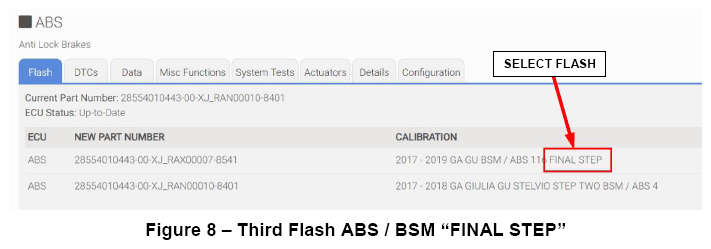
and proceed with the third reprogramming procedure (Figure 8).
- Read the flash special instructions page. Select "OK" to continue.
- From the flash ECU agreement page, agree to terms by checking the box.
- Select "Flash ECU"
and then follow the wiTECH screen instructions to complete the flash.NOTE: Read all the instructions and warning messages displayed during reprogramming; do not continue without performing all of the relevant procedures when prompted.NOTE: If the reprogramming process is interrupted/aborted, it must be restarted.
- Click "View DTCs" , select "Clear All DTCs" , click "Continue" and then click "Close" .
- The following table shows the software (SW) codes of the ABS/BSM, before and after the third reprogramming (Figure 9).
Before ABS/BSM programming After ABS/BSM programming SW number SW version SW number SW version XJ_RAN00010 8401 XJ_RAX00007 8541 NOTE: The ABS/BSM Brake Pedal Feel software flash may be bypassed. Proceed to the next steps for Post-Reprogramming Calibration Procedure.
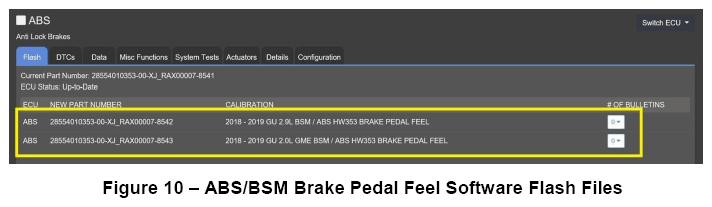
The brake pedal feel software flash may be performed on all (GU) Stelvio vehicles and will modify brake pedal feel. However, this flash is NOT required for Procedure A of this recall and labor time to perform this flash will NOT be reimbursed (Figure 10):- "2018 - 2019 GU 2.9L BSM/ABS BRAKE PEDAL FEEL"
- "2018 - 2019 GU 2.0L GME BSM/ABS BRAKE PEDAL FEEL"
Step 5 - Post-Reprogramming Calibration Procedure
NOTE: The post-reprogramming calibration procedure must be carried out with the vehicle on a flat ground and no people on board. - From the ABS "Misc. Functions"
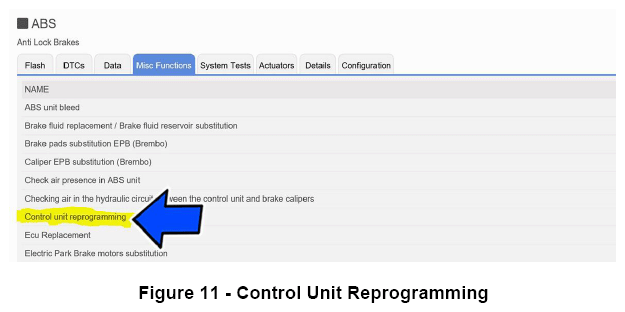
tab, select and run the "Control Unit Reprogramming"
routine (Figure 11).
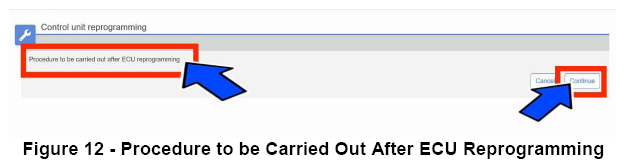
- Select "Procedure to be carried out after ECU reprogramming"
and then click "Continue"
(Figure 12).NOTE: If prompted with only the option to perform programming after a module replacement, complete all programming steps within that routine.
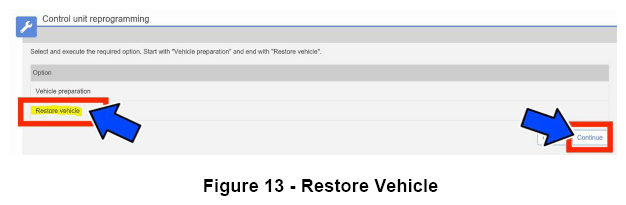
- Select "Restore Vehicle"
and then click "Continue"
(Figure 13).NOTE: Read all the instructions and warning messages displayed during reprogramming; do not continue without performing all of the relevant procedures when prompted.
- Check that every calibration has been completed.
- Click "View DTCs" , select "Clear All DTCs" , click "Continue" and then click "Close" .
- Place the ignition in the "OFF" position and then remove the wiTECH micro pod II device from the vehicle.
- Remove the battery charger from the vehicle.
- Close the vehicle hood.
- Return the vehicle to the customer or inventory.
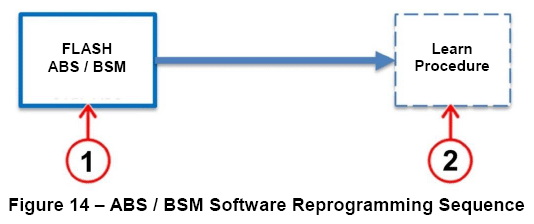
Procedure B
- Step 1 -Flash ABS/BSM "FINAL STEP" .
- Step 2 - Post reprogramming calibration procedure.
Step 1 - Flash ABS/BSM - "FINAL STEP"
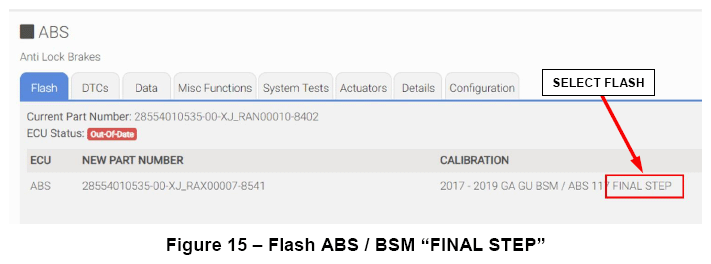
- 11. From the ABS flash tab, select the ABS flash "FINAL STEP"
and proceed with the reprogramming procedure (Figure 15).
- 12. Read the flash special instructions page. Select "OK" to continue.
- 13. From the flash ECU agreement page, agree to terms by checking the box.
- 14. Select "Flash ECU"
and then follow the wiTECH screen instructions to complete the flash.NOTE: Read all the instructions and warning messages displayed during reprogramming; do not continue without performing all of the relevant procedures when prompted.NOTE: If the reprogramming process is interrupted/aborted, it must be restarted.
- 15. Click "View DTCs" , select "Clear All DTCs" , click "Continue" and then click "Close" .
- 16. The following table shows the software (SW) codes of the ABS/BSM, before and after the reprogramming (Figure 16).
Before ABS/BSM programming After ABS/BSM programming SW number SW version SW number SW version XJ_RAN00010 8401 XJ_RAX00007 8541 NOTE: The ABS/BSM Brake Pedal Feel software flash may be bypassed. Proceed to the next steps for Post-Reprogramming Calibration Procedure.
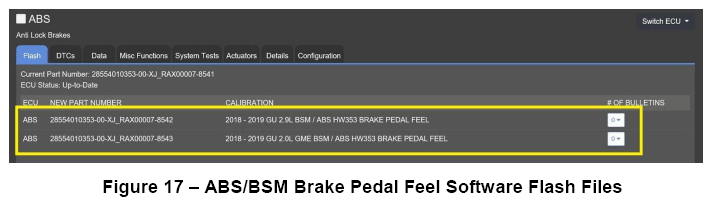
The brake pedal feel software flash may be performed on all (GU) Stelvio vehicles and will modify brake pedal feel. However, this flash is NOT required for Procedure B of this recall and labor time to perform this flash will NOT be reimbursed (Figure 17):- "2018 - 2019 GU 2.9L BSM/ABS BRAKE PEDAL FEEL"
- "2018 - 2019 GU 2.0L GME BSM/ABS BRAKE PEDAL FEEL"
Step 2 - Post reprogramming calibration procedure
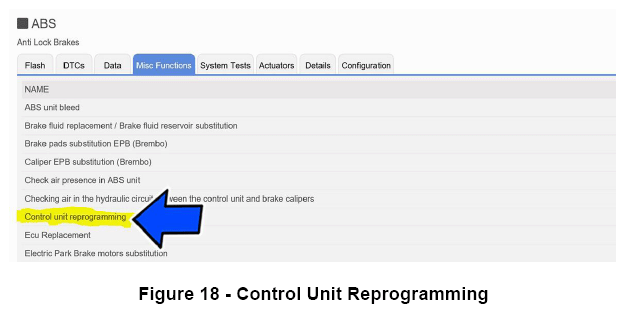
NOTE: The post-reprogramming calibration procedure must be carried out with the vehicle on a flat ground and no people on board. - 17. From the ABS "Misc. Functions"
tab, select and run the "Control Unit Reprogramming"
routine (Figure 18).
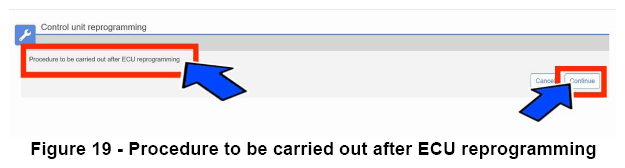
- 18. Select "Procedure to be carried out after ECU reprogramming"
and then click "Continue"
(Figure 19).NOTE: If prompted with only the option to perform programming after a module replacement, complete all programming steps within that routine.
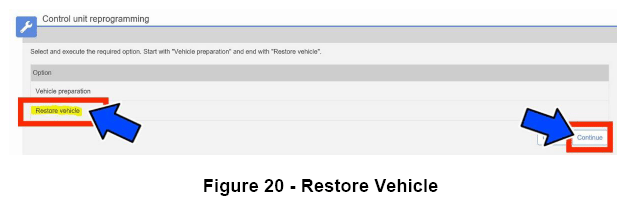
- 19. Select "Restore Vehicle"
and then click "Continue"
(Figure 20).NOTE: Read all the instructions and warning messages displayed during reprogramming; do not continue without performing all of the relevant procedures when prompted.
- 20. Check that every calibration has been completed.
- 21. Click "View DTCs" , select "Clear All DTCs" , click "Continue" and then click "Close" .
- 22. Place the ignition in the "OFF" position and then remove the wiTECH micro pod II device from the vehicle.
- 23. Remove the battery charger from the vehicle.
- 24. Close the vehicle hood.
- 25. Return the vehicle to the customer or inventory.
Procedure C - (Only for 2018 - 2019 GU)
- Step 1 - First flash ABS/BSM - "FINAL STEP"
- Step 2 - Second flash "BRAKE PEDAL FEEL"
- Step 3 - Post reprogramming calibration procedure
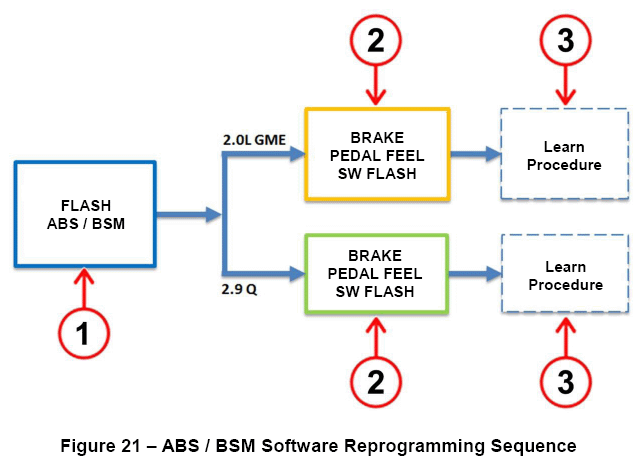
- Stelvio 2.9L V6: All vehicles
- Stelvio 2.0L GME: Built between April 12, 2018 to August 28, 2018
Step 1 - First flash ABS/BSM - "FINAL STEP"
- 11. From the ABS tab, select the ABS flash "FINAL STEP"
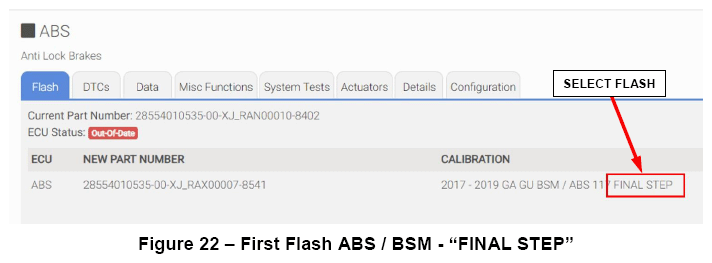
and proceed with the reprogramming procedure (Figure 22).
- 12. Read the flash special instructions page. Select "OK" to continue.
- 13. From the flash ECU agreement page, agree to terms by checking the box.
- 14. Select "Flash ECU"
and then follow the wiTECH screen instructions to complete the flash.NOTE: Read all the instructions and warning messages displayed during reprogramming; do not continue without performing all of the relevant procedures when prompted.NOTE: If the reprogramming process is interrupted/aborted, it must be restarted.
- 15. Click "View DTCs" , select "Clear All DTCs" , click "Continue" and then click "Close" .
- 16. The following table shows the software (SW) codes of the ABS/BSM, before and after the reprogramming (Figure 23).
Before BSM programming After BSM programming SW number SW version SW number SW version XJ_RAN00010 8402 XJ_RAX00007 8541 XJ_RAN00010 8403 Step 2 - Second flash "BRAKE PEDAL FEEL"
- 17. From the ABS flash tab, select the ABS/BSM flash name, according to the engine liter size installed in the vehicle described in the table below, then proceed with the reprogramming procedure (Figure 24).
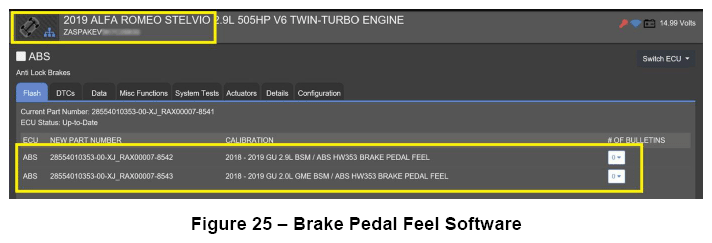
Engine Original ABS SW Level ABS SW After Programming ABS SW flash name SW number SW version SW number SW version 2.9L XJ_RAN00010 8402 XJ_RAX00007 8542 2018 - 2019 GU 2.9L BSM/ABS B P F ABS 2.0L XJ_RAN00010 8403 XJ_RAX00007 8543 2018 - 2019 GU 2.0L GME BSM/ABS B P F ABS CAUTION: Brake pedal feel software must be applied to (GU) Stelvio vehicles with the following production dates:- Stelvio 2.9L V6: All vehicles
- Stelvio 2.0L GME: Built between April 12, 2018 to August 28, 2018
NOTE: Brake pedal feel software may be applied to all (GU) Stelvio vehicles. - 18. Read the flash special instructions page. Select "OK" to continue.
- 19. From the flash ECU agreement page, agree to terms by checking the box.
- 20. Select "Flash ECU" then follow the wiTECH screen instructions to complete the flash (Figure 25).NOTE: Read all the instructions and warning messages displayed during reprogramming; do not continue without performing all of the relevant procedures when prompted.NOTE: If the reprogramming process is interrupted/aborted, it must be restarted.
Step 3 - Post reprogramming calibration procedure
NOTE: The post-reprogramming calibration procedure must be carried out with the vehicle on a flat ground and no people on board. - 21. From the ABS "Misc. Functions"
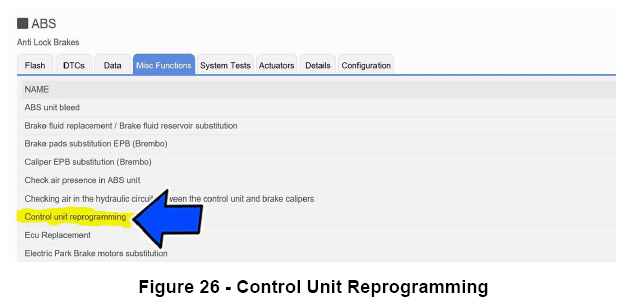
tab, select and run the "Control Unit Reprogramming"
routine (Figure 26).
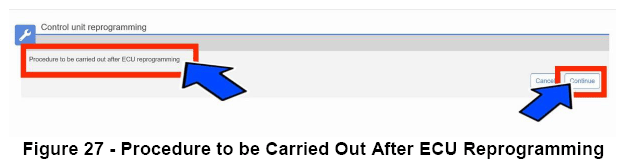
- 22. Select "Procedure to be carried out after ECU reprogramming"
and then click "Continue" (Figure 27).NOTE: If prompted with only the option to perform programming after a module replacement, complete all programming steps within that routine.
- 23. Select "Restore Vehicle"
and then click "Continue"
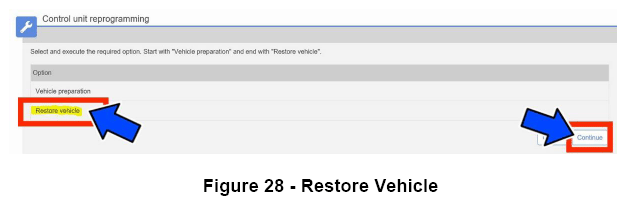
(Figure 28).NOTE: Read all the instructions and warning messages displayed during reprogramming; do not continue without performing all of the relevant procedures when prompted.
- 24. Check that every calibration has been completed.
- 25. Click "View DTCs" , select "Clear All DTCs" , click "Continue" and then click "Close" .
- 26. Place the ignition in the "OFF" position and then remove the wiTECH micro pod II device from the vehicle.
- 27. Remove the battery charger from the vehicle.
- 28. Close the vehicle hood.
- 29. Return the vehicle to the customer or inventory.
Procedure D
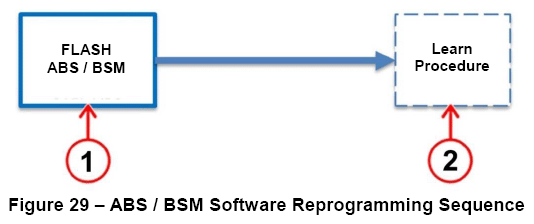
- Step 1 - Flash ABS/BSM "FINAL STEP" .
- Step 2 - Post reprogramming calibration procedure.
Step 1 - Flash ABS/BSM "FINAL STEP"
- 11. From the ABS flash tab, select the ABS flash "FINAL STEP"
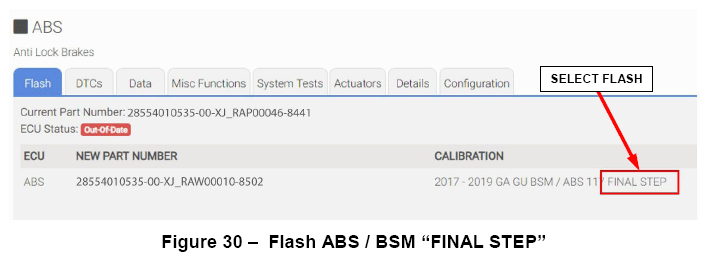
and proceed with the reprogramming procedure (Figure 30).
- 12. Read the flash special instructions page. Select "OK" to continue.
- 13. From the flash ECU agreement page, agree to terms by checking the box.
- 14. Select "Flash ECU"
and then follow the wiTECH screen instructions to complete the flash.NOTE: Read all the instructions and warning messages displayed during reprogramming; do not continue without performing all of the relevant procedures when prompted.NOTE: If the reprogramming process is interrupted/aborted, it must be restarted.
- 15. Click "View DTCs" , select "Clear All DTCs" , click "Continue" and then click "Close" .
- 16. The following table shows the software (SW) codes of the ABS/BSM, before and after the reprogramming (Figure 31).
Before ABS/BSM programming After ABS/BSM programming SW number SW version SW number SW version XJ_RAP00046 8441 XJ_RAW00010 8502 Step 2 - Post reprogramming calibration procedure
NOTE: The post-reprogramming calibration procedure must be carried out with the vehicle on a flat ground and no people on board. - 17. From the ABS "Misc. Functions"
tab, select and run the "Control Unit Reprogramming"
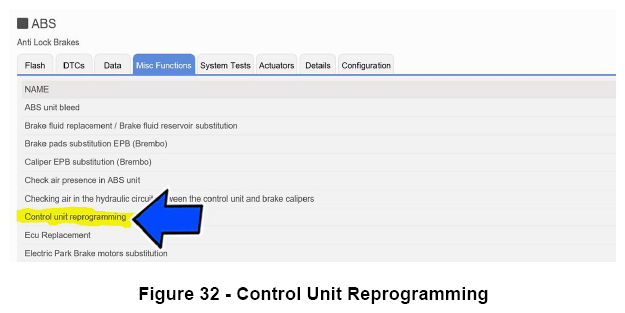
routine (Figure 32).
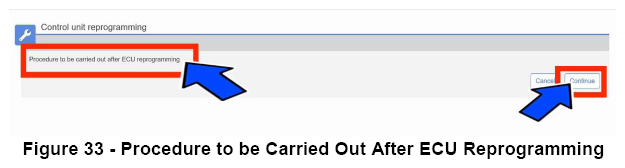
- 18. Select "Procedure to be Carried Out After ECU reprogramming"
and then click "continue"
(Figure 33).NOTE: If prompted with only the option to perform programming after a module replacement, complete all programming steps within that routine.
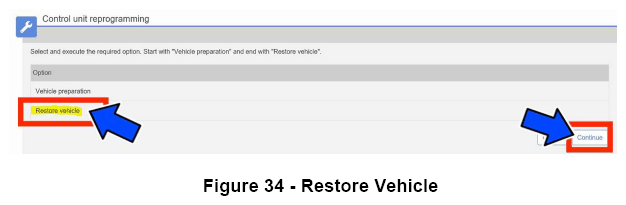
- 19. Select "Restore Vehicle"
and then click "Continue"
(Figure 34).NOTE: Read all the instructions and warning messages displayed during reprogramming; do not continue without performing all of the relevant procedures when prompted.
- 20. Check that every calibration has been completed.
- 21. Click "View DTCs" , select "Clear All DTCs" , click "Continue" and then click "Close" .
- 22. Place the ignition in the "OFF" position and then remove the wiTECH micro pod II device from the vehicle.
- 23. Remove the battery charger from the vehicle.
- 24. Close the vehicle hood.
- 25. Return the vehicle to the customer or inventory.
Procedure E
- Step 1 - First flash "2019 GA GU BSM/ABS HW 115 NAFTA"
- Step 2 - Post reprogramming calibration procedure.
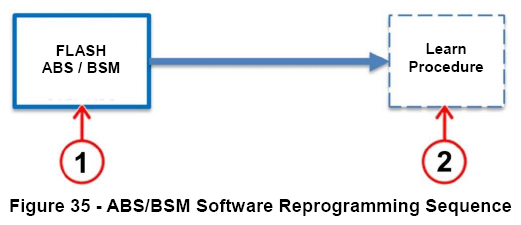
Step 1 - First flash "2019 GA GU BSM/ABS HW 115 NAFTA"
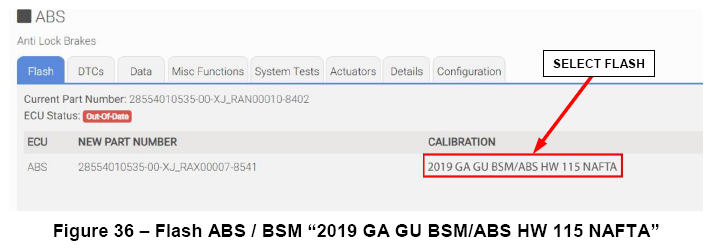
- 11. From the ABS flash tab, select the ABS flash "2019 GA GU BSM/ABS HW 115 NAFTA"
and proceed with the reprogramming procedure (Figure 36).
- 12. Read the flash special instructions page. Select "OK" to continue.
- 13. From the flash ECU agreement page, agree to terms by checking the box.
- 14. Select "Flash ECU"
and then follow the wiTECH screen instructions to complete the flash.NOTE: Read all the instructions and warning messages displayed during reprogramming; do not continue without performing all of the relevant procedures when prompted.NOTE: If the reprogramming process is interrupted/aborted, it must be restarted.
- 15. Click "View DTCs", select "Clear All DTCs", click "Continue" and then click "Close".
- 16. The following table shows the software (SW) codes of the ABS/BSM before and after the third reprogramming (Figure 37).
Before BSM programming After BSM programming SW number SW version SW number SW version XJ_RAT00007 84C1 XJ_RAY00006 8581 XJ_RAS00023 8481 XJ_RAS00042 8482 Step 2 - Post reprogramming calibration procedure
NOTE: The post-reprogramming calibration procedure must be carried out with the vehicle on a flat ground and no people on board. - 17. From the ABS "Misc. Functions"
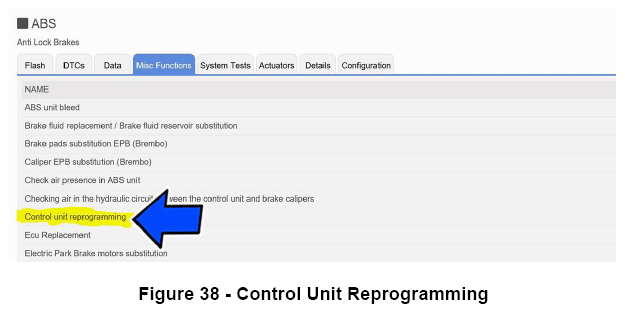
tab, select and run the "Control Unit Reprogramming"
routine (Figure 38).
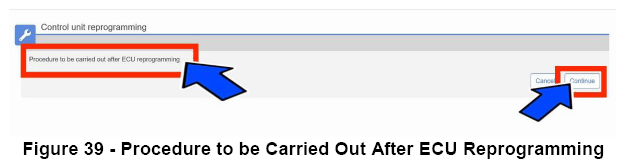
- 18. Select "Procedure to be carried out after ECU reprogramming"
and then click "Continue"
(Figure 39).NOTE: If prompted with only the option to perform programming after a module replacement, complete all programming steps within that routine.
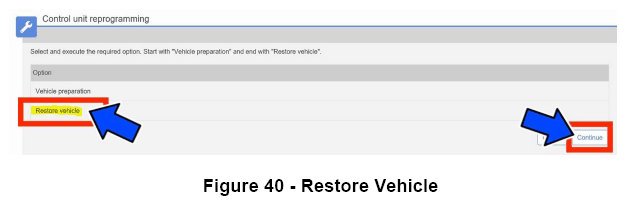
- 19. Select "Restore Vehicle"
and then click "Continue"
(Figure 40).NOTE: Read all the instructions and warning messages displayed during reprogramming; do not continue without performing all of the relevant procedures when prompted.
- 20. Check that every calibration has been completed.
- 21. Click "View DTCs", select "Clear All DTCs", click "Continue" and then click "Close" .
- 22. Place the ignition in the "OFF" position and then remove the wiTECH micro pod II device from the vehicle.
- 23. Remove the battery charger from the vehicle.
- 24. Close the vehicle hood.
- 25. Return the vehicle to the customer or inventory.
Procedure F
- Place the ignition in the "OFF" position and then remove the wiTECH micro pod II device from the vehicle.
- Remove the battery charger from the vehicle.
- Close the vehicle hood.
- Return the vehicle to the customer or inventory.
COMPLETION REPORTING AND REIMBURSEMENT
Claims for vehicles that have been serviced must be submitted on the DealerCONNECT Claim Entry Screen located on the Service tab. Claims paid will be used by FCA to record recall service completions and provide dealer payments.
Use one of the following labor operation numbers and time allowance:
| Labor Operation Number | Time Allowance | |
|---|---|---|
| Inspect ABS/BSM Software Level and Release the vehicle with procedure F | 18-V2-71-81 | 0.2 hours |
| Inspect ABS/BSM Software Level and Reprogram ABS/BSM with procedure E | 18-V2-71-82 | 0.3 hours |
| Inspect ABS/BSM Software Level and Reprogram ABS/BSM with procedure D | 18-V2-71-83 | 0.3 hours |
| Inspect ABS/BSM Software Level and Reprogram ABS/BSM with procedure C | 18-V2-71-84 | 0.4 hours |
| Inspect ABS/BSM Software Level and Reprogram ABS/BSM with procedure B | 18-V2-71-85 | 0.3 hours |
| Inspect ABS/BSM Software Level and Reprogram ABS/BSM with procedure A | 18-V2-71-86 | 0.7 hours |
DEALER NOTIFICATION
To view this notification on DealerCONNECT, select "Global Recall System" on the Service tab, then click on the description of this notification.
OWNER NOTIFICATION AND SERVICE SCHEDULING
All involved vehicle owners known to FCA are being notified of the service requirement by first class mail. They are requested to schedule appointments for this service with their dealers. A generic copy of the owner letter is attached.
VEHICLE LISTS, GLOBAL RECALL SYSTEM, VIP AND DEALER FOLLOW UP
All involved vehicles have been entered into the DealerCONNECT Global Recall System (GRS) and Vehicle Information Plus (VIP) for dealer inquiry as needed.
GRS provides involved dealers with an updated VIN list of their incomplete vehicles. The owner's name, address and phone number are listed if known. Completed vehicles are removed from GRS within several days of repair claim submission.
To use this system, click on the "Service" tab and then click on "Global Recall System." Your dealer's VIN list for each recall displayed can be sorted by: those vehicles that were unsold at recall launch, those with a phone number, city, zip code, or VIN sequence.
Dealers must perform this repair on all unsold vehicles before retail delivery. Dealers should also use the VIN list to follow up with all owners to schedule appointments for this repair.
Recall VIN lists may contain confidential, restricted owner name and address information that was obtained from the Department of Motor Vehicles of various states. Use of this information is permitted for this recall only and is strictly prohibited from all other use.
ADDITIONAL INFORMATION
If you have any questions or need assistance in completing this action, please contact your Service and Parts District Manager.
Customer Services/Field Operations
FCA US LLC
IMPORTANT SAFETY RECALL
Adaptive Cruise Control
Dear [Name],
This notice applies to your vehicle,
[Model Year and Model]
VIN XXXXXXXXXXXXXXXXX
V27/NHTSA 19V-148
LOGO
VEHICLE PICTURE
This notice is sent to you in accordance with the National Traffic and Motor Vehicle Safety Act.
FCA has decided that a defect, which relates to motor vehicle safety, exists in certain [2017 - 2019 Model Year (GA) Alfa Romeo Giulia and 2018 - 2019 Model Year (GU) Alfa Romeo Stelvio] vehicles equipped with Adaptive Cruise Control (ACC).
It is extremely important to take steps now to repair your vehicle to ensure the safety of you and your passengers.
WHY DOES MY VEHICLE NEED REPAIRS?
The ACC on your vehicle [1] may not allow cancelation of the ACC in specific driving conditions. In certain circumstances while ACC is active and the traction control detects a specific wheel slip, it is possible for a positive torque request to be locked by the Brake System Module (BSM) which may result in unexpected acceleration. If the driver does not shift to neutral or apply firm, sustained brake-pedal application to deactivate the ACC, this condition can cause a vehicle crash without prior warning.
HOW DO I RESOLVE THIS IMPORTANT SAFETY ISSUE?
FCA will repair your vehicle [2] free of charge (parts and labor). To do this, your dealer will update the BSM software of affected vehicles to eliminate a positive torque request lock. The estimated repair time is 30 minutes. In addition, your dealer will require your vehicle for proper check-in, preparation, and check-out during your visit, which require more time. Your time is important to us, so we recommend that you schedule a service appointment to minimize your inconvenience. Please bring this letter with you to your dealership.
TO SCHEDULE YOUR FREE REPAIR, CALL YOUR ALFA ROMEO DEALER TODAY
WHAT IF I ALREADY PAID TO HAVE THIS REPAIR COMPLETED?
If you have already experienced this specific condition and have paid to have it repaired, you may visit www.fcarecallreimbursement.com to submit your reimbursement request online. [3] Once we receive and verify the required documents, reimbursement will be sent to you within 60 days. If you have had previous repairs performed and/or already received reimbursement, you may still need to have the recall repair performed.
We apologize for any inconvenience, but are sincerely concerned about your safety. Thank you for your attention to this important matter.
Customer Assistance/Field Operations
FCA US LLC
YOUR SCHEDULING OPTIONS
- RECOMMENDED OPTION Call your authorized Alfa Romeo dealership.
- Call Alfa Romeo Premium Care at 1-866-932-3881. An agent can help schedule an appointment.
- Visit recalls.mopar.com, scan the QR code below, or download the Mopar Owner's Companion App.
QR Code
Get access to recall notifications, locate your nearest dealer, and more through this website or Mopar Owner's Companion App. You will be asked to provide your Vehicle Identification Number (VIN) to protect and verify your identity. The last eight characters of your VIN are provided above.
DEALERSHIP INSTRUCTIONS
Please reference Safety Recall V27.