Removal And Installation: Installation
- Position the knuckle in place on the vehicle, guiding the axle shaft into the hub and bearing.
- Install a NEW knuckle to lower control arm mounting bolt. Do not tighten at this time.
- Install the tension link in the knuckle, then install the toe link to the knuckle and install the toe link to knuckle mounting bolt. Do not tighten at this time.
- Install the wheel speed sensor bracket to the knuckle and install the wheel speed sensor to knuckle mounting bolt and tighten to the proper specification. Refer to TORQUE SPECIFICATIONS .
- Carefully install the wheel speed sensor into the knuckle and install the wheel speed sensor to knuckle mounting bolt and tighten to the proper specification. Refer to TORQUE SPECIFICATIONS .
- Position the brake rotor shield to the knuckle.
- Install and tighten the three brake rotor shield to knuckle screws.
- Install the rear brake rotor. Refer to ROTOR, BRAKE, REMOVAL AND INSTALLATION .
- Install the rear spring. Refer to SPRING(S), REMOVAL AND INSTALLATION .
- Install the rear shock absorber. Refer to SHOCK ABSORBER, SUSPENSION, REMOVAL AND INSTALLATION .NOTE:
Always install a new hub nut. The original hub nut is one-time use only and must be discarded when removed.
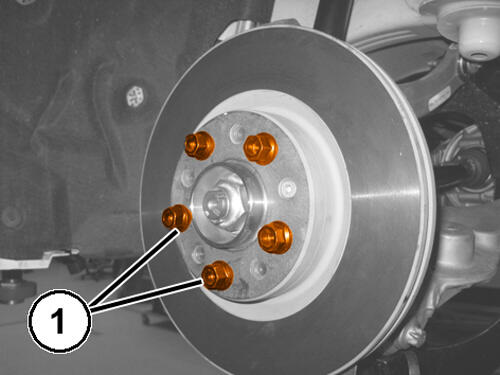
- Install a NEW
hub nut (1) and while a helper applies the brakes, tighten the nut to the proper specification. Refer to TECHNICAL SPECIFICATIONS .NOTE:
Do not use air tools on staking tool while staking hub nut.
- Using (special tool #10287, Tool, Front Hub Staking)align the leading cutting edge of tool with the channel on axle. Tighten fastener on staking tool with hand tools until the threads bottom out completely.NOTE:
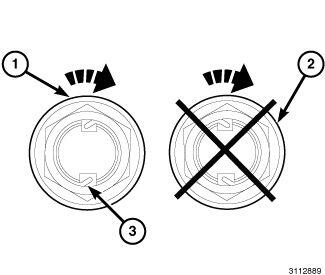
The hub nut must be staked as shown in illustration (1) in Correct Hub Nut Staking. Both edges must be split and bent into the shape shown (3). The staking must be in the opposite direction from the forward rotation of the wheel.
NOTE:Do not stake the hub nut as shown in Correct Hub Nut Staking (2).
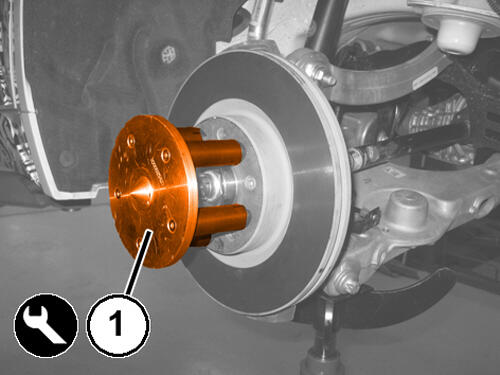
- Install the wheel studs on the hub and bearing without tightening.
- Mount the special tool (special tool #2000025100, Measuring Tool, Wheel Centering) (1) on the wheel stud heads.
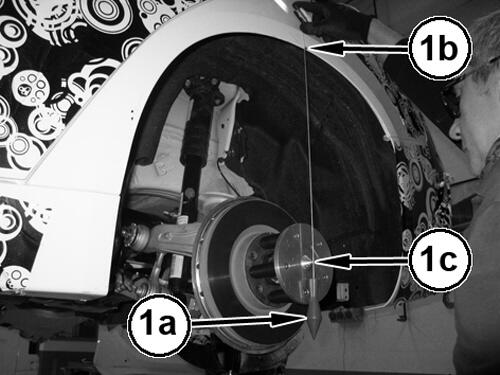
- Using an appropriate plump-bob (2a) determine and mark the stud curvature (2b) that corresponds to the wheel axle (2c).
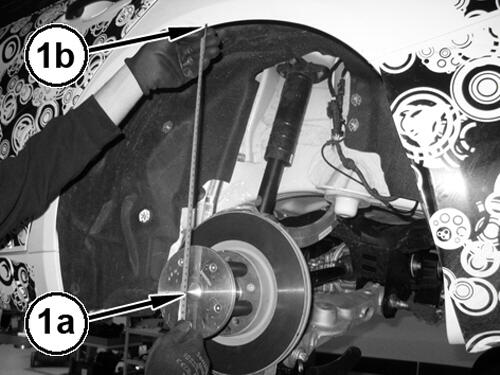
- Lift the lower control arm up until the height 366.5 mm between the wheel center (1a) and the corresponding mark on the wheel arch (1b).
- Tighten the camber link to knuckle mounting bolt to the proper specification. Refer to TECHNICAL SPECIFICATIONS .
- Tighten the toe link to crossmember mounting bolt to the proper specification. Refer to TECHNICAL SPECIFICATIONS .
- Tighten the toe link to knuckle mounting bolt to the proper specification. Refer to TECHNICAL SPECIFICATIONS .
- Tighten the knuckle to lower control arm mounting bolt to the proper specification. Refer to TECHNICAL SPECIFICATIONS .
- Tighten the camber link to knuckle mounting bolt to the proper specification. Refer to TECHNICAL SPECIFICATIONS .
- Tighten the shock absorber to lower control arm mounting bolt to the proper specification. Refer to TECHNICAL SPECIFICATIONS .
- Remove the special tool, Measuring Tool, Wheel Centering 2000025100
- Install tire and wheel assembly. Refer to REMOVAL AND INSTALLATION .
- Remove the supports and lower the vehicle
- Connect the negative battery cable.
- Preform a wheel alignment. Refer to WHEEL ALIGNMENT, STANDARD PROCEDURE .