Test Procedure
- 1. Driver's Dashboard Panel - Remove
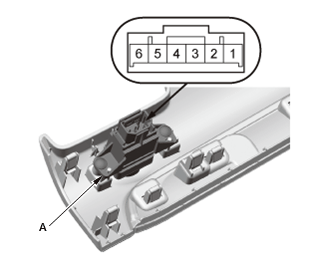
- 2. ECON Switch - Test
NOTE: When doing the ECON switch test, install the bulb correctly.
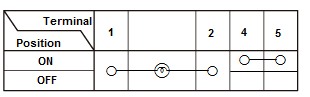
1. Check for continuity between the terminals in each switch position according to the table.
2. If the continuity is not as specified, replace the bulb.
3. If the continuity is still not as specified, replace the ECON switch (A) .
- 3. All Removed Parts - Install - Install the parts in the reverse order of removal.