Power Mirrors (Front Passenger's Power Window Switch) Input Test(With Door Multiplex Control Unit)
NOTE:
- If you are troubleshooting multiple DTCs, be sure to follow the instructions in B-CAN System Diagnosis Test Mode A - Refer to: Body Electrical Troubleshooting - B-CAN System Diagnosis Test Mode A - Initial Communication and DTC ChecksBody Electrical Troubleshooting - B-CAN System Diagnosis Test Mode 1 and Test Mode 2 (without the HDS)Body Electrical Troubleshooting - B-CAN System Diagnosis Test Mode B - Control Unit Not CommunicatingBody Electrical Troubleshooting - B-CAN System Diagnosis Test Mode C - No DTCs and Output Won't Shut OFFBody Electrical Troubleshooting - B-CAN System Diagnosis Test Mode D - No DTCs and Output Won't Turn ON .
- Before testing, check for DTCs. If any DTCs are indicated, troubleshoot those DTCs first.
- Before testing, make sure the No. B44 (20 A) fuse in the under-dash fuse/relay box is OK.
1. Turn the vehicle to the OFF (LOCK) mode
2. Disconnect the following connector.
| Front passenger's power window switch 37P connector |
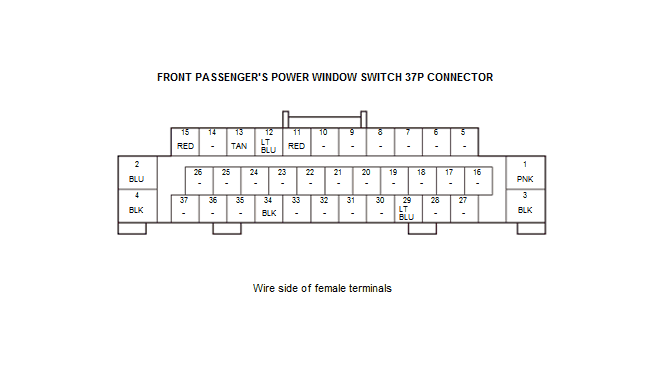
3. Inspect the connector and socket terminals to be sure they are all making good contact:
- If the terminals are bent, loose, or corroded, repair them as necessary, and recheck the system.
- If the terminals look OK, go to step 4.
4. Reconnect the 37P connector to the power window switch, do the following input tests:
- If any test indicates a problem, find and correct the cause, then recheck the system.
- If all the input tests prove OK, go to step 5.
| Cavity | Wire | Test condition | Test: Desired result | Possible cause if desired result is not obtained |
|---|---|---|---|---|
| 4 | BLK | Under all conditions | Measure the voltage to ground:There should be battery voltage. |
|
| 3 | BLK | In all power modes | Measure the voltage to ground:There should be less than 0.2 V. |
|
5. Turn the vehicle to the OFF (LOCK) mode
6. Disconnect the connector from the front passenger's power window switch, and do the following input tests:
- If any test indicates a problem, find and correct the cause, then recheck the system.
- If all the input tests prove OK, replace the front passenger's power window switch .
NOTE: After replacing the front passenger's power window switch, do the resetting the power window control unit .
| Cavity | Wire | Test condition | Test: Desired result | Possible cause if desired result is not obtained |
|---|---|---|---|---|
| 13 - 12 | TAN - LT BLU | Connect terminals No. 4 and No. 13 (or No. 12), and terminals No. 12 (or No. 13) and No. 3 with jumper wires | Check the right power mirror operation: The right power mirror should UP (or DOWN). |
|
| 12 - 11 | LT BLU - RED | Connect terminals No. 4 and No. 12 (or No. 11), and terminals No. 11 (or No. 12) and No. 3 with jumper wires | Check the right power mirror operation: The right power mirror should LEFT (or RIGHT). |
|
| 15 | RED | Connect terminals No. 15 and No. 4 with a jumper wire | Check the right power mirror operation: The right power mirror defogger should work (the inside lower edge becomes warm). |
|
| 34 | BLK | Disconnect these connectors:
|
Check for continuity between terminal No. 34 and power window master switch 37P connector terminal No. 36:There should be continuity. | An open in the LIN(P/W) wire |
| Check for continuity between terminal No. 34 and moonroof control unit/motor 14P connector terminal No. 12:There should be continuity. | An open in the LIN (P/W) wire | |||
| Check for continuity to ground: There should be no continuity. | A short to ground in the LIN(P/W) wire |