How to Check for DTCs With the HDS
How to Check for DTCs With the HDS
NOTE:
- There are three methods used to check for DTCs. The recommended method is to use the Honda Diagnostic System (HDS) with the appropriate software, plugged into the data link connector (DLC).
- The second method is to run the self-diagnostic function built into the climate control unit.
- The third method is to use B-CAN system diagnosis test mode A - Refer to: Body Electrical Troubleshooting - B-CAN System Diagnosis Test Mode A - Initial Communication and DTC ChecksBody Electrical Troubleshooting - B-CAN System Diagnosis Test Mode 1 and Test Mode 2 (without the HDS)Body Electrical Troubleshooting - B-CAN System Diagnosis Test Mode B - Control Unit Not CommunicatingBody Electrical Troubleshooting - B-CAN System Diagnosis Test Mode C - No DTCs and Output Won't Shut OFFBody Electrical Troubleshooting - B-CAN System Diagnosis Test Mode D - No DTCs and Output Won't Turn ON .
1. Make sure the vehicle ignition is the OFF (LOCK) mode
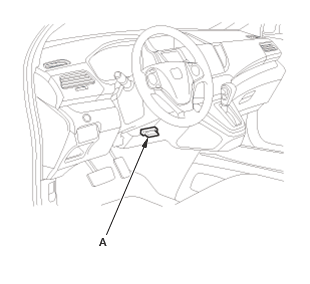
2. Connect the HDS to the DLC (A) located under the driver's side of the dashboard.
3. Turn the vehicle to the ON mode.
4. Make sure the HDS communicates with the vehicle and the climate control unit. If it does not, go to the DLC circuit troubleshooting .
5. Select BODY ELECTRICAL in the System Selection Menu.
6. Select HVAC/Climate Control in the Body Electrical System Select.
7. Select DTCs in the HVAC/Climate Control Mode Menu.
8. Check for DTCs. If any DTCs are indicated, write down the DTCs, then go to the indicated DTC troubleshooting. If no DTCs are indicated, do all system scan, then refer to symptom troubleshooting.
NOTE:
- After troubleshooting, clear the DTCs with the HDS.
- For specific operations, refer to the user's manual that came with the HDS.