Audio System Symptom Troubleshooting - No sound is heard from the speaker(s) (display is normal) (Without Navigation and Stereo Amplifier)
NOTE:
- Check the vehicle 12 volt battery condition first. Refer to 12 VOLT BATTERY TEST .
- Set the fader and the balance positions to the center.
- Before doing this troubleshooting, refer to AUDIO SYSTEM SYMPTOM TROUBLESHOOTING - AUDIO UNIT POWER SWITCH WILL NOT TURN ON (NO AUDIO INFORMATION DISPLAY AND NO SOUND) (WITH NORMAL AUDIO) .
- Check the connectors for poor connections or loose terminals.
- 1. Problem verification:
- 1. Turn the vehicle to the ON mode.
- 2. Turn on the audio unit, and check for sound in each mode (AM/FM, USB, and CD).
Is the sound OK in each mode?
YES
Intermittent failure, the system is OK at this time. Check for loose connections at the audio-navigation unit and speaker(s).
NO: No sound is heard in all modes
The failure is duplicated in all modes, go to step 2.
NO: No sound is heard in AM/FM mode
NO: No sound is heard in USB mode
Refer to Audio System Symptom Troubleshooting - USB input sound is low or cannot be heard(With Normal Audio) .
NO: No sound is heard in CD mode
Refer to AUDIO SYSTEM SYMPTOM TROUBLESHOOTING - AUDIO DISC DOES NOT PLAY .
- 2. Determine possible failure area (volume level, others):
- 1. Check that the volume knob is not set to the MIN level.
Is it at the MIN level?
YES
Raise the volume level, and recheck the function.
NO
Go to step 3.
- 3. Determine possible failure area (audio unit, others):
- 1. Do the Self-Diagnostic Function, and use the speaker check mode. Refer to AUDIO SYSTEM SELF-DIAGNOSTIC FUNCTION , &HOW TO TROUBLESHOOT THE AUDIO SYSTEM .
Did all speakers produce a tone?
YES
Replace the audio unit. Refer to AUDIO UNIT REMOVAL & INSTALLATION(WITH DISPLAY AUDIO) , & AUDIO UNIT REMOVAL & INSTALLATION(WITH NORMAL AUDIO) .
NO
Go to step 4.
- 4. Shorted wire check (SPKR lines):
- 1. Turn the vehicle to the OFF (LOCK) mode.
- 2. Disconnect the following connector.
NOTE: Eject the disc before disconnecting the audio unit to prevent damaging the CD player's load mechanism.
Audio unit connector A (24P) - 3. Check for continuity between these test points and body ground individually.
Test condition Vehicle OFF (LOCK) mode Audio unit connector A (24P): disconnected Connector Terminal Audio unit connector A (24P). Refer to AUDIO UNIT CONNECTOR FOR INPUTS AND OUTPUTS(WITH DISPLAY AUDIO) , & AUDIO UNIT CONNECTOR FOR INPUTS AND OUTPUTS(WITH NORMAL AUDIO) No. 15 No. 16 No. 19 No. 20 No. 5 No. 6 No. 9 No. 10 Is there continuity?
YES
Repair a short to body ground in the wire(s) between the audio unit and the speaker(s).
NO
The SPKR wires are not shorted to ground. Go to step 5.
- 5. Determine possible failure area (speaker, others) 1:
- 1. Check the speaker(s) with no sound for any damage.
Is there any damage?
YES
Replace the faulty speaker(s). Refer to REMOVAL & INSTALLATION .
NO
Go to step 6.
- 6. Determine possible failure area (speaker, others) 2:
- 1. Test the speaker(s). Refer to TEST .
Is the speaker(s) OK?
YES
Go to step 7.
NO
Replace the faulty speaker(s). Refer to REMOVAL & INSTALLATION .
- 7. Open wire check (SPKR lines):
- 1. Reconnect the front door speaker 2P connector(s) and the rear door speaker 2P connector(s).
- 2. Measure the resistance between test points 1 and 2.
Test condition Vehicle OFF (LOCK) mode Audio unit connector A (24P): disconnected Test point 1: Audio unit connector A (24P) Refer to AUDIO UNIT CONNECTOR FOR INPUTS AND OUTPUTS(WITH DISPLAY AUDIO) , & AUDIO UNIT CONNECTOR FOR INPUTS AND OUTPUTS(WITH NORMAL AUDIO)
Test point 2: Audio unit connector A (24P) Refer to AUDIO UNIT CONNECTOR FOR INPUTS AND OUTPUTS(WITH DISPLAY AUDIO) , & AUDIO UNIT CONNECTOR FOR INPUTS AND OUTPUTS(WITH NORMAL AUDIO)
Resistance No. 15 No. 16 About 4 Ω No. 19 No. 20 About 4 Ω No. 5 No. 6 About 4 Ω No. 9 No. 10 About 4 Ω Is the resistance OK?
YES: Without tweeter
Replace the audio unit. Refer to AUDIO UNIT REMOVAL & INSTALLATION(WITH DISPLAY AUDIO) , & AUDIO UNIT REMOVAL & INSTALLATION(WITH NORMAL AUDIO) .
YES: With tweeter
Go to step 8.
NO
Repair an open in the wire between the audio unit and the speaker(s).
- 8. Open wire check (FR SPKR (Tweeter) lines):
- 1. Connect terminals A and B with jumper wires.
Terminal A Audio unit connector A (24P) No. 15. Refer to AUDIO UNIT CONNECTOR FOR INPUTS AND OUTPUTS(WITH DISPLAY AUDIO) , & AUDIO UNIT CONNECTOR FOR INPUTS AND OUTPUTS(WITH NORMAL AUDIO) Terminal B Audio unit connector A (24P) No. 16. Refer to AUDIO UNIT CONNECTOR FOR INPUTS AND OUTPUTS(WITH DISPLAY AUDIO) , & AUDIO UNIT CONNECTOR FOR INPUTS AND OUTPUTS(WITH NORMAL AUDIO) Terminal A Audio unit connector A (24P) No. 19. Refer to AUDIO UNIT CONNECTOR FOR INPUTS AND OUTPUTS(WITH DISPLAY AUDIO) , & AUDIO UNIT CONNECTOR FOR INPUTS AND OUTPUTS(WITH NORMAL AUDIO) Terminal B Audio unit connector A (24P) No. 20. Refer to AUDIO UNIT CONNECTOR FOR INPUTS AND OUTPUTS(WITH DISPLAY AUDIO) , & AUDIO UNIT CONNECTOR FOR INPUTS AND OUTPUTS(WITH NORMAL AUDIO) - 2. Check for continuity between test points 1 and 2.
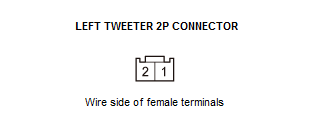
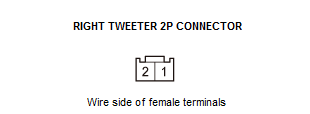
Test condition Vehicle OFF (LOCK) mode Audio unit connector A (24P): disconnected Left (Right) front door speaker 2P connector: disconnected Audio unit connector A (24P) No. 15 and No. 16: jumped Audio unit connector A (24P) No. 19 and No. 20: jumped Test point 1 Left tweeter 2P connector No. 1 Test point 2 Left tweeter 2P connector No. 2 Test point 1 Right tweeter 2P connector No. 1 Test point 2 Right tweeter 2P connector No. 2 Is there continuity?
YES
Replace the audio unit. Refer to AUDIO UNIT REMOVAL & INSTALLATION(WITH DISPLAY AUDIO), , & AUDIO UNIT REMOVAL & INSTALLATION(WITH NORMAL AUDIO) .
NO
Repair an open in the wire(s) between the audio unit and the tweeter.