How to Check the HFL DTC's (with normal audio)
How to Check the HFL DTC's (with normal audio)
1. Turn the vehicle to the ON mode
2. Make sure the audio unit is turned off
3. Use the DISPLAY button on the steering wheel to select the screen that display Audio Off
4. Press and hold the preset No. 1 and No. 6 buttons
5. While holding the buttons, press the POWER button
6. Release the buttons, and the self-diagnosis begins (A-Diag is displayed)
7. Press and hold the PHONE button for more than 5 seconds to enter the HFL diagnostic mode (DIAG is displayed).
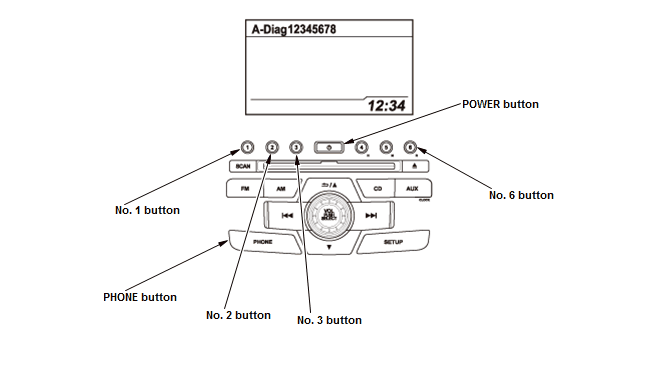
8. When you are in the HFL diagnostic mode, pressing a preset button starts the diagnostic mode that is assigned to that preset button. To exit this mode, go to step 12. Once you exit this test, you must start again at step 1.
- No. 1 button: The HFL DTC display mode
- No. 2 button: The HandsFreeLink control unit software version display mode (USA and Canada models: HandsFreeLink control unit update function is available )
- No. 3 button: The HandsFreeLink control unit parts number display mode
9. Check the HandsFreeLink control unit software version (No. 2 button) and parts number (No. 3 button). If the Part number and software version is not displayed, there may be a problem with the GA-Net. Go to HFL does not respond troubleshooting - Refer to: HandsFreeLink System Symptom Troubleshooting - HFL does not respond(With Normal Audio)HandsFreeLink System Symptom Troubleshooting - Bluetooth audio does not work(With Normal Audio)HandsFreeLink System Symptom Troubleshooting - Bluetooth cell phone cannot be paired(With Normal Audio)HandsFreeLink System Symptom Troubleshooting - The HFL prompts or incoming call cannot be heard or are weak (HFL information display is normal) (With Normal Audio)HandsFreeLink System Symptom Troubleshooting - No sound when Bluetooth audio is used(With Normal Audio)HandsFreeLink System Symptom Troubleshooting - HFL does not respond(With Navigation, With Display Audio)HandsFreeLink System Symptom Troubleshooting - HFL does not respond(Without Navigation, With Display Audio) .
10. Check the HFL DTC. Each time you press the No. 1 button, the screen displays HFL DTCs in following order:
- B1775 (OK or NG)
- B1776 (OK or NG)
- B1779 (OK or NG)
- B1780 (OK or NG)
- B1792 (OK or NG)

11. If any HFL DTC is NG, troubleshoot the indicated HFL DTC(s)
12. To end the self-diagnostic function, turn the audio unit off, or turn the vehicle to the OFF (LOCK) mode.